

The reason? PDF retains formatting and keeps page structure consistent across different devices. Additionally, PDF files are easier to access and share with co-authors.
Authors can save research data in a well-formatted PDF manually using MS Word, but it is time-consuming, as it requires selecting the file format and giving a file name to get the job done.
Gladly, there is a quicker and more efficient method, which is to utilize specialized online tools. These tools allow authors to convert research extracts into a PDF with a single click. In this blog post, we are going to discuss this quick method in a step-by-step procedure.
Steps to Quickly Save Research Extracts as a PDF
The process is simple and straightforward. Authors need to follow these steps.
Look for a Text to PDF Converter
Firstly, as an author, you need to explore the internet to find a good text to PDF converter. It is an online tool that is specifically designed to convert text, data, or documents into a well-formatted and organized PDF in just a few clicks.
On the internet, there is a wide variety of such converters available. You can pick and use any based on your personal needs and preferences. However, we suggest going with one that has good rankings: try to pick a text to PDF converter that is ranking higher in the search engine results, probably on the first page. A high ranking indicates that the tool is reliable and versatile. Beyond that, look for:
- Formatting options: Go with a tool that allows you to format the research extracts in a readable manner before actually converting them into a PDF. So that even if you have to share the PDF with a co-author, it looks understandable and professional.
- No limitations: Find a converter that is available for free and has no limitations regarding input text.
Considering these factors will make the selection process easier for you.
Input Research Extracts and Format Them Properly
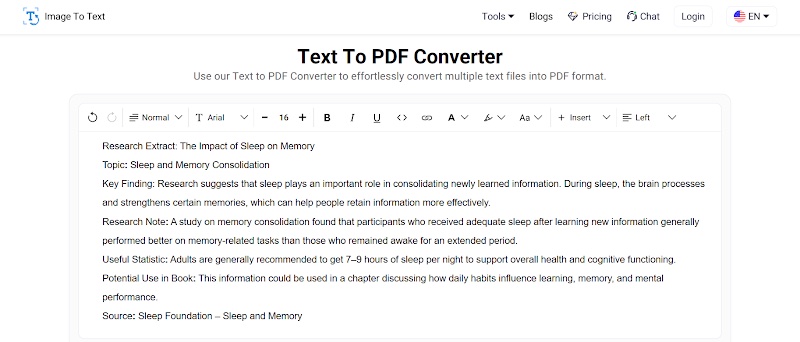
Once you have picked a text to PDF converter, simply enter the research extract in the input box. You can either directly paste the data or upload the Doc, DocX, or Txt file from local storage.
For pictorial demonstration, we also entered a sample research extract into a text to PDF converter, and this is how its interface now looks:
Source: https://www.imagetotext.io/text-to-pdf
Now, your job is to start formatting the research extract by using the available formatting options for better readability and clarity. The tool we used allows you to add headings, bold, italicize and underline the text, adjust font type and style, and much more.
Convert and Download the PDF
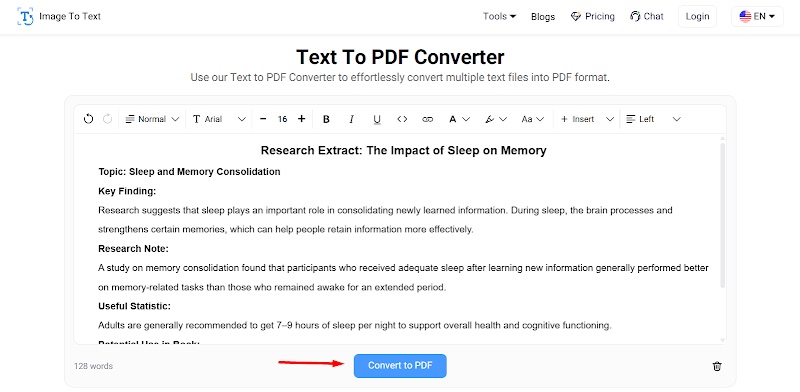
When you are done with the formatting of the research data, click on the “Convert to PDF” button. Within seconds, a PDF file will be downloaded to your device.
Open PDF for Review (Optional)
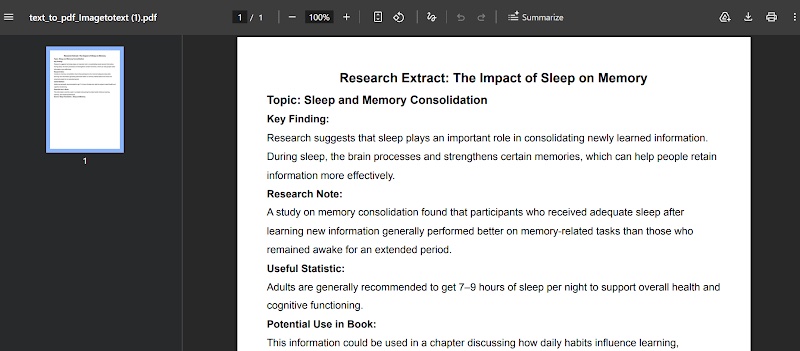
This is an optional step. When the PDF file is downloaded, it is suggested to open it once for a thorough review. Make sure it is accurate, well-organized, and formatted. This is because online tools can sometimes malfunction (which is very rare), leading to poor output results. So, it is better to always review the converted file.
After opening the PDF file we created in the previous step, this is how it looks.
So, that's the quickest way authors can save research extracts as PDFs.
Final Words
Many authors prefer saving research extracts in PDF format because it offers more accessibility and shareability. However, saving plain data into a well-formatted PDF shouldn't require the manual effort MS Word often does. Fortunately, specialized text to PDF converters have provided a quick way to get this task done. You need to enter the research extract, perform formatting if required, and download the PDF. In this blog post, we have explained this process in detail along with screenshots for a better understanding.
Frequently Asked Questions (FAQs)
What are research extracts?
Research extracts are specific facts, findings, and references that are collected through research.
Why do authors prefer PDF when saving research extracts?
Well, there are multiple reasons. For instance, it retains text formatting and page layout across different devices. Additionally, PDFs are more secure and easier to share.
Are text-to-PDF converters safe and secure?
Yes, most text-to-PDF converters available online are safe and secure to use.

About the author
Muhammad Hamza is a technical content writer who specializes in creating clear, practical, and easy-to-understand content on digital tools and technology. He enjoys exploring efficient solutions for everyday tasks, from document management and file conversion to online productivity tools. His writing focuses on simplifying technical processes and helping readers make informed decisions through useful, actionable insights.