

In writing, voice is one of the major elements that makes your content recognizable. It demonstrates how you think, explain ideas, and connect information with your target audience. So, should you abandon the use of artificial intelligence (AI)? Big No! We are not saying this.
You should use AI in such a way that your original writing voice doesn't get compromised. In this article, we are going to explain how this can be done.
Using AI Without Losing Your Unique Writing Voice
Here is how you can use the power of artificial intelligence for writing without compromising on your unique voice.
Always Pick a Reliable AI Tool
On the internet, there is a huge variety of AI-powered content-generating tools. However, one useful category of tools for this purpose is AI paragraph generators. They can generate paragraphs in different tones and types based on the given prompt.
So, if you have some parts of content on your own while following a unique voice, then AI paragraph generators can assist in creating upcoming headings or points while following the same writing tone and style.
However, it is important to pick a reliable AI paragraph generator. Below, we have discussed a few essential factors that should be considered in this regard:
- A free tool is helpful if you plan to use it frequently while drafting and revising content.
- It should support paragraph generation in different types and styles, i.e., friendly, informative, and more.
- There must be an option to adjust paragraph length as per your specific needs.
Based on these factors, we also selected Paragraph Generator for the demonstration of upcoming steps. It fulfills the above-mentioned criteria and generates multiple paragraphs against a single prompt, giving you the choice to use the most suitable version.
Provide Instructions and Select Your Writing Voice
This is the most important step if you want to maintain your original writing voice while using the power of artificial intelligence.
Paragraph generators are specifically trained on generating content in different writing voices and styles. Your job is to simply select your preferred writing voice and provide brief instructions to the tool about what type of content you are expecting.
Let's say you have written some content on the topic “Importance of Document Digitization for Businesses” and now want to generate content for the next heading “Improve Document Accessibility” in “Informative” voice using AI.
Then you can provide this type of instruction to the AI paragraph generator.
“How document digitization helps enhance document accessibility for businesses.”
Many generators (including the one we picked) provide users with the option to select the length (concise or detailed) and number of paragraphs that should be generated. So, do not forget to select these as options as well.
Here is the result we got after entering the above instruction:
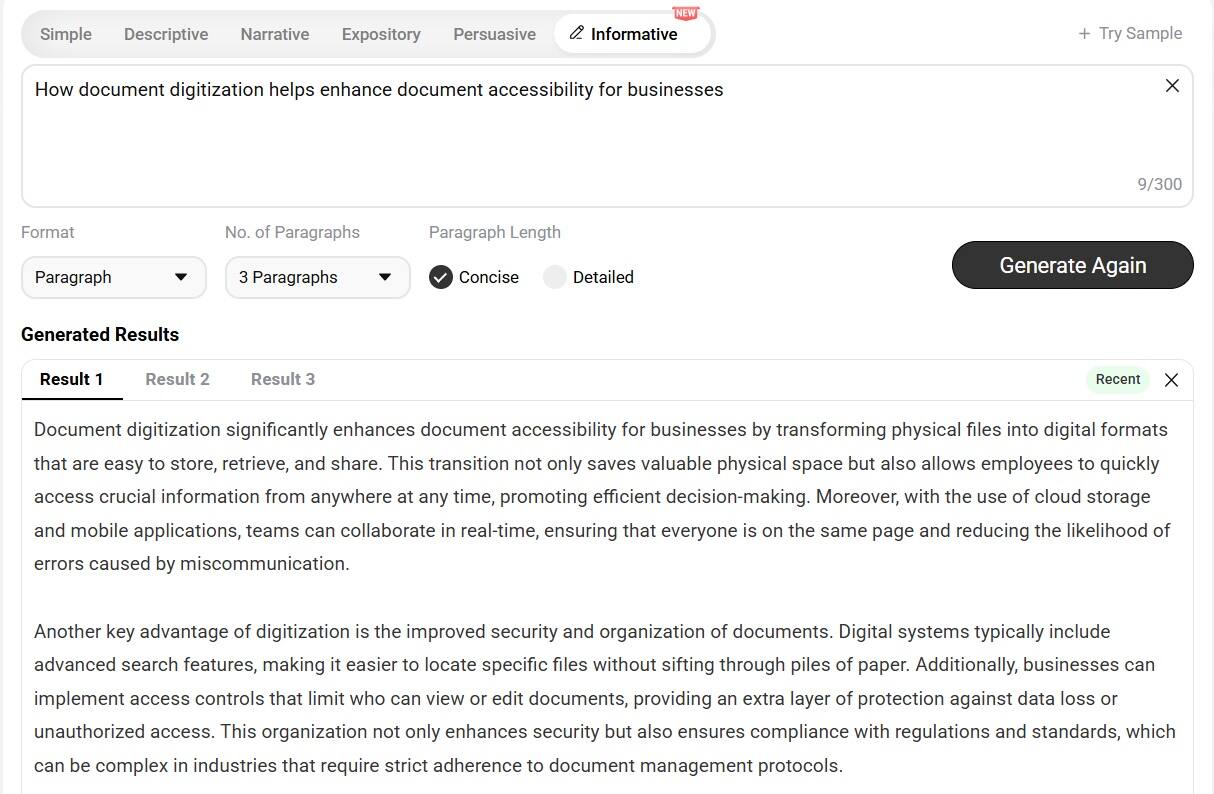
As you can see, the AI paragraph generator has created multiple paragraphs logically connected with each other in an informative way. If required, you can fine-tune the content as per your specific needs and requirements.
Edit AI Draft Heavily and Inject Personal Experiences/Stories
Even if you generated a well-written content draft using a proper prompt, it is still better to edit it ruthlessly to make it more natural and personalized to your original voice.
For this, you should first read the entire draft and identify sentences that don't sound similar to your original writing style. A good AI detector can shortcut that search, pointing out the AI-flavored lines before you even start reading. Restructure them in your own words. Also, pay attention to:
- Generic statement
- Repetitive explanations
- Unnecessary transitions and phrases
Besides these simple edits, you should also add personal experiences, stories, or real-life scenarios to the AI draft. Here is what you can consider discussing:
- A challenge you personally faced
- A lesson you learnt
- An example from a relevant project
- Your personal opinion about something
While discussing such information, make sure it is contextually relevant to the main topic. Doing so will make the draft more natural and personal and give readers a chance to connect.
Final Words
AI can automate much of the content creation process. However, doing this will compromise your unique writing voice. One-click content generation sounds generic, robotic, and less personal. A better approach is to use AI as a companion. Use the right tool, provide clear instructions about your writing style, and add manual input to the generated AI draft.