

Hiring a narrator for a full-length book runs into the thousands and weeks of back-and-forth. A finished audiobook is the format most indie authors skip — not because readers don't want it, but because the production wall is real.
AIWriteBook removes that wall. The same platform that wrote your chapters also narrates them, in the Audiobook Studio: 25 professional voices, a distinct voice for every character, emotion-aware delivery, paragraph-level retouching, and a mastered export. Because the audio is generated from the exact text already in your editor, the narration matches the book you actually published - not a reworked version of it.
How to turn your book into an audiobook with AI voices
A step-by-step tour of Audiobook Studio: pick voices, generate narration chapter by chapter, review it, and export a finished audiobook.
How the Audiobook Studio works
The studio is its own workspace at /app/tool/audiobook. You point it at a book in your library and the chapter text is the script - nothing to upload, nothing to paste.
- 1
Pick your book and your narrator
Choose any book in your library - fiction, non-fiction, or a visual book. Then pick your narrator from 25 professional voices, each with a preview you can play before you spend a credit. Every audiobook is narrated with ElevenLabs v3, the highest quality model, the one that understands emotion.
- 2
Review the character casting
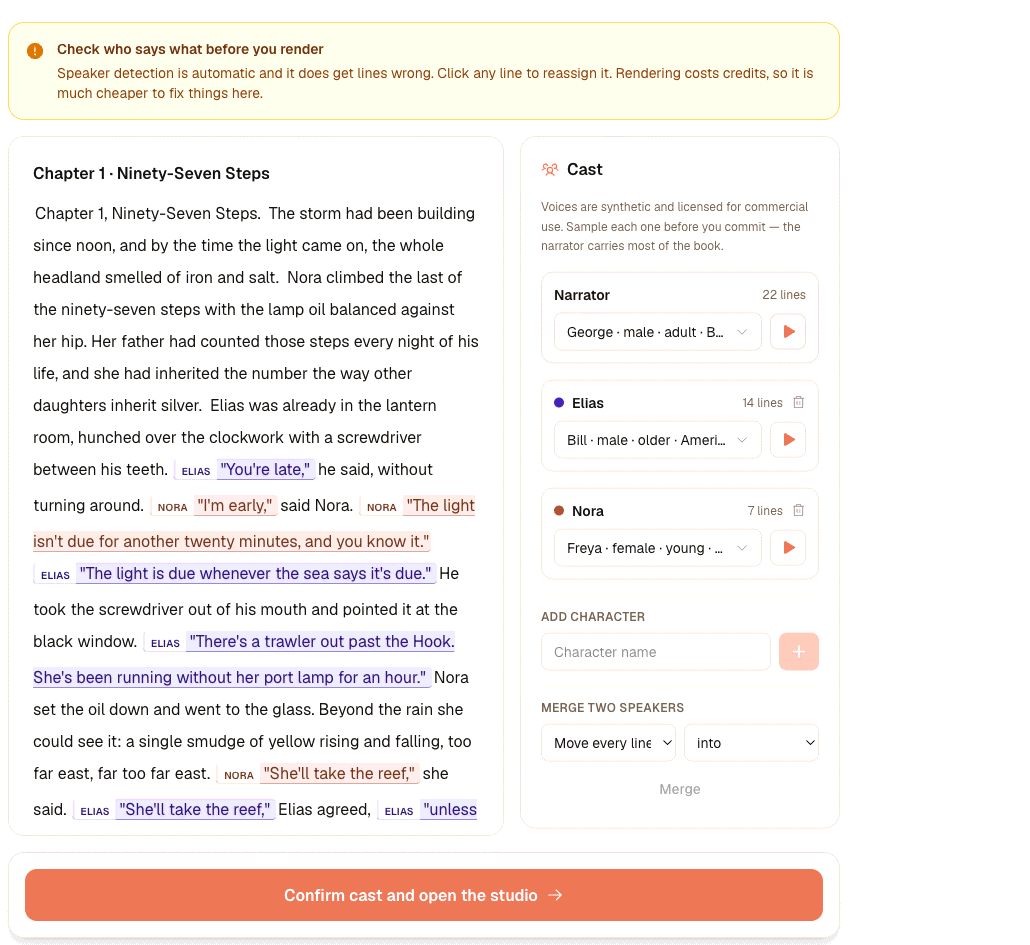
The studio reads the book, works out who speaks each line of dialogue, and proposes a voice for every character alongside your narrator. You review the cast list and swap any voice before a second of audio is rendered. Prefer one steady narrator throughout? Turn multi-voice off.
- 3
Render, retouch, and export
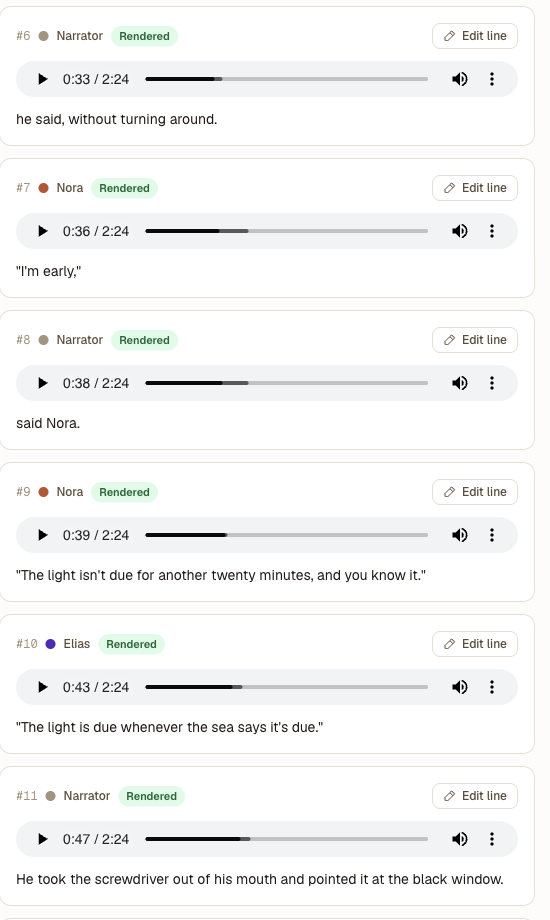
Chapters render one at a time so you can listen as you go. Any line you want changed, you re-record on its own - the rest of the chapter is untouched. Then export a merged MP3 with chapter markers, a ZIP of numbered chapter files, or an M4B with chapters and cover art built in, all loudness-mastered to a retail or streaming target.
Twenty-five narration voices, previewed before you spend a credit
Every voice has a play button in the studio, so you audition the narrator on the real thing before generating a second of paid audio. Match the voice to the genre - a warm, measured tone for memoir, a brighter one for middle-grade, a steady baritone for a thriller - and give each character in the cast a voice of their own.
Female voices
Rachel, Sarah, Bella, Matilda, Alice, Lily, Charlotte, Freya, Grace, Jessica, Laura
Male and neutral voices
George, Daniel, Adam, Brian, Eric, Roger, Chris, Callum, Bill, Liam, Will, Harry, Charlie, River
Voices span American, British, Australian and Swedish accents. Your narrator and your full cast are saved with the audiobook project, so the whole book stays consistent unless you deliberately change it. Hear both below.
Your audiobook, in your book's language
The Audiobook Studio is not English-only. Every one of the 25 voices is multilingual: the narration model reads whatever language your book is written in and keeps the same voice identity across languages, so a French novel is narrated in French by the same narrator an English reader would hear.
Most requested
French, Spanish, German, Italian, Portuguese, Japanese, Norwegian, Dutch, Polish, Korean, Chinese, Hindi, Arabic, Swedish and Ukrainian.
Everything else
Danish, Finnish, Czech, Greek, Hebrew, Romanian, Hungarian, Turkish, Vietnamese, Thai, Indonesian, Malay, Tagalog, Bengali and Catalan.
That is 31 languages in total, across 38 regional variants — English alone comes in US, UK, Australian and Indian settings, Spanish in European and Latin American, Portuguese in Brazilian and European, and French in French and Canadian.
In the studio you can hear each voice in French, Spanish, German, Italian, Portuguese, Japanese and Norwegian before you choose one. Voice labels such as British or American describe the timbre of the voice, not a limit on what it can read.
Hear real samples
Both clips below were rendered by the audiobook generator itself and uploaded exactly as they came out - no re-takes, no editing, no cleanup pass. Play them with the sound up and judge the narration the way a listener would.
Classic single-narrator reading
Forty-five seconds narrated end to end by George, one of the twenty-five voices in the studio. This is what non-fiction, memoir and most self-published audiobooks sound like: one steady reader, consistent pacing, straight out of the generator and unedited.
Narrator plus a cast of two
Sixty-nine seconds of dialogue with George narrating and two characters voiced by Rachel and Daniel, each with their own emotional delivery. It is one seamless recording, not three clips stitched together - the generator casts the lines and records neighbouring turns in a single take, so the characters actually react to each other.
Both samples are English, because that is what these two books were written in. The same pipeline narrates every book you make, in your book's own language and in the voice and casting you pick.
This is the actual studio
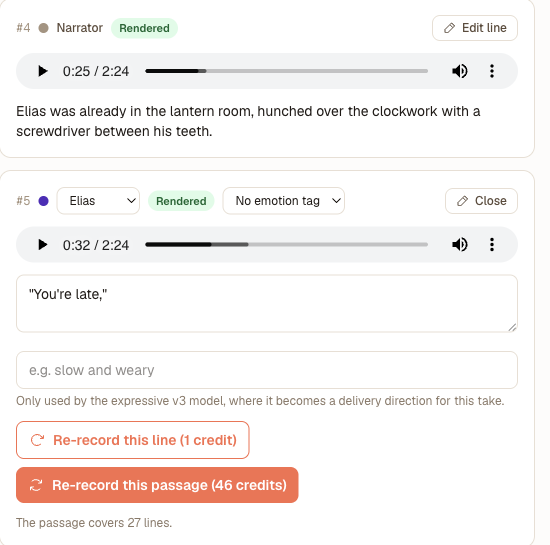
These are unedited screenshots of the Audiobook Studio working on a real chapter. The studio reads your manuscript, detects who speaks each line, casts a voice for every character, and then hands you line-level control before and after rendering.
One narrator or a full cast
Every audiobook is narrated with ElevenLabs v3. The choice you make is how many voices tell the story.
Single narrator
One voice reads the whole book, the way a classic audiobook sounds. The natural fit for non-fiction, memoir and visual books, and the base credit rate.
Multi-voice casting
Every character gets their own voice and dialogue is cast automatically, so a scene plays as a scene. Neighbouring lines are recorded together in one take, so the voices react to each other and the pacing carries. Adds 20% to the credit cost.
What it costs in credits
Narration is 1 credit per 12.5 characters, plus 20% when multi-voice casting is on. A 2,000-word chapter is about 880 credits with a single narrator, 1,056 with a full cast. A launch discount takes 75% off every render until 4 September 2026. The studio shows you the exact figure for the chapter and for the whole book before you render anything.
Why authors narrate inside AIWriteBook
The point isn't novelty audio — it's a finished, sellable audiobook produced without leaving the tool that wrote the book.
No studio, no narrator fees
Skip the casting, the per-finished-hour rates, and the revision rounds. A book you would never have voiced because of cost becomes an audiobook you can ship this week.
Narration that matches the page
The audio is generated from the exact chapter text in your editor, so a rewrite is reflected the moment you re-render that chapter - the audiobook never drifts from the ebook.
Fix one line, not the whole chapter
Invented place names, foreign words and acronyms are where text-to-speech usually stumbles. Open the line in the studio, respell the name the way it should sound or add a delivery note, and re-record just that line - on its own or together with the lines it was narrated with, so the delivery still matches. The respelling lives in the audio script; your book text is untouched.
Mastered files, distribution-ready
Every chapter is loudness-mastered to a retail (-19 LUFS) or streaming (-14 LUFS) target and encoded at 128, 192 or 256 kbps. Export a merged MP3 with a chapter-markers file, a ZIP of numbered chapter MP3s, or an M4B with chapter markers and cover art embedded - whichever your distribution route asks for.
Pricing and credits
Narration is billed in credits by character count, out of the same credit pool every other AIWriteBook feature uses. The studio shows you the exact figure for a chapter and for the whole book before you render anything.
What a render costs
- Base rate
- 1 credit per 12.5 characters of text
- Multi-voice casting
- Adds 20% on top of the base rate
Launch discount
75% off every audiobook render until 4 September 2026 - during the launch window a render costs a quarter of the listed credits.
Two worked examples
Credit counts follow the character count, so the arithmetic is the same whether you narrate one chapter or the whole manuscript.
A 2,000-word chapter
About 11,000 characters
Single narrator: 880 credits
Multi-voice: 1,056 credits
During the launch discount: 220 credits single-voice, 264 multi-voice.
A 50,000-word book
About 275,000 characters
Single narrator: 22,000 credits
Multi-voice: 26,400 credits
During the launch discount: 5,500 credits single-voice, 6,600 multi-voice.
Which plans include audiobooks
Audiobook generation is included on the Pro and Ultra subscription plans, and on AppSumo lifetime Tier 2 and above. It is not part of Free, Plus, or the one-time credit packs.
Pro
$50/month, or $30/month billed annually
5,000 credits a month
Ultra
$200/month, or $120/month billed annually
25,000 credits a month
Credits are the same pool used by every AIWriteBook feature - chapters, covers, tools and narration all draw on it. Unused monthly subscription credits do not roll over.
See full pricingWhere your finished audiobook can go
You export standard MP3, ZIP and M4B files, so they work anywhere audiobooks are sold. Store policies on AI narration vary and most simply ask you to declare it, so check the policy wherever you publish.
Retail audiobook stores
Spotify through Findaway Voices and Google Play Books both accept AI-narrated audiobooks when you disclose the narration. You supply per-chapter or full-book audio and the cover - both of which AIWriteBook produces - and the M4B plays natively in Apple Books. Amazon also runs KDP Virtual Voice on your ebook, a separate route you can use alongside the files you export here.
Direct and bundled sales
Sell the MP3 straight to readers, bundle it with the ebook, or offer it as a backer reward — direct sales keep the full margin and have no exclusivity strings.
Serialized as a podcast
Drop each chapter MP3 into a podcast feed to release a book episode by episode and build an audience before the full audiobook lands.
Frequently asked questions
What authors ask before they narrate their first chapter.
Chapter by chapter, in the Audiobook Studio. Chapters render one at a time so you can listen as you go, stop, adjust and continue - nothing forces you to commit the whole book in one shot. When every chapter is done, export the whole audiobook as one merged MP3 with chapter markers, a ZIP of per-chapter files, or an M4B.
There are 25 professional voices - eleven female, thirteen male and one neutral - in American, British, Australian and Swedish accents. Each has a preview button in the studio, so you listen to the actual narrator before generating any paid audio. With multi-voice casting on, each character in your book gets a voice of their own from that same library.
It runs on credits based on character count: 1 credit per 12.5 characters, plus 20% when multi-voice character casting is on. A 2,000-word chapter is about 880 credits with a single narrator. A launch discount takes 75% off every render until 4 September 2026. The studio shows the exact estimate for the chapter and the whole book before you render.
Respell it. Open that line in the studio, spell the awkward name the way it should sound, add a delivery note if the emphasis is off, and re-record just that line - the rest of the chapter stays as it is, so you never re-pay for audio that was already fine. The respelling only lives in the audio script; your book text is untouched.
Loudness-mastered MP3 and M4B: one file per chapter, one merged file for the whole audiobook with a chapter-markers file, and an M4B with chapter markers and cover art built in. Pick a retail (-19 LUFS) or streaming (-14 LUFS) target and 128, 192 or 256 kbps. That is the format audiobook aggregators, podcast feeds and direct downloads accept, so yes, you can distribute and sell it.
Keep building the book
Features, tools, and reading that pair with audiobook production:
From manuscript to audiobook in the same place
An audiobook used to mean a budget and a booking calendar. Because AIWriteBook narrates the exact text it helped you write - 25 voices, a voice for every character, emotion-aware delivery and a mastered export - the audio edition stops being the format you skip and becomes one more thing you finish before you publish.
See how narration fits the wider AI writing assistant workflow