Scrivener vs AIWriteBook

Scrivener Organizes Your Novel. AIWriteBook Helps You Write It.

Below, one example novel goes from idea to KDP files in both tools: the outline, a chapter draft, revisions, the cover and the export. See where each one fits.

No credit card required

Worked example

One Novel, Two Workflows

An invented book project, taken through the same five steps in each tool.

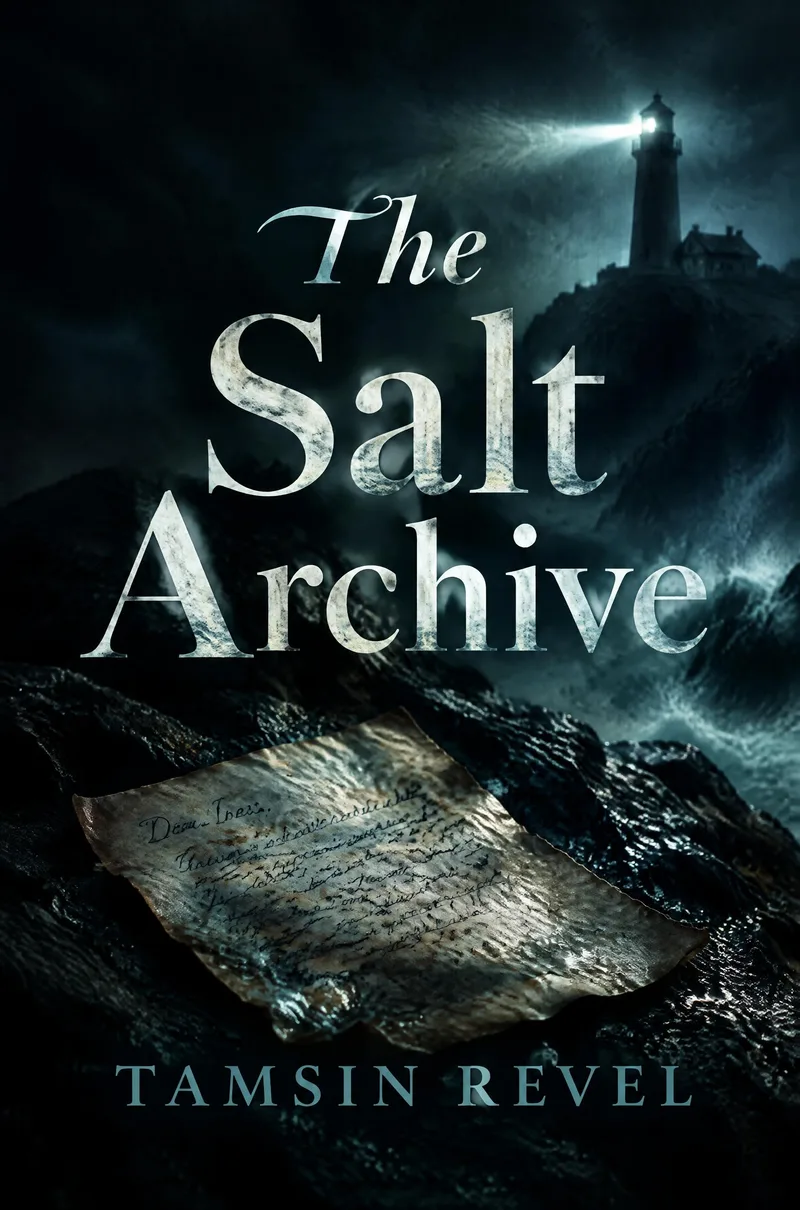
AI-generated cover of The Salt Archive by Tamsin Revel: a weathered letter on wet rock below a lighthouse in a storm
Cover generated in AIWriteBook's cover generator (dark and moody style). Title and pen name are invented for this example.

The project

The Salt Archive

by Tamsin Revel

Gothic mystery · 6 chapters planned · about 60,000 words

An archivist sent to close a tiny sea archive on a Cornish island finds a letter from the drowned lighthouse keeper, dated three days after his death and addressed to her.

1. Outline

In Scrivener

Create a folder per chapter, write a synopsis on each index card and rearrange them on the corkboard. Every beat comes from you.

In AIWriteBook

Describe the premise, characters and tone. The app drafts a chapter-by-chapter outline with events, locations and twists, which you edit before any prose exists.

The outline AIWriteBook starts from

  1. Ch. 1 · The Fortieth Letter

    Ines finds a letter dated three days after keeper Thomas Aske drowned. It is addressed to her.

  2. Ch. 2 · Tide Tables

    She checks it against the lighthouse log. The night of 11 November was rewritten in a different ink.

  3. Ch. 3 · The Bishop's Rock

    Old boatman Colm Treloar admits the lamp went dark an hour before the storm peaked.

  4. Ch. 4 · Mainland Post

    The postmark leads to a box at the Penzance sorting office, rented under her mother's maiden name.

  5. Ch. 5 · What the Fog Signal Said

    Aske's fog-signal notes turn out to be a record of a second boat that night.

  6. Ch. 6 · Against the Dark

    Her mother steps off the ferry, and the last letter is read aloud.

2. Draft Chapter 1

In Scrivener

You write the chapter yourself in a focused editor, with the outline and research pinned beside it.

In AIWriteBook

Pick a model (Gemini, Claude or Grok), set the target length and add instructions. The chapter is drafted from its outline and the Story Bible, then it is yours to edit.

Chapter 1 excerpt, as drafted from the outline

The letter had been filed under W, for weather, which was the first thing about it that was wrong.

Ines found it on her third morning on Pell, when the generator coughed out and she worked by the grey light from the archive's one window. The keeper's letters were bundled in string, forty-one of them, each stiff with old salt, each signed the same way: Yours, against the dark, T. Aske. She had read thirty-nine. They were about fog signals and tinned peaches and a gull he had named the Bishop.

The fortieth was dated 14 November 1974.

She checked it against the register twice. Thomas Aske had gone into the water on the eleventh. The coroner's notes were in the drawer behind her, and they did not hedge. The handwriting did not hedge either. It leaned hard to the right, the way it always had, as if the words were walking into wind.

It began with her name. Not Dear Sir, not To whom it may concern. Ines, in a dead man's hand, fifty years before she had come to read it.

Outside, the lamp room turned its blind eye toward the mainland, and the sea went on with its filing.


3. Revise

In Scrivener

Snapshots keep earlier versions and Revision Mode colors your edits. The rewriting itself is up to you.

In AIWriteBook

Ask the AI Chat to tighten a scene, or regenerate with a note such as "shorter sentences in the storm scene". Edit any line by hand in the editor.

4. Cover

In Scrivener

Not part of the app. Hire a designer or use a separate cover tool.

In AIWriteBook

Choose a style, enter the title and author lines, and generate a front cover. The cover above came from that generator.

5. Export for KDP

In Scrivener

Compile to EPUB, DOCX or PDF. Compile formats and section layouts give fine control, and take time to learn.

In AIWriteBook

Generate the blurb, categories and keywords, then download EPUB, DOCX, or a print PDF with your trim size and bleed.

Which fits you?

Choose Scrivener if you want to write every word yourself and prefer a one-time licence.

Which fits you?

Choose AIWriteBook if you want AI drafting, revision, a cover and KDP files in one place.

Moving from Scrivener? Import your manuscript

Watch a Word manuscript get imported and split into chapters. No project files, no sync folders.

Where Scrivener Stops

Scrivener is an excellent organizer. Writing and publishing a whole book needs more.

Steep Learning Curve

Binder, corkboard, compile formats: Scrivener rewards the time you put in. AIWriteBook works from the first session.

No AI Writing Help

Scrivener has no built-in AI. AIWriteBook outlines, drafts and revises chapters with Gemini, Claude or Grok.

Several Tools Needed

Covers, proofreading and audiobooks happen outside Scrivener. AIWriteBook includes them.

Compile Takes Practice

Compile is powerful but detailed. AIWriteBook exports EPUB, DOCX and print PDF from one screen.

Side-by-Side Comparison

Checked September 2026

FeatureScrivenerAIWriteBook
AI writing helpNone built inOutline, chapter drafts, revision
Learning curveSignificantStart in minutes
OutliningCorkboard and index cards, by handAI outline you edit
Chapter writingYou write every wordAI drafts, you edit
Story continuityYour own notes and research folderStory Bible used in every draft
AI modelsNoneGemini, Claude, Grok
ProofreadingSpellcheck onlyBuilt-in AI proofreader
Cover designNot includedAI cover generator
AudiobookNot included30+ AI voices
ExportCompile to EPUB, DOCX, PDF and moreEPUB, DOCX, print PDF
KDP listingWrite blurb and keywords yourselfAI blurb, categories, keywords
SyncVia Dropbox or your own folderCloud-based, any browser
Import a manuscriptImport Word and other filesUpload .docx, chapters detected
PlatformsMac, Windows, iOS (separate licences)Any browser, any device
Price$59.99 Mac or Windows, $23.99 iOS, one-timeFrom $12/mo billed yearly
Free optionTrial: 30 days of useFree outline and first chapter

The Short Version

What each tool does for you

Scrivener

  • Takes time to learn before it pays off
  • No AI: it never drafts or suggests
  • Covers, proofreading and audiobooks need other tools
  • Compile needs setup for each format

AIWriteBook

  • Productive in the first session
  • AI outlines, drafts and revises with you
  • Covers, proofreading and audiobooks built in
  • EPUB, DOCX and print PDF from one screen

What writers say about AIWriteBook

Real reviews left on AppSumo, Trustpilot and the other places our customers use.

4.7511 reviews onAppSumoCapterraTAAFTToolify

Frequently Asked Questions

Common questions from Scrivener users

Stop Organizing. Start Writing.

Plan your book and write the first chapter free. Outlines, chapters, covers, audiobooks and KDP-ready export in one tool. No credit card.

Free outline and first chapter
EPUB, DOCX and print PDF
AI covers and audiobooks