

On this page
Amazon Advertising is the closest thing self-published authors have to a fair fight. You are not buying attention from people scrolling cat videos — you are paying to appear next to books a reader is already searching for or browsing. Done right, it is the most reliable way to turn an invisible listing into steady daily sales.
Done wrong, it is a quiet way to hand Amazon your royalties. The good news for beginners: you do not need a big budget or a marketing degree. You need to understand a handful of ideas — the ad types, the auction, targeting, budget, and ACOS — and then start small enough that mistakes cost a coffee, not a paycheck.
First: are you actually ready to advertise?
Ads amplify whatever your book page already does. If the page converts, ads pour fuel on the fire. If it doesn't, ads just light money on fire faster. Before you spend a cent, run through this. Tap each item you can honestly check off.
The pre-ads readiness check
Five things that decide whether ad clicks turn into sales
The three ad types, explained simply
Amazon gives authors three ad formats. You do not need all three on day one — most beginners should start with the first and ignore the rest until it's working. Here's what each one does and where it fits.
Sponsored Products
The one to start with
These promote a single book and appear right inside search results and on other books' detail pages — labelled 'Sponsored' but otherwise looking like a normal listing. They are the workhorse of author advertising: roughly nine out of ten beginner campaigns are Sponsored Products, and for good reason.
Great for
Direct, intent-driven sales. A reader searches 'cozy mystery', your book shows up, they click and buy. The shortest path from ad to sale.
Watch out
Bids on popular keywords climb fast. Start with lower bids and a focused keyword list rather than blasting broad, expensive terms.
Start here. One Sponsored Products campaign is enough to learn the entire system.
How the auction and bids actually work
Every time a reader does something that could trigger an ad, Amazon runs a split-second auction among advertisers. Understanding this removes most of the mystery — and most of the fear of overspending.
You set a maximum bid, not a fixed price
Your bid is the most you're willing to pay for a single click on a keyword or product — say $0.40. It's a ceiling, not what you'll always pay.
Amazon ranks the competing ads
When a slot opens, Amazon weighs everyone's bid alongside how relevant and likely-to-sell each ad looks. A relevant book with a strong page can win a slot even against a higher bidder.
You usually pay less than your bid
It's a second-price-style auction: the winner typically pays just above the next-highest competing bid, not their full maximum. Bidding $0.40 doesn't mean every click costs $0.40.
You only pay for clicks, never views
Your ad can be shown thousands of times for free. The charge only lands when someone actually clicks through to your book. Impressions cost nothing.
The one number to control: cost per click
Your bid drives your average cost per click (CPC). Most book keywords settle somewhere between $0.10 and $0.60 a click. Start your bids low — around $0.20 to $0.30 — and nudge them up only on keywords that are actually converting. You can always bid more; you can't un-spend money.
Automatic vs manual targeting
When you build a Sponsored Products campaign, Amazon asks how you want to find readers: let it decide (automatic) or tell it exactly where to show up (manual). Each has a clear job.
Automatic targeting
Amazon reads your book's metadata and matches it to searches and similar products on its own. It's the easiest way to start and, more importantly, the best way to discover which terms convert.
- Zero keyword research to launch — pick a bid and go
- Surfaces search terms you'd never have guessed
- Acts as a discovery engine to feed your manual campaigns
Manual targeting
You choose the exact keywords (what readers type) or products (specific competing books) your ad appears on. More control, more precision, more upkeep. Ground your list in real KDP keyword research so you bid on phrases readers actually type.
- Keyword targeting: bid on the phrases readers actually search
- Product targeting: appear on a comparable author's book page
- Set a different bid for every term so you fund the winners
Run one automatic campaign first. After a week or two, open its search-term report, find the words and products that produced actual sales, and move those into a manual campaign with higher bids. The auto campaign keeps hunting; the manual one banks the winners.
Setting a tiny, safe starting budget
The fastest way to hate Amazon Ads is to set a big budget, ignore it, and get a shocking bill. The fix is simple: start so small that a bad week is painless, then grow only what's working.
$5–10/day
One automatic campaign
Enough clicks to gather data, small enough that two flat weeks cost less than a paperback. Your only goal here is information, not profit.
$10–15/day
Add a manual campaign
Move proven keywords into a manual campaign, add negative keywords for terms that spend with no sales, and let the wasteful ones go quiet.
Raise winners only
Profitable terms
Once a campaign earns more royalty than it spends, increase its budget and bids in small steps. Scale what works; never raise a budget out of hope.
A daily budget is an average, not a hard cap — Amazon can spend up to roughly 25% over it on a busy day and balance out over the month. Set the daily number assuming the occasional overspend, and check your campaigns before, not after, the credit card statement arrives.
Reading ACOS without the panic
ACOS — Advertising Cost of Sale — is the single number that tells you whether your ads make or lose money. Beginners panic at a 40% ACOS and celebrate a 20% one without knowing if either is good. It depends entirely on your royalty — which is why ad math and your overall plan to actually make money on Amazon are inseparable. Read a click that never converts the way any other business would in conversion funnel optimization: the leak is usually the page the click landed on, not the bid that paid for it.
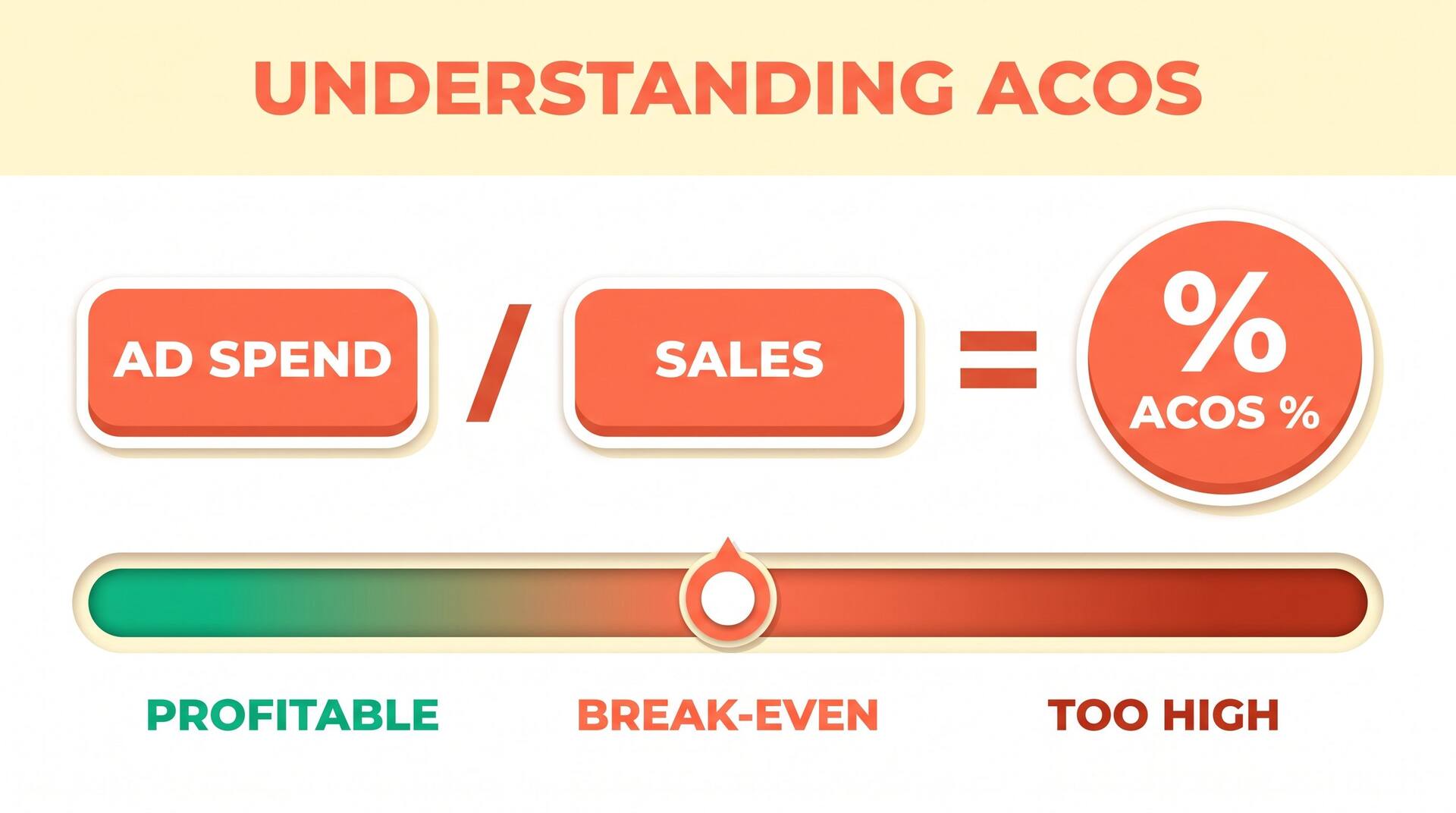
ACOS = Ad spend ÷ Sales revenue from those ads
Spend $10 on ads and make $40 in sales, your ACOS is 25%. Lower is more efficient — but 'good' is defined by your break-even point, not by the number alone.
What's a good ACOS for your book?
Pick a price point to see the break-even ACOS — the line between profit and loss
Royalty / sale
~$3.40
Break-even ACOS
~68%
Healthy target
Under 55%
The sweet spot for many indies. A $4.99 ebook at 70% nets about $3.40, so you break even near a 68% ACOS and have real room underneath it. This price gives you the most margin to pay for clicks while staying inside the 70% royalty band.
One advanced nuance worth knowing early: if your book is part of a series, a slightly unprofitable ACOS on book one can still win overall, because some readers go on to buy books two, three, and four at zero ad cost. That read-through is why series authors can afford to bid higher — but as a beginner with one book, treat your break-even ACOS as a hard line.
Where AIWriteBook fits in
Every readiness item above — a competitive cover, a description that sells, a finished book worth advertising — is upstream of the ad dashboard. AIWriteBook handles that part: it turns your idea into an outline, drafts the manuscript with Gemini or Grok, generates a cover, and writes a hook-driven blurb so your book page actually converts the clicks you pay for. Then our free KDP keyword research and royalty calculator tools hand you the targeting and break-even math your campaigns run on.
Ads can't fix a weak listing — start with a strong one
Outline, draft, cover, and blurb in one place, so when you switch on Amazon Ads the page is ready to sell.
Beginner mistakes that burn money
Advertising before the page is ready
The most expensive mistake of all. Paying for clicks to a book with no reviews, a weak blurb, or a homemade cover converts nobody — you're funding traffic that bounces. Fix the listing first.
Setting bids high to 'win' fast
High bids don't buy sales, they buy expensive clicks. Start low, let the data come in, and raise bids only on keywords that have already produced orders.
Never adding negative keywords
Some search terms eat clicks and never convert — a free-book hunter, an unrelated genre, a competitor's name. Add those as negative keywords so you stop paying for them. Skipping this is a slow leak.
Killing a campaign after two days
Ads need a couple of weeks and enough clicks to mean anything. Judging a campaign after 20 clicks is reading tea leaves. Give it data before you give it a verdict.
Ignoring break-even ACOS
A 30% ACOS feels great until you realize your print book breaks even at 25%. Always know the line for the exact format you're advertising — the same number can be a win or a loss.
Frequently asked questions
The bottom line for beginners
Amazon Ads reward patience and small steps, not big bets. Get the listing ready, launch one automatic Sponsored Products campaign on a tiny budget, watch which search terms actually sell, move those into a manual campaign, and always measure your ACOS against the break-even point for that format. That loop — learn, refine, scale the winners — is the whole game.
When you're ready to go deeper into keyword harvesting, negative-keyword strategy, bid math, and scaling rules, our advanced guide picks up exactly where this one leaves off. But start here, start small, and let the data, not your hopes, decide where the money goes.
Explore the full Amazon KDP guide for keyword research, pricing, categories, and launch strategy.