

When people search for 'how to create a book,' they usually mean something broader than just writing one. They want to know the full process — how the words become chapters, how chapters become a designed interior, how the cover gets made, how the whole package becomes a file that Amazon, Apple, or a print shop will accept. This guide walks through all of that, from blank idea to a finished object a reader can buy.
The good news is that creating a book in 2026 is more accessible than it has ever been. Tools that used to require a graphic designer, a typesetter, and a distributor can now be handled by one person at a kitchen table. The bad news is that most people only learn half the process and skip the design and publishing parts, which is why so many self-made books look amateur and sell nothing. Do all six phases below and your book will not be one of them.
Create vs Write: What's the Difference?
Writing a book is producing the manuscript — the words, the chapters, the story or argument. Creating a book is everything: writing, editing, cover design, interior design, formatting, metadata, and publishing. A manuscript lives in a Word document. A book lives on Amazon, in readers' hands, and in print catalogs. This guide covers the full create process, not just the write part.
Plan What Kind of Book You're Making
Before you write a word, decide what the finished book will look like. Fiction novel or nonfiction guide? Paperback, hardcover, ebook, or all three? Standard 6x9 trim size or something unusual? Black-and-white interior or full color? Photos, illustrations, or plain text? Each of these choices affects the writing, the design, and the final file you'll need to produce. The same planning applies to practical books written for your own business: a guesthouse owner might turn the house rules, the local tips and the answers to every question guests ask into a short guest guide, the same way a hotel linen supplier writes up care instructions for the properties it serves.
The most common beginner mistake is choosing format after writing. A children's picture book written as a plain-text Word document has to be completely reshaped once you realize it needs illustrations on specific pages. A cookbook written without thinking about photo placement looks wrong when you try to lay it out. Spend one afternoon at the start figuring out what format the finished book will take, sketch a rough outline, then write accordingly.
Phase checklist
- Decide on primary format: ebook only, paperback only, or both
- Pick a trim size. 6x9 is the self-publishing default for novels and nonfiction
- Decide color interior or black-and-white. Color printing is expensive
- Sketch your illustration or photo plan if the book needs visuals
Write and Structure the Manuscript
Drafting the manuscript is a separate full-time project and we cover it in depth in our guide on how to write a book. The short version: pick a realistic word count, outline the chapters, write a target daily word count on a fixed schedule, and revise in three passes — structure, prose, then copy. Finish the manuscript before you touch any design work.
A manuscript is ready for the next phase when it has been revised at least twice, had external feedback from at least one reader, and has a final table of contents. If you are creating the book using an AI tool, generate a full outline and draft, then do your own revision passes before handing anything to design. Design work done on an unfinished manuscript gets thrown away when you later cut three chapters.
Phase checklist
- Finish a full first draft. No placeholders, no [fill in later] gaps
- Complete at least two revision passes — structure first, then prose
- Get external feedback from at least one reader who is not family
- Finalize the table of contents and chapter order
Design the Cover
The cover is the single most important marketing asset for the book. Readers decide in under two seconds whether a cover looks like a book they want to buy. A great cover follows genre conventions — thrillers look like thrillers, romance looks like romance, business books look like business books. Do not try to be original on the cover. Try to signal 'this is exactly the kind of book you like' to your reader.
Study the top ten bestsellers in your Amazon category. Notice the typography, the color palette, the imagery, the layout. Your cover should feel like a sibling of those covers, not a clone but a match in visual language. You can generate covers with AI tools, hire a designer on Reedsy or 99designs, or buy a pre-made cover from DesignRR. If you design it yourself, use Canva or similar tools — but be honest about whether your cover holds up next to the bestsellers. If it doesn't, redo it.
Phase checklist
- Pull the top 10 covers in your Amazon category and analyze the common elements
- Generate or hire at least three cover options before picking one
- Confirm cover dimensions match KDP specs: 2560x1600 pixels minimum for ebook
- Create a print-wrap version too if you're doing paperback — spine width depends on page count
Lay Out the Interior
The interior layout — the way text and images sit on the page — makes the difference between a book that looks professional and one that looks self-published in the bad way. For an ebook, layout is mostly automatic: your EPUB file contains chapters, headings, and paragraphs, and the reading device renders them. For print, layout is harder. You need correct margins, consistent fonts, page numbers, running headers, a title page, a copyright page, and proper chapter openings.
Tools that handle interior layout well include Vellum (Mac only, expensive, excellent), Atticus (cross-platform, reasonable), and AIWriteBook's built-in export, which produces KDP-compliant EPUB and print PDFs automatically. If you're laying out in Word, you'll need to manually handle page breaks, section breaks, and gutter margins. Expect to spend a full day on print layout if you do it yourself. It's worth it. Amateur layout is what readers notice first when they open the book.
Phase checklist
- Pick a layout tool: Vellum, Atticus, AIWriteBook, or manual Word layout
- Include all required front matter: title page, copyright page, dedication, table of contents
- Set correct trim size, margins, and gutter — use KDP's guide for your paperback size
- Proof the final PDF by printing one physical copy and reading it cover to cover
Prepare Metadata and Publishing Package
A finished manuscript and cover are not enough to publish. You also need a book description (150–300 words that actually sell), seven Amazon keywords, two categories, an author bio, and an ISBN (free from KDP, or bought from Bowker in the US if you want your own). The description is especially important — it is the sales page for your book, and a vague, passive description kills click-through even when the cover gets the click.
Write the description in three parts: a hook that states the book's central promise, a middle that raises stakes or provides proof, and a close that asks for the click. For fiction, the hook is the premise. For nonfiction, the hook is the outcome the reader will have after reading. Research keywords using a KDP-specific tool rather than generic SEO tools — Amazon's search algorithm is different from Google's. Pick two categories that are relevant but not impossibly competitive; a small category you rank #1 in sells better than a giant one you rank #500 in.
Phase checklist
- Write a 200-word book description with a hook, middle, and call to action
- Research and pick seven keywords with real search volume and manageable competition
- Pick two categories where your book can realistically rank in the top 100
- Write a 100-word author bio that builds credibility without sounding like a resume
Publish and Distribute
For most self-published authors, Amazon KDP is the starting point. It covers ebook, paperback, and hardcover printing with print-on-demand, so you hold no inventory. Uploading is straightforward: create a KDP account, start a new book, enter metadata, upload your correctly formatted manuscript file, upload the cover, set your price, and publish. A book goes live within 72 hours, usually sooner.
Many authors also distribute through Draft2Digital, IngramSpark, or Apple Books Author. Draft2Digital hits Apple, Barnes & Noble, Kobo, and other retailers with one upload. IngramSpark is necessary if you want bookstore distribution, because Amazon's paperback program isn't accepted by most bookstores. Decide your distribution strategy before publishing — re-uploading after changes is doable but tedious.
Phase checklist
- Create your KDP account and verify tax information — this takes 1–2 business days
- Upload, preview, and fix any formatting issues the KDP previewer flags
- Set pricing — $2.99–$9.99 for ebook to qualify for 70% royalty, $9.99–$19.99 for paperback
- After publishing, check the live Amazon listing within 72 hours for any display issues
File Formats You'll End Up With
A fully created book produces several files at the end of the process. Here is what you will have in your project folder when the book is done.
EPUB (ebook)
Reflowable ebook format accepted by Amazon Kindle, Apple Books, Kobo, and most ereaders. This is the main ebook file. Generated by Vellum, Atticus, AIWriteBook, or Calibre.
Print PDF (paperback / hardcover)
Fixed-layout PDF at your exact trim size with correct margins and bleed. This is what KDP and IngramSpark print from. Much more sensitive to errors than EPUB.
Cover JPG (ebook)
The 2D cover image used on Amazon, your website, and promotional materials. KDP wants 2560x1600 pixels minimum, 72 DPI, sRGB color.
Cover Wrap PDF (print)
A full print wrap including front, spine, and back, sized exactly for your book's page count and trim size. The spine width changes when the page count changes.
Create Once, Publish Everywhere
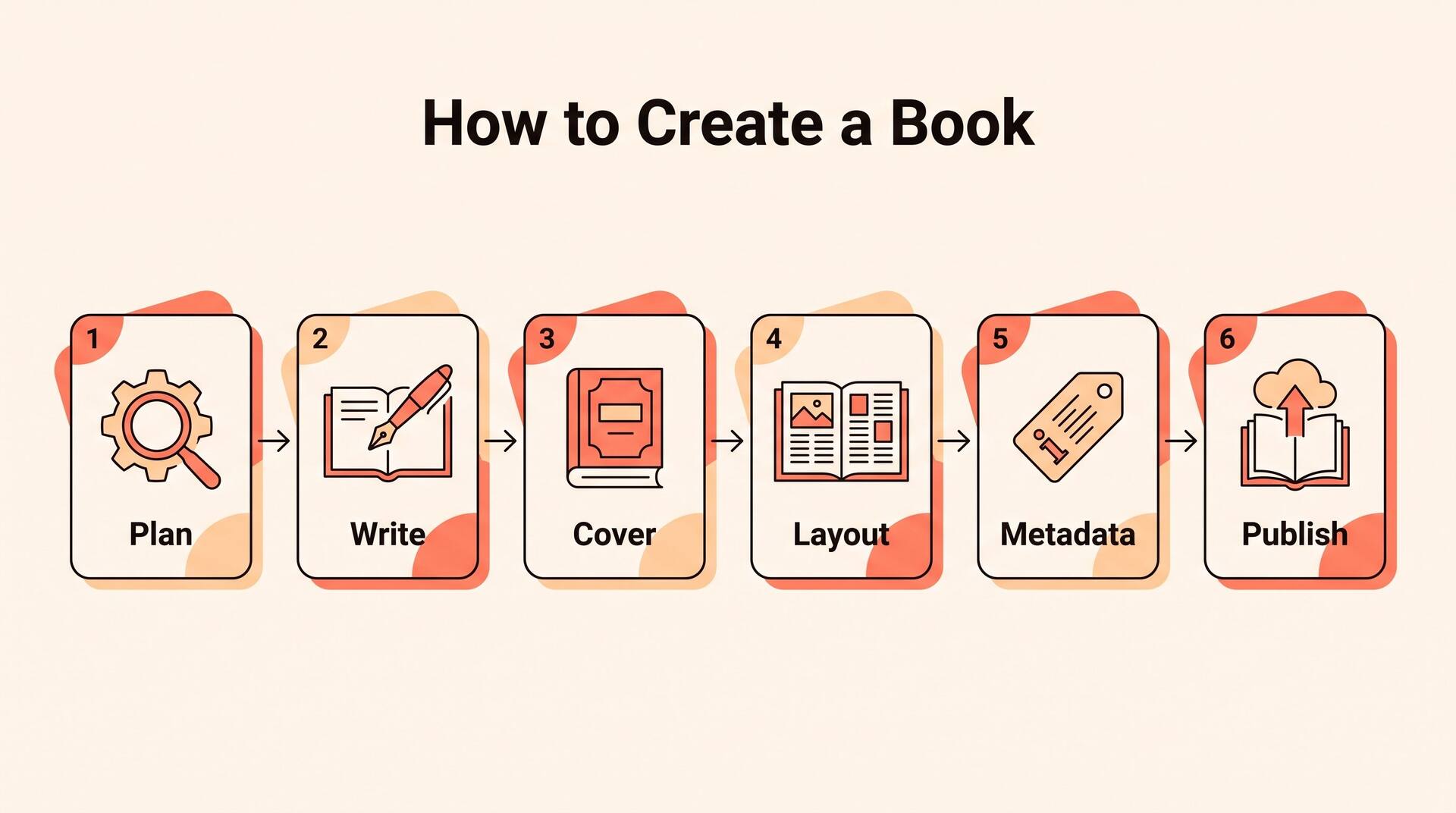
Creating a book is more work than most people expect, but it breaks down into six manageable phases. If you complete each phase before starting the next, you end up with a professional book that competes with traditionally published ones. If you skip phases — especially design, layout, and metadata — you end up with a manuscript that happens to be on Amazon, not a book that sells.
The tools available in 2026 can compress the process dramatically. AIWriteBook handles phases two through four in one workflow — manuscript drafting, cover generation, and KDP-ready export — which gets most first-time authors from idea to published book in under a month. Whatever tools you pick, commit to finishing all six phases. A book is not done when the manuscript is done.