


The short answer
Vine is worth it for a print-led book (a cookbook, a picture book, a gift book, practical non-fiction) that you can sell through Seller Central with Fulfillment by Amazon. It is not available for Kindle ebooks at all, and for most KU genre fiction an ARC team gets more reviews for less money.
Good fit
- Paperback or hardcover is the main format
- The book appeals to general shoppers, not only genre fans
- You already sell physical stock or can ship 30 copies to Amazon
Poor fit
- Ebook-first or Kindle Unlimited-first
- Niche genre fiction that needs readers who know the tropes
- Book already has 30 or more reviews
How Vine works for a book
Amazon invites its most helpful reviewers into Vine. These Vine Voices browse a private catalog of free products and request what interests them. When one of them picks your book, Amazon ships a copy from your FBA stock, and the reviewer has a deadline to post an honest review.
You never learn who they are and you cannot contact them. Their reviews carry the label Vine Customer Review of Free Product, so shoppers know the copy was free. A Vine review can be one star; Amazon does not remove it because you dislike it.
That last point is the trade. You get credible, policy-safe reviews from people with a track record, and you give up any say over who reads the book. A Vine Voice who mostly reviews kitchen gadgets may request your cozy mystery because the cover looked nice.
The sequence
- 1
You enroll an eligible ASIN and choose how many units to offer, up to 30.
- 2
The book appears in the Vine catalog for Vine Voices.
- 3
Reviewers request copies; Amazon ships them from your FBA inventory.
- 4
Reviews post over the following weeks, labeled as Vine reviews.
- 5
Amazon bills the fee 30 days after enrollment, once the first review is live.
Who can enroll a book
This is where most guides stay vague, so plainly: there is no Vine button anywhere in the KDP dashboard. Vine lives in Seller Central (and Vendor Central for traditional publishers), and Amazon's own enrollment rules exclude digital products. A Kindle ebook can never be a Vine product.
For a print edition, Amazon's requirements are a Professional selling account, a listing fulfilled by Amazon (FBA), fewer than 30 reviews on the product page, and a listing with an image and a description. The seller also needs a Brand Registry role for the brand on the listing, or the product has to be one Amazon treats as generic.
In practice an indie author tries it by opening a Professional seller account, adding an FBA offer on their own paperback ASIN, shipping stock into a fulfillment center, and then checking whether the ASIN shows as eligible in the Vine dashboard under Advertising. Amazon decides per ASIN, and the dashboard is the only reliable answer for your book.
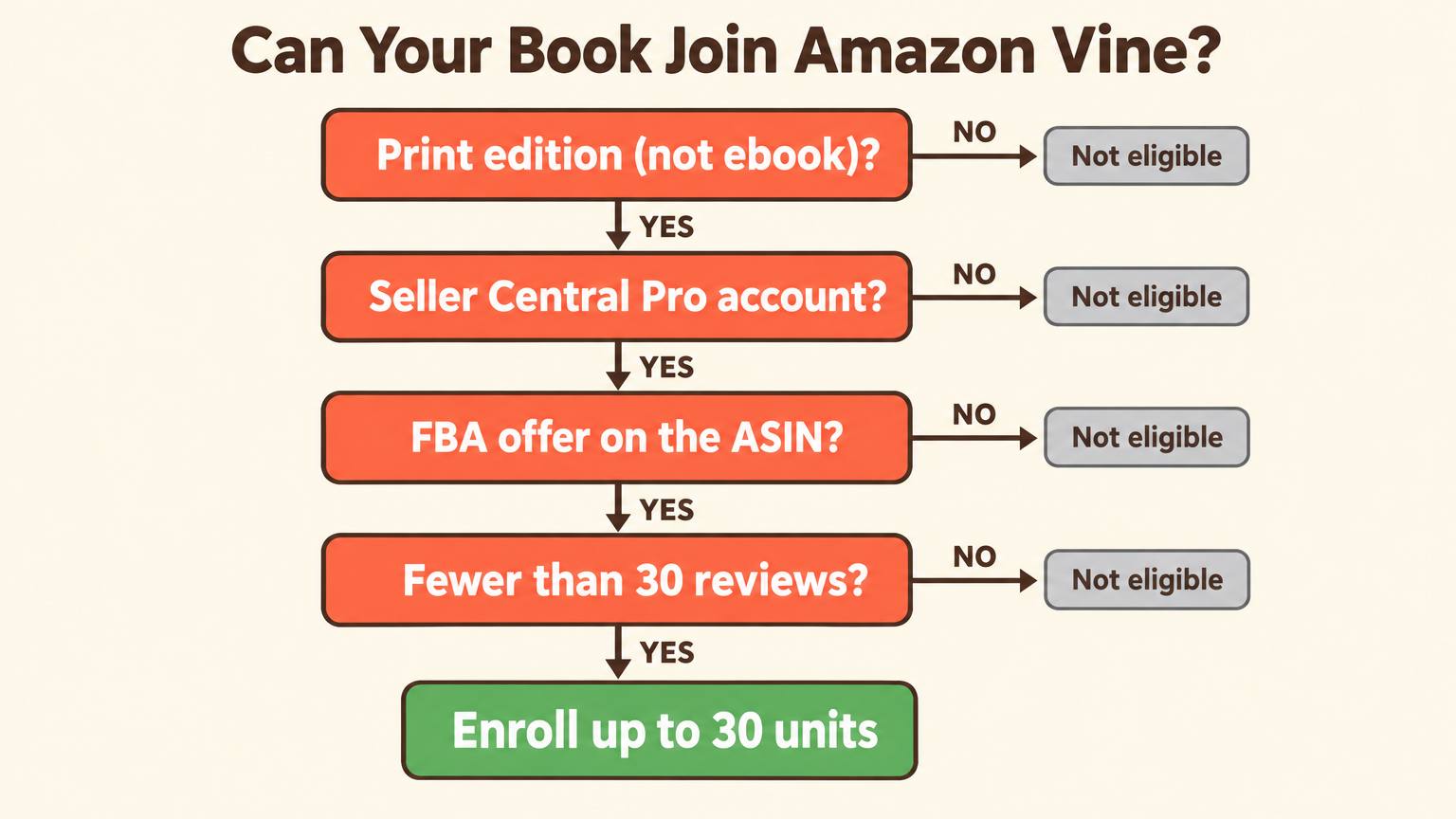
Check your book in 20 seconds
Answer four questions. All four have to be yes.
Is the edition you want reviewed a paperback or hardcover?
Do you have, or will you open, a Seller Central Professional account?
Can you list an FBA offer on that ASIN and ship copies to Amazon?
Does the product page have fewer than 30 reviews?
Answer all four to see your result.
Vine fees in 2026
Amazon's US Vine page, checked in October 2026, lists the fee per parent product by how many units you offer. Fees vary by marketplace, and your Vine dashboard shows the exact amount before you confirm.
| Units offered | Enrollment fee (US) |
|---|---|
| 1 to 2 | Free |
| 3 to 10 | $75 |
| 11 to 30 | $200 |
Billing has two safety valves. You are not charged until 30 days after enrollment and only after your first Vine review posts, and if no Vine review appears within 90 days you pay nothing. Several 2026 seller guides also report a free enrollment tier for products listed under $100 since March 2026, which would cover nearly every book. Treat that as a bonus if your dashboard shows it, not as the basis of your budget.
The costs nobody puts in the headline
- +Seller Central Professional plan: $39.99 a month in the US, for as long as the account is open.
- +Author copies: printing plus shipping into an Amazon fulfillment center, for every unit.
- +FBA storage on the stock that sits waiting for a reviewer to request it.
What one Vine review really costs
The fee is only one line. The number that matters is cost per posted review, because not every unit gets requested and not every reader posts. Guides that track Vine for books report review rates of roughly 50 to 70 percent of units.
Vine cost-per-review calculator
- Enrollment fee
- $200.00
- Copies
- $150.00
- Seller account
- $39.99
- Total spend
- $389.99
- Expected reviews
- 18
- Cost per review
- $21.67
Worked example: 30 paperbacks at $5 each landed at Amazon, one month of the Professional plan, the $200 tier and a 60 percent review rate. That is $200 plus $150 plus $39.99, about $390 for 18 reviews, so roughly $22 a review. With a $0 fee the same campaign lands near $11.
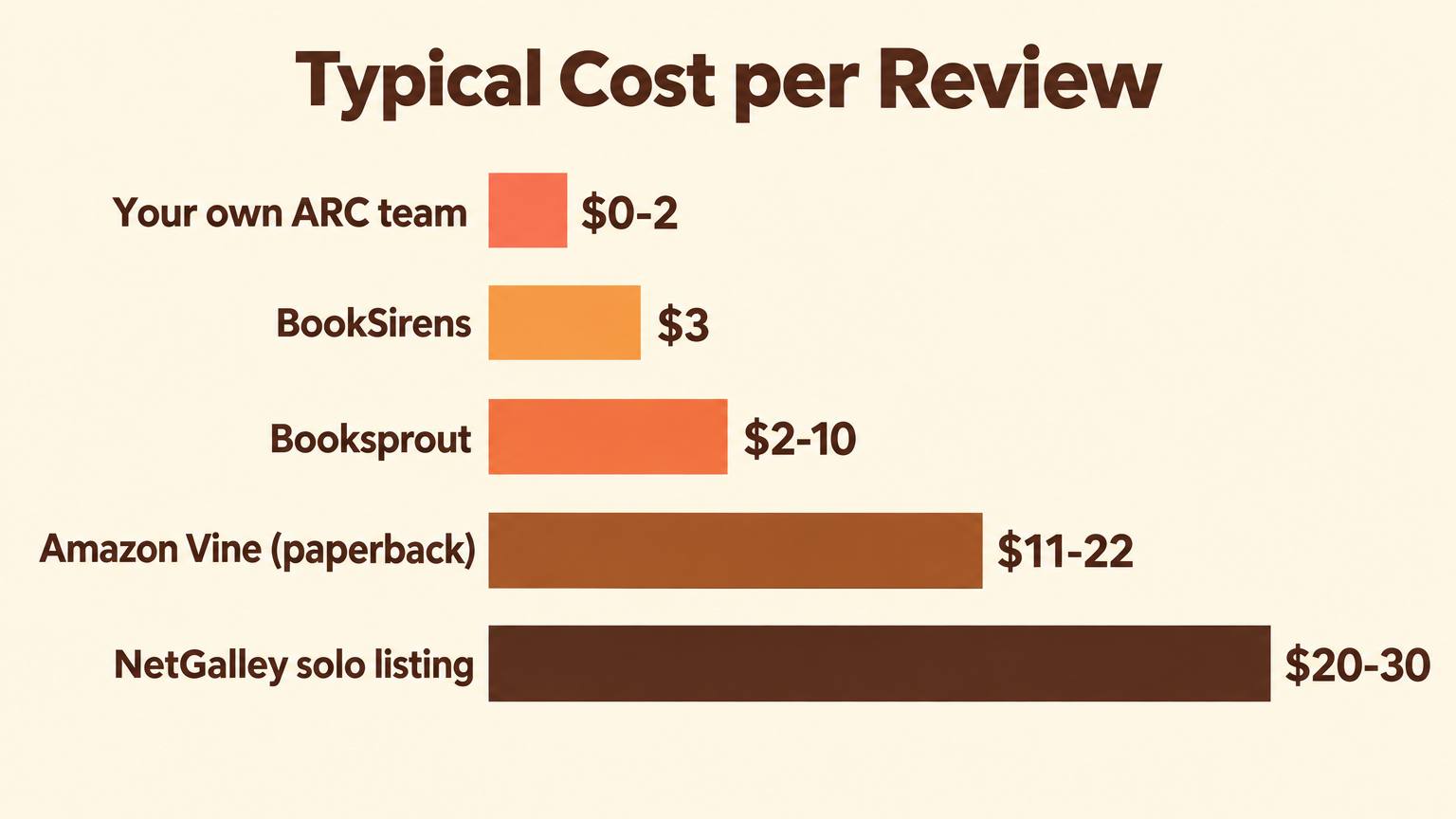
Compare that with BookSirens at $2 per reader with a reported 75 percent review rate, or a newsletter-built ARC team that costs almost nothing per review. Vine earns its premium only when its reviewers fit the book: practical, giftable, visual titles that ordinary shoppers judge well. For genre fiction, readers who already love the genre review faster and fairer. Our guide to NetGalley for self-published authors runs the same math for that platform.
Staying inside Amazon's review rules
Vine exists because Amazon bans almost every other way of trading products for reviews. It is the one place where the free product and the review are formally linked, and Amazon runs it. Outside Vine, the rules for books are narrow and worth knowing exactly.
Allowed
- Giving a free or discounted copy to a reader, as long as a review is not a condition of getting it.
- Asking readers, in your back matter or a newsletter, to leave an honest review if they want to.
- Using Vine, or reader-matching services that sell access to readers rather than guaranteed reviews.
Gets reviews removed or worse
- Asking for a positive review, or a specific star rating.
- Paying, gifting cards, or offering anything beyond the book itself.
- Reviews from family, close friends or anyone with a financial stake in the book.
- Trying to identify or contact Vine Voices about their reviews.
Our full guide on how to get book reviews on Amazon without breaking rules covers the ARC side in more depth, including the follow-up emails that turn readers into reviewers.
Mistakes that waste a Vine slot
Enrolling a cover that does not say the genre
Vine Voices pick from a catalog thumbnail and a description. If the cover reads as a thriller and the book is a slow-burn romance, you get a reader who is set up to be disappointed. Make the genre obvious on the cover and in the first line of the description.
Offering 30 units for a book few shoppers would want
Units that nobody requests still sit in FBA storage. For a narrow niche, the $75 tier with 10 units keeps the stock you pay to print and store in line with the demand you can realistically expect.
Waiting until the book has 25 reviews
Vine's value is highest at zero. Enroll before or right at launch, when the page has nothing and every credible review moves conversion.
Expecting stars instead of signal
Vine reviews are honest and sometimes blunt. A three-star review that explains who the book suits still sells to the right buyer. Read them as free editorial feedback for the next edition.
Template: the first two lines of a Vine-ready description
Vine Voices decide in seconds. Your description should tell a general shopper what the book is and who it is for before anything else.
Line 1: [Genre or format] for [specific reader] who wants [concrete outcome or feeling].
Line 2: [One unusual detail only this book has], in [page count or format detail].
Example
A weeknight vegetarian cookbook for busy parents who want dinner on the table in 30 minutes. Every recipe uses one pan and eight ingredients or fewer, across 190 full-color pages.
The cheaper review engine to run alongside Vine
Even authors who get into Vine still need readers who come back for the next book, and those come from your own list. Two things make that list easy to build.
First, the free review request generator writes the ARC team invitation, the review request email and the reader magnet copy from your title and genre, so asking sounds natural rather than needy. Second, an author page on AIWriteBook gives every book a shareable page with a free chapter preview that collects reader emails into a list you own, and lets you send a launch broadcast to that list when the next book is ready.
If the description is the weak point, the blurb generator drafts a sales description you can tighten into the two-line template above.
Write the book that earns the reviews
AIWriteBook takes you from outline to formatted paperback and EPUB, then gives you the author page and launch tools to find your first readers.
Amazon Vine for books: FAQ
Not from the KDP dashboard. Vine is enrolled through Seller Central or Vendor Central, it needs an FBA offer, and Amazon excludes digital products, so Kindle ebooks never qualify. Some indie authors enroll their paperback by opening a Professional seller account and listing an FBA offer on their own ASIN.
Amazon's US page lists free for 1 to 2 units, $75 for 3 to 10 units and $200 for 11 to 30 units per parent product, billed only after the first review posts. Add the $39.99 monthly Professional plan and the cost of the copies you send to Amazon.
They are labeled differently: Vine Customer Review of Free Product. Shoppers can see the copy was free, and Amazon treats the review as legitimate because it runs the program.
No. Vine reviews follow the same community guidelines as any review, so only a review that breaks those guidelines can be reported. A low rating alone is not a reason for removal.
Requests usually start within days of enrollment, and reviews trickle in over the following weeks as Vine Voices finish reading. Plan for the bulk to arrive within the first two months.
The verdict
Vine is a real advantage for print-first books that general shoppers buy: you get credible, rule-proof reviews at launch for roughly $11 to $22 each. For ebooks it is closed, and for genre fiction it is usually the most expensive way to reach the wrong readers.
Build your own ARC list either way. It costs least per review and it is the only reviewer pool you keep for the next book.