


Contents
Who is on NetGalley, and why that matters
NetGalley's members are professional readers: book reviewers and bloggers, librarians, booksellers, educators and media. Each one keeps a profile that shows their audience, the retailers they review on and a feedback ratio, the share of approved books they have actually reviewed. You choose who gets your book from that information.
That audience is the reason to pay. A librarian who likes your galley can order copies for a library system, and a bookseller can stock it. No other ARC platform reaches those buyers. If all you want is Amazon star ratings for a Kindle Unlimited romance, you are paying for reach you will not use.
NetGalley earns its price when
- The book has wide print distribution, for example through IngramSpark, so libraries and stores can actually order it.
- The genre does well with NetGalley readers: romance, YA, literary and book-club fiction get the most requests.
- You have a release date 6 to 12 weeks away, so early buzz lands before launch.
- You want trade-style credibility: blog reviews, Goodreads ratings and media mentions, not only Amazon stars.
What NetGalley costs a self-published author in 2026
NetGalley's own order page, checked in October 2026, lists these pay-per-title prices. They are aimed at authors and small presses putting up one to four books a year; above that, NetGalley quotes a subscription.
| Option | Price | What you get |
|---|---|---|
| Digital review copy listing | $575 | 6 months on NetGalley with your own listing dashboard |
| Featured Title promotion | $150 with a listing, $175 alone | One week in the Featured carousel on the Find Titles page |
| Audiobook promotion add-on | $125 | Promotion for the audiobook edition |
| Co-op slot (example: Victory Editing) | $75 a month, ebook | A listing under a co-op's publisher account; you manage requests yourself |
The co-op route is how most indies use NetGalley. A co-op holds a publisher subscription and rents slots by the month. Victory Editing, one of the longest-running, charges $75 a month for an ebook slot, $80 for an audiobook and $155 for both. Two months around a launch costs $150 instead of $575. The Independent Book Publishers Association runs a similar program with member pricing on 3- and 6-month listings.
All NetGalley fees are non-refundable, and none of them buy reviews. You are paying for access to readers who request your book. That distinction is exactly what keeps NetGalley reviews inside Amazon's rules.
Listing your book, step by step
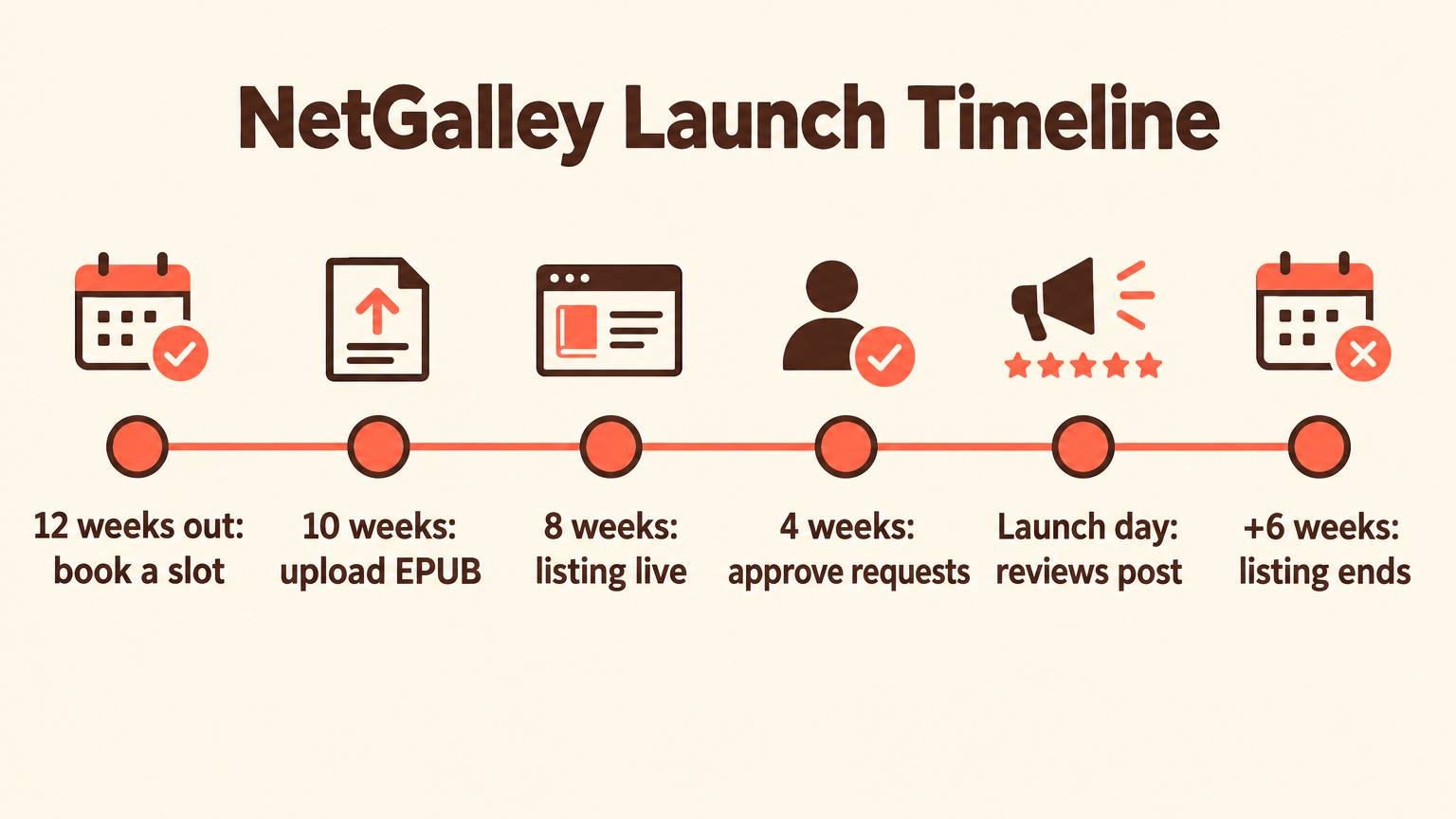
Work backward from your release date. Most of the value arrives in the weeks before launch, so the listing should go live well ahead of it.
- 1
Lock the files and the ISBN
You need an ISBN-13, a cover image in JPG or PNG, and the interior as an EPUB (preferred) or PDF. Some co-ops accept a 13-digit identifier of your own, but you lose retailer links, so use a real ISBN. If you publish on KDP with a free ASIN only, buy an ISBN first; our guide to getting an ISBN for a self-published book covers where.
- 2
Choose solo or co-op and book the dates
Co-op slots fill up around holidays and big release seasons. Book about 12 weeks before launch so the listing can run for the 8 weeks before release.
- 3
Write the listing like a catalog page
Members browse a catalog of hundreds of titles. Your description, comparable titles and genre tags decide whether they click. Use the template below.
- 4
Set approval preferences
Decide whether to approve each request by hand, auto-approve members who meet your criteria, or open a limited Read Now window. Start manual; it teaches you who is requesting.
- 5
Approve, then follow the feedback
Review requests a few times a week. Feedback arrives in your dashboard, and reviewers post to Goodreads and blogs before launch and to retailers like Amazon once the book is on sale.
- 6
Close the loop after launch
When the listing ends, export the reviewers who gave strong feedback and invite them to your own ARC list for the next book. That list is the asset you keep.
Approving requests: where reviews are won or lost
Independent comparisons put NetGalley's review rate at roughly 30 to 50 percent of downloads, lower than smaller ARC services. Part of that is the audience: librarians and booksellers read to decide what to order, and they owe you no public review. The rest is approval habits, which you control.
Before you approve, check
0 of 5 checks readyDecline politely and often. A smaller, well-chosen group beats 400 downloads from members who hoard galleys. Your published reviews depend on who you let in, not how many.
Templates you can copy
Listing description
[Comp title] meets [comp title] in this [genre] about [protagonist] who must [central goal] before [stakes]. [One sentence on the hook only this book has.] Perfect for readers who loved [specific trope or book] and want [the feeling the book delivers].
Note to reviewers (shown on the listing)
Thank you for requesting [Title]. I approve requests from readers who enjoy [genre or tropes] and who post honest reviews on Goodreads or their own platforms. Content notes: [list]. The book releases on [date], and Amazon reviews can be posted from that day.
Decline message
Thank you for your interest in [Title]. I am keeping this galley to a small group of readers who focus on [genre] this time. I hope you will find it on release day.
NetGalley vs BookSirens vs Booksprout
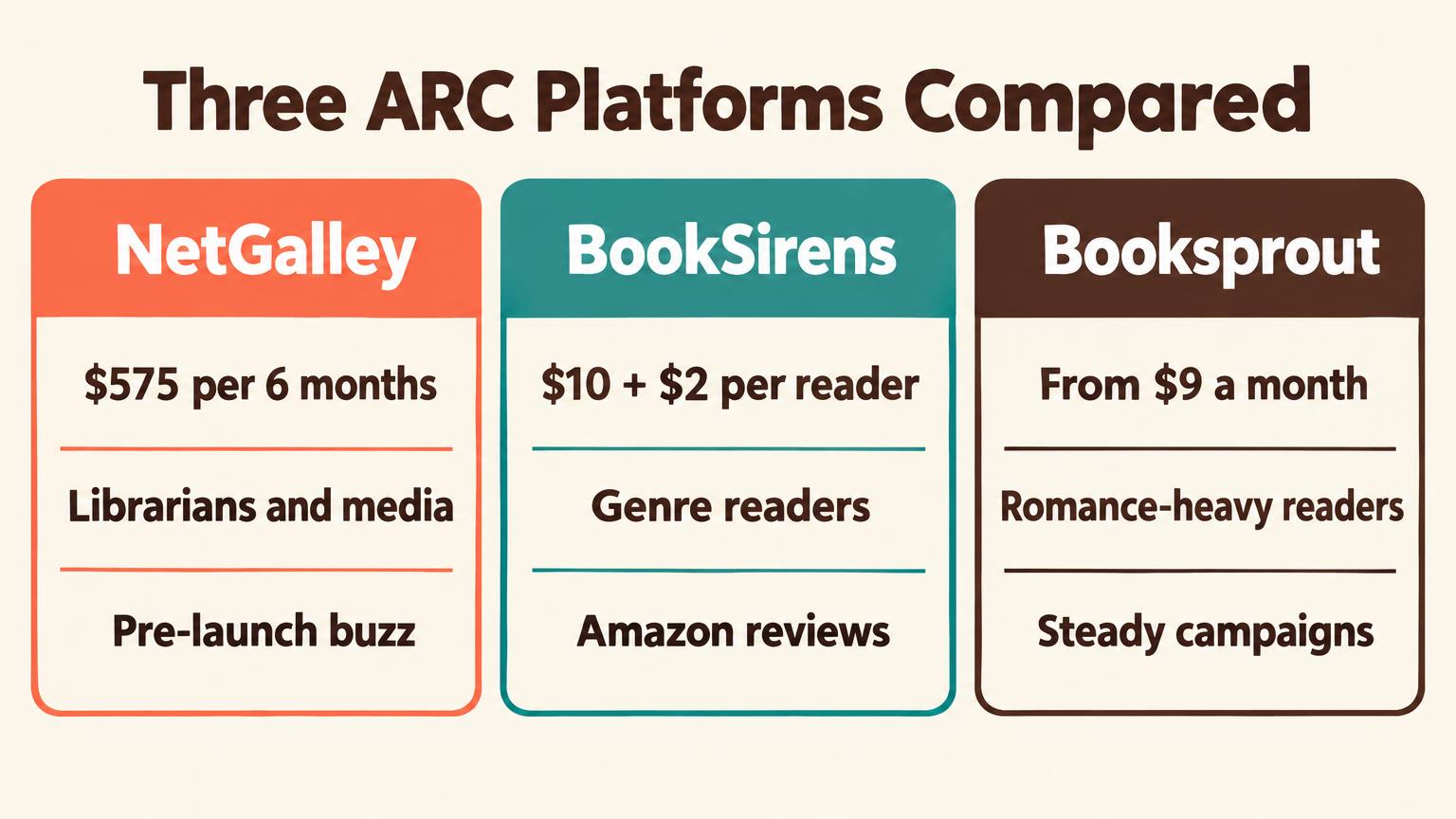
All three sell access to readers, not reviews. They differ in who those readers are and how you pay.
- Price
- $575 for 6 months solo, or co-op slots from $75 a month
- Who reads
- Reviewers, bloggers, librarians, booksellers, educators and media
- Reported review rate
- Roughly 30 to 50 percent of downloads
- Best for
- Print-distributed books that want library and bookstore orders and pre-launch buzz
A practical split for many indies: BookSirens or Booksprout for Amazon review volume on every release, and NetGalley through a co-op only for the books where library and bookseller reach matters. For print-first books that general shoppers buy, also look at Amazon Vine for books, which places copies with Amazon's own reviewer program.
Common NetGalley mistakes
- ×Listing a book with no wide print distribution, so the librarians you paid to reach cannot order it.
- ×Going live two weeks before launch. Reviews need reading time; give it 6 to 8 weeks.
- ×Auto-approving everyone, then wondering why only a fraction of downloads became reviews.
- ×Uploading an EPUB that fails validation or has broken formatting. Reviewers mark down sloppy galleys, even when told it is an advance copy.
- ×Asking reviewers for positive reviews or star ratings. That breaks Amazon's rules and NetGalley's spirit; ask only for honest feedback.
- ×Letting the listing end without capturing the readers who loved the book.
Getting the NetGalley files ready fast
The listing fee is the visible cost; the hidden one is preparing a clean EPUB, a description that sells in a crowded catalog, and the outreach that follows. AIWriteBook handles each of those parts.
The book formatter exports a print PDF and an EPUB that passes epubcheck validation, in your choice of interior theme and trim size, so the galley looks like a finished book. The free blurb generator drafts the listing description from your premise, which you can then shape with the template above.
When the listing closes, the free review request generator writes the invitation that moves your best NetGalley readers onto your own ARC team, and the author page gives them a place to subscribe, with a free chapter preview and launch broadcasts for the next book. For the wider review playbook, our guide on how to get book reviews on Amazon covers newsletters, back-matter asks and follow-ups.
Turn the draft into a galley-ready book
Write, edit and format in one place, then export an EPUB ready for NetGalley and every ARC platform.
Is NetGalley worth it for indie authors?
At the full $575, NetGalley is worth it for a print-distributed book chasing library orders and trade-style buzz. Through a co-op at $75 a month it becomes a reasonable launch line item for most fiction with a release date set two months out. For Amazon review volume alone, BookSirens and Booksprout deliver more reviews per dollar.
Whichever you choose, approve carefully, give readers time, and keep the readers you win.
Our Amazon KDP guide connects this to pricing, categories and the rest of your launch plan.