

There are a few methods you can use to achieve this, and one of the friendliest ways is to let your reader be the character, even if it's for a few minutes. "Which character from my book are you?" is one of the most popular tricks, and it works very well because people love finding out what a character says about them. Besides being interesting, it's also shareable: people screenshot it, share it with their friends, and even post it on their social media stories.
In this guide, we'll go through how to build a character personality quiz for your own book: how to turn your cast into something a quiz can sort people into, how to write questions that feel fun instead of random, and how to build it on WordPress with the Quiz Maker plugin.
Why Authors Make Character Quizzes
There are a few reasons why this format works well:
- Readers like to post what a quiz says about them. A result like "You're the brooding anti-hero" is a bit of identity that fits in a screenshot, which is why "Which character are you?" and "Which trope are you?" quizzes get passed around. BookBub's guide to building an author email list puts them alongside reader magnets and private groups, as a way to get readers talking to you and give them something to share.
- A quiz can also gather email addresses. By the time readers answer the last question, they want to see their result, so asking for an email just before showing it feels fair. Some quiz tools come with templates for authors, such as "Which Character Are You?" and "Which Book Should You Read Next?"
- It lets readers meet your characters without any spoilers. Someone who gets a result like "You're Mira, the cautious planner who never says what she feels" learns who Mira is before they've read a page.
- The quiz also shows you something about your readers. If most of them end up with the same character, that is the person your audience relates to. You can use this information in your ads, or to choose who gets more space on the page in the next book.
So, How Do You Actually Create One for Your Book?
First and foremost, you have to consider how your characters differ from one another. For a quiz to tell people apart, your characters must have differences that a question can detect.
Many writers use a personality system to decide what the quiz will test. Here are three personality systems that are commonly used:
- The Big Five, which includes openness, conscientiousness, extraversion, agreeableness, and neuroticism.
- Sixteen-type systems and the Enneagram give you labels, a name and a clear motivation. Psychology handles them more carefully, and people often get a different type when they take the test again.
- Archetypes such as the hero, the mentor, and the trickster are a third starting point, and they map directly onto roles in a story.
Let's take a look at a fantasy novel with three main characters. You can map them like this:
| Character | Takes risks or plays it safe? | Leads with brain or heart? | Lonely or group person? |
|---|---|---|---|
| Mira, the strategist | Keeps it safe | Brain | Lonely |
| Dario, the rogue | Takes risks | Brain | Lonely |
| Elin, the healer | Keeps it safe | Heart | Group |
When you map your characters like this, it becomes much easier to see how they differ.
Step 1: Install the Quiz Plugin
Once you're done with the mapping, it's time to install the plugin on your WordPress website and activate it to get started.
Step 2: Create Your Questions and Quiz First
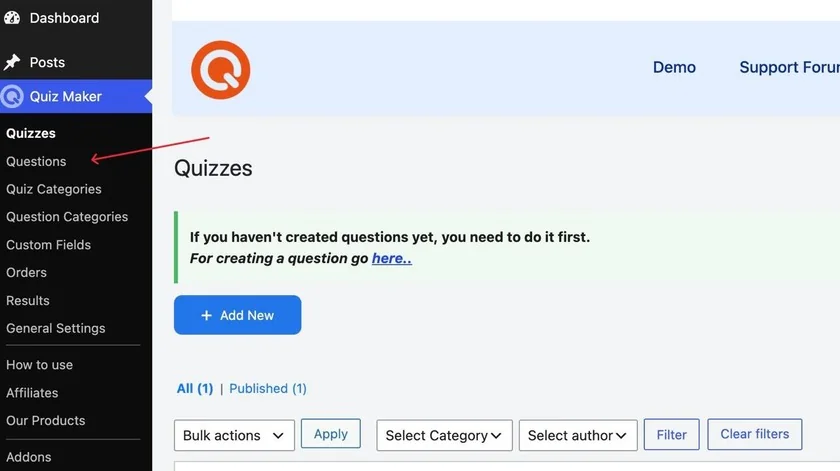
Build your questions and add them to your quiz as usual. To add new questions, click the Quiz Maker icon in your left sidebar, choose Questions, and click Add New, as shown in the screenshot below.
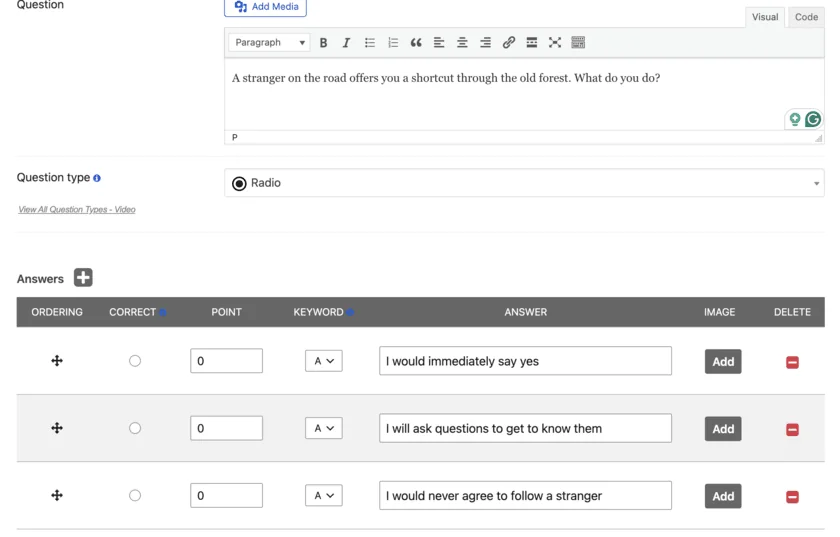
While creating questions, it's crucial to write questions that people actually want to answer. For example, instead of asking "Are you spontaneous?", you can ask something like "A stranger on the road offers you a shortcut through the old forest. What do you do?" This kind of question makes readers think and reflect on themselves, so the answer they choose is honest and on point.
Below you can see an example of a question I created.
Here are a few tips for creating questions:
- Go for six to ten questions. Long enough to feel meaningful, short enough to finish in a couple of minutes.
- Make every answer sound appealing. Nobody wants to feel their only options are bad ones. Your characters' flaws can show up in the results, written with affection.
- Add images when you can. Pictures on the answer options make the quiz feel more like an experience than a form, and the plugin lets you add an image to each answer.
- Use different types of questions. Quiz Maker offers more than 10 question types, so get to know them before you build.
Once you create your question, you will see the keyword section, as shown below.
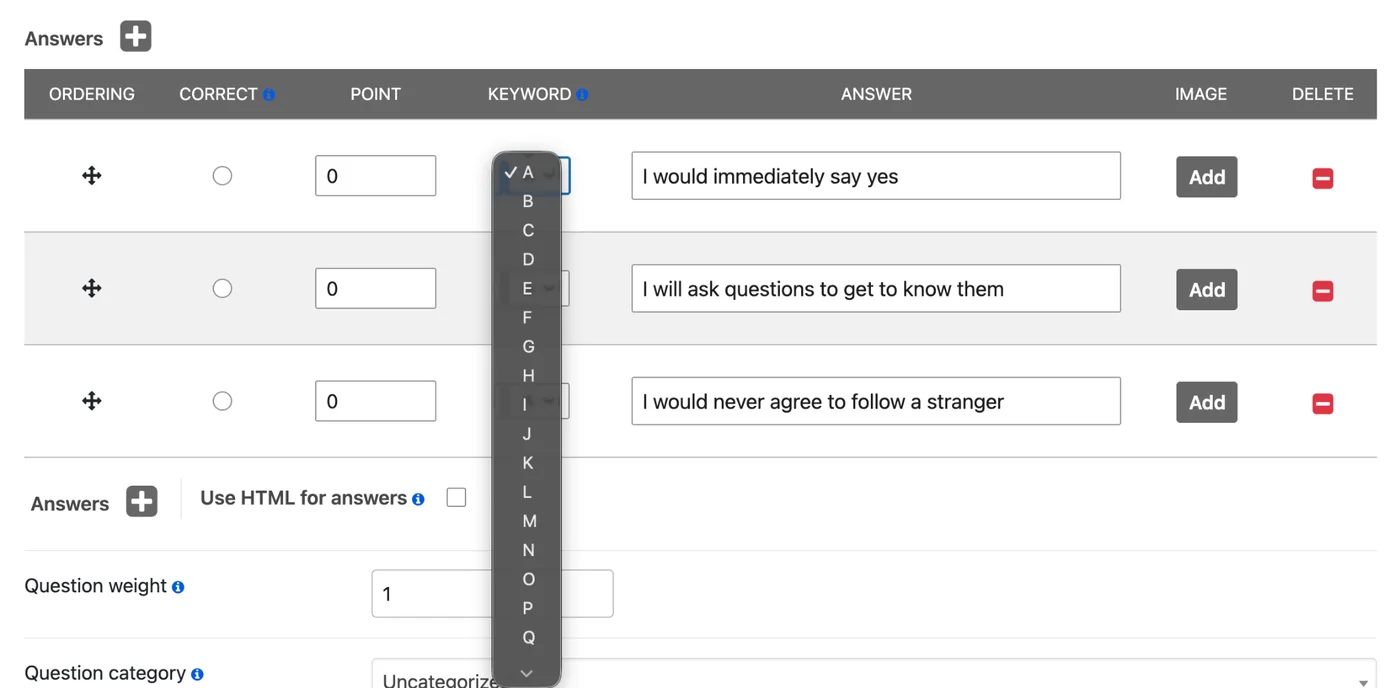
This is one of the most important parts: you have to give every answer a keyword. Assign a different letter to each character, for example A for Mira, B for Dario and C for Elin. Every answer that points to Mira gets an A, and so on. This is how the quiz knows which character each answer belongs to.
Step 3: Set the Results
To set the results, go to the Results Settings section.
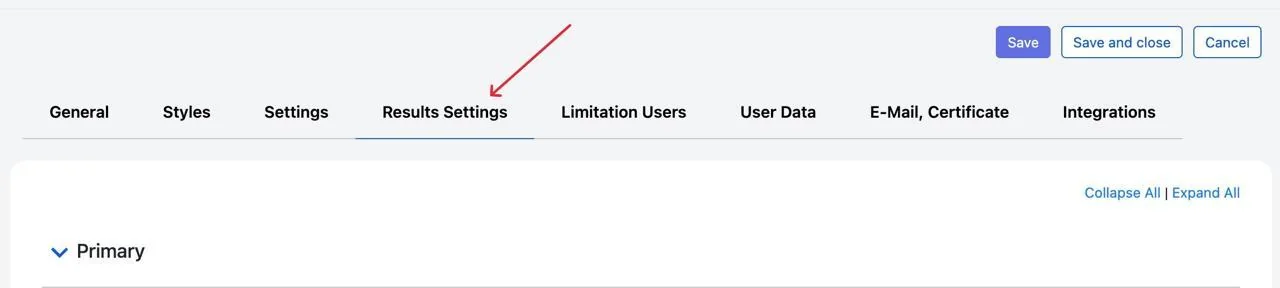
Scroll down a bit until you see the Intervals section, and click By keywords.
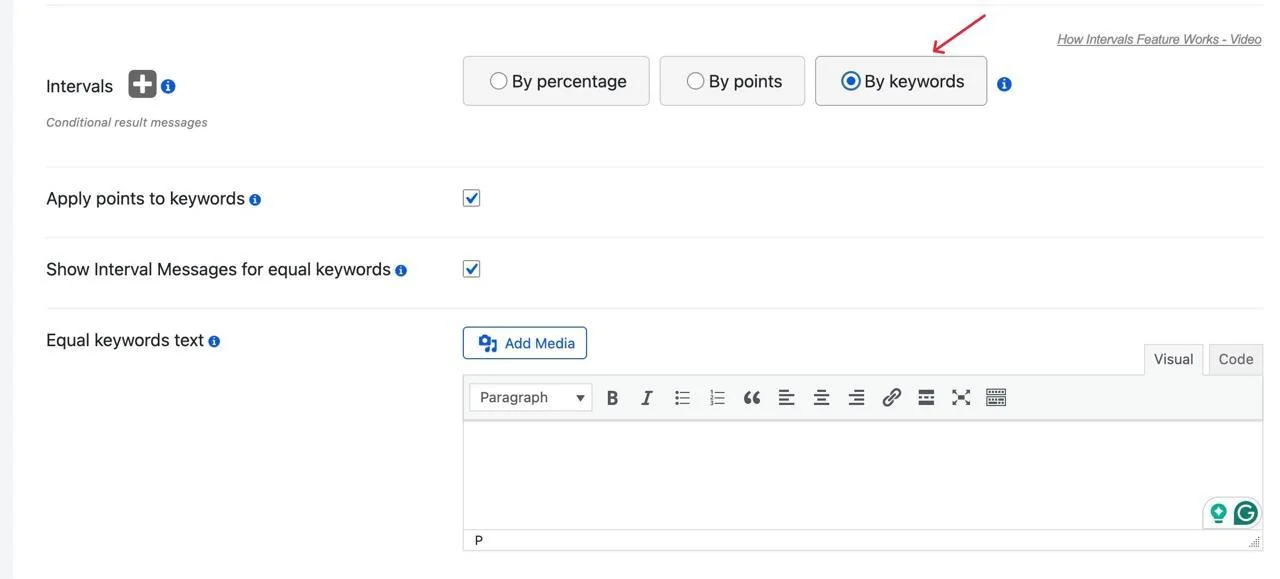
Once you click it, this page opens, and you can assign the result text to each keyword. You can even add images of your characters.
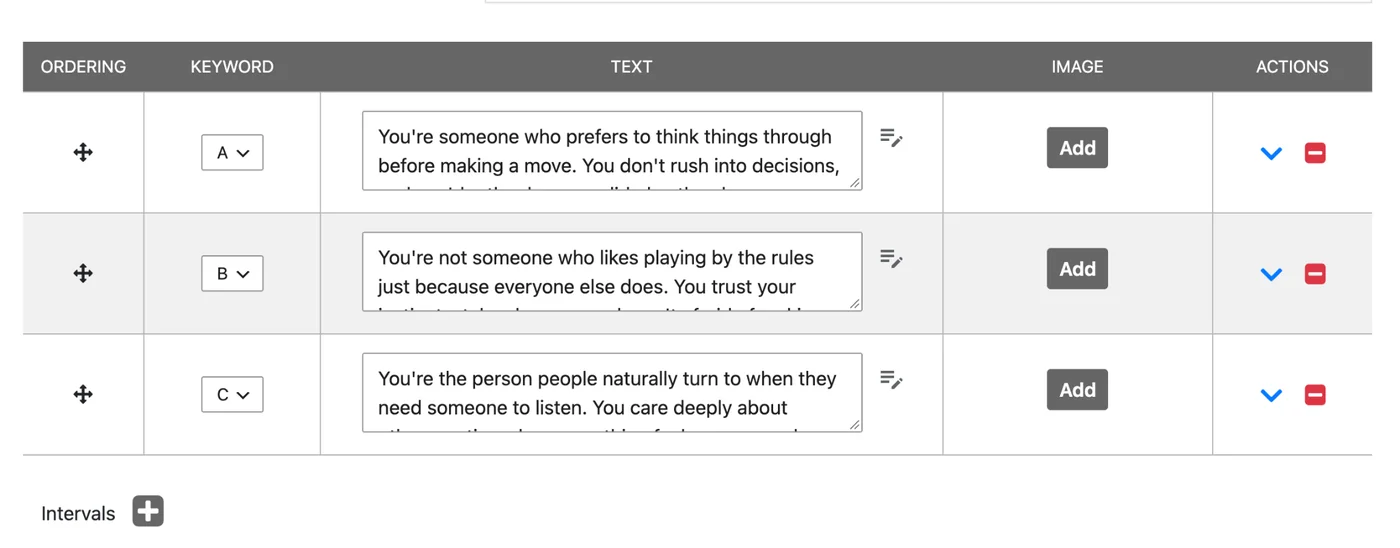
Once you set up everything, click Save and preview the very first character personality quiz you just created.
Final Words
A character personality quiz is one of the marketing tools that is also fun to create. It lets you think more deeply about your characters, it gives your readers a fun way to get to know your characters and your world, and it gives you a reason to ask people to join your email list.
Start small, with three or four characters. Work out what sets them apart and write a few questions, then take the quiz as each character. If every one of them lands on their own result, build it in Quiz Maker and share it with your readers to see who they turn out to be.