

Most authors who try to write a whole book inside ChatGPT eventually hit the same wall: the model forgets earlier chapters, characters drift, formatting is a copy-paste job, and there is no path to a finished, publishable file. But ChatGPT is genuinely great at the first 10 percent of the work, the part where you are still figuring out what the book even is. The hybrid workflow keeps that strength and hands the rest off to an AI writing platform built for long-form books.
Why a hybrid workflow beats either tool alone
ChatGPT and a specialized book writer are not competitors. They sit at different stages of the same pipeline.
ChatGPT is a thinking partner
It is open-ended. You can argue with it about your premise, ask for 30 character backstories, or pressure-test a plot twist. That is exactly what you want before you commit to a 60,000-word manuscript.
AIWriteBook is a manufacturing line
Once you know what you are writing, you want consistency across chapters, persistent characters, KDP-ready formatting, a cover, and an audiobook. That is a different job and needs a different tool.
The handoff is where most authors fail
People either spend three weeks brainstorming in ChatGPT and never start the book, or they skip planning entirely and produce a generic draft. The hybrid workflow forces a clean handoff between the two phases.
The five-step hybrid workflow
This is the exact sequence we recommend to authors moving from ChatGPT to AIWriteBook:
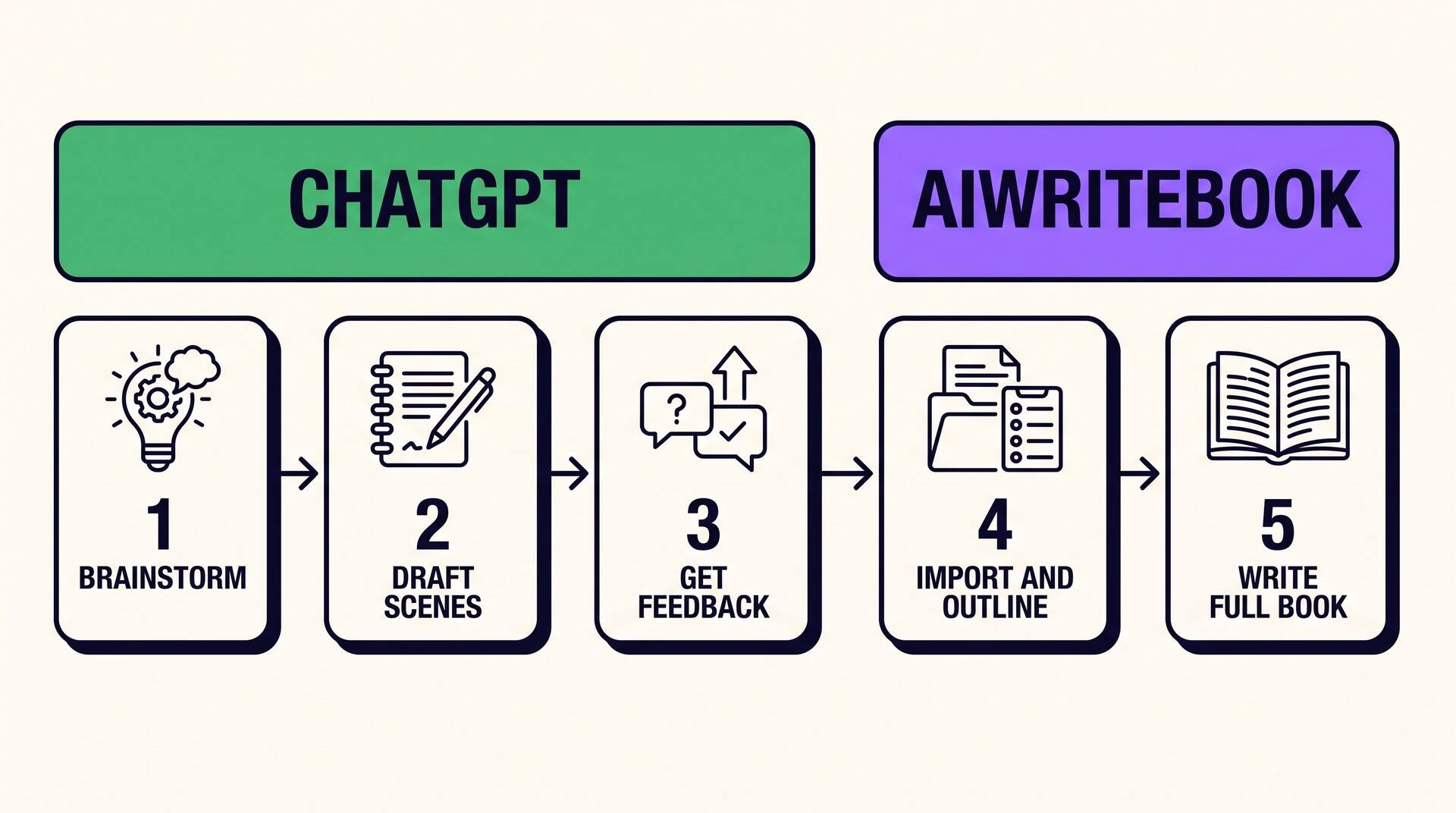
Step 1. Ideation in ChatGPT
Start with a loose premise and let ChatGPT push back. Ask it to suggest five different angles, three different protagonists, and the strongest objection a reader might have. Pick the version that excites you. Save the conversation.
Step 2. Character sketches in ChatGPT
Generate names, ages, backstories, motivations, and contradictions for each main character. Have ChatGPT interview the characters in their own voices to surface inconsistencies early. Paste the final sketches into a plain text file.
Step 3. Outline draft in ChatGPT
Ask ChatGPT for a chapter-by-chapter outline based on the premise and characters. Aim for 15 to 25 chapters with a one to three sentence summary each. Iterate until the structure feels right. Do not let ChatGPT write the actual prose yet.
Step 4. Move the outline into AIWriteBook
Open AIWriteBook, start a new book, paste your characters into the character manager, and drop the outline into the outline editor. AIWriteBook treats the outline as the source of truth and stays consistent with it as it generates each chapter.
Step 5. Generate, polish, publish
AIWriteBook generates the full manuscript in roughly 30 minutes for a 20-chapter book. Run AI proofreading, design a KDP-spec cover, generate a 20-voice audiobook, and export to KDP. ChatGPT is no longer in the loop at this stage, and that is the point.
We are building a one-click ChatGPT outline import
We are currently building a dedicated tool at /tool/chatgpt-outline-import that takes a ChatGPT conversation, parses out the outline and character notes, and drops them into a new AIWriteBook project for you. It is not yet shipped at the time of writing. Until it is live, the manual paste process in step 4 works well and takes about five minutes.
Prompts that make ChatGPT useful in the hybrid workflow
These prompts are tuned for the ideation and outline stages, not for drafting prose. Use them in ChatGPT, then move the results into AIWriteBook.
Premise pressure test
“I want to write a [genre] novel about [premise in one sentence]. Give me five sharper versions of this premise, then list the three strongest reasons a reader might bounce off the book in the first chapter. Be harsh.”
Character interview
“Here is my protagonist: [paste sketch]. Interview them as a journalist would. Ask 10 questions that will surface contradictions or thin spots in their backstory. Then summarize what is still missing.”
Outline scaffold
“Given this premise and these characters, draft a 20-chapter outline. One to three sentences per chapter. Mark the inciting incident, the midpoint reversal, the climax, and the resolution. Do not write any prose yet.”
Outline stress test
“Here is my outline. For each chapter, tell me one thing that does not yet earn its place in the book. Which chapters could be cut or merged? Which character arcs feel unresolved? Be specific.”
What belongs in which tool
| Task | ChatGPT | AIWriteBook |
|---|---|---|
| Brainstorming the premise | Yes, this is its strength | Skip |
| Character sketches and interviews | Yes, iterate freely | Paste finalized sketches |
| Chapter-by-chapter outline | Draft and refine here | Use as the source of truth |
| Full manuscript generation | Drifts after a few chapters | About 30 minutes for 20 chapters |
| Cross-chapter consistency | Manual reminders required | Persistent characters and outline |
| AI proofreading pass | Not built in | Discrete proofreading pass |
| KDP-spec cover (1600 by 2560) | Not available | Built-in cover designer |
| Audiobook with 20 voices | Not available | Included |
| KDP export | Not available | One-click export |
| Multi-language translation | Manual, chapter by chapter | Book-level translation feature |
Three mistakes that break the hybrid workflow
Writing chapters in ChatGPT before moving over
If you let ChatGPT draft chapters one by one, you end up with prose that drifts in voice and contradicts itself. Stop ChatGPT at the outline. Let AIWriteBook generate the full manuscript with the outline as a single coherent source.
Skipping the character sketches
AIWriteBook keeps characters consistent across chapters, but only if it knows who they are. Spend 20 minutes in ChatGPT building sketches with motivations, contradictions, and voice notes. Paste them in. The quality jump is large.
Trying to copy-paste the whole ChatGPT chat
ChatGPT conversations are full of false starts and dead branches. Curate the final outline and character sheets into a single Word .docx before importing — .docx is the only format the importer takes, and it is what carries your headings and formatting through. If your source material is stored as a PDF, you can also convert it using a PDF to Google Docs workflow before editing and organizing the content for import. The forthcoming /tool/chatgpt-outline-import tool will automate this. For now, do it manually.
A worked example: a cozy mystery in one afternoon
Here is what the hybrid workflow looks like end to end for a 60,000-word cozy mystery.
Morning, 30 minutes in ChatGPT
Brainstormed five premises. Picked one: a retired librarian solving a murder at a small-town book festival. Got pushback from ChatGPT on the killer's motive being too thin, sharpened it.
Morning, 45 minutes in ChatGPT
Built three full character sketches: protagonist, victim, suspect. Interviewed each. Found that the suspect's alibi was too clean and rewrote it.
Late morning, 45 minutes in ChatGPT
Drafted a 20-chapter outline. Stress-tested it, cut two redundant chapters, added a midpoint reveal. Saved as plain text.
Lunch, 10 minutes in AIWriteBook
Created a new book. Pasted characters into the character manager. Pasted the outline into the outline editor. Hit generate.
Afternoon, about 30 minutes of generation
AIWriteBook produced the full 20-chapter manuscript. Ran the AI proofreading pass. Generated a cover. Exported to KDP.
Why this works
ChatGPT is a conversational tool. It is built for divergent thinking, where you want options, pushback, and reframings.
AIWriteBook is a production tool. It is built for convergent execution, where you want a 60,000-word manuscript that is internally consistent, properly formatted, and ready to publish.
Use each one for what it is good at. That is the hybrid workflow.
Frequently asked questions
Do I still need a ChatGPT subscription to use the hybrid workflow?
The free ChatGPT tier is usually enough for the ideation and outline stages. AIWriteBook handles the manuscript, cover, audiobook, and export. You do not need a paid ChatGPT plan to make this work.
Can I import a ChatGPT outline directly into AIWriteBook today?
Yes, manually. Paste the outline into AIWriteBook's outline editor and the characters into the character manager. We are also building a dedicated importer at /tool/chatgpt-outline-import that automates the parsing. It is in development, not yet shipped.
What if I already wrote a few chapters in ChatGPT?
Use them as reference for voice and tone, but regenerate them inside AIWriteBook so the entire manuscript stays consistent with the rest of the book. Mixing AI-written chapters from different tools usually shows.
Does AIWriteBook own the rights to what it generates?
No. You own everything you generate, including on the free tier, with full commercial rights.
Will the hybrid workflow work for nonfiction?
Yes. The same five steps apply: use ChatGPT to sharpen the angle and draft the chapter outline, then move into AIWriteBook for the full manuscript and KDP export.