

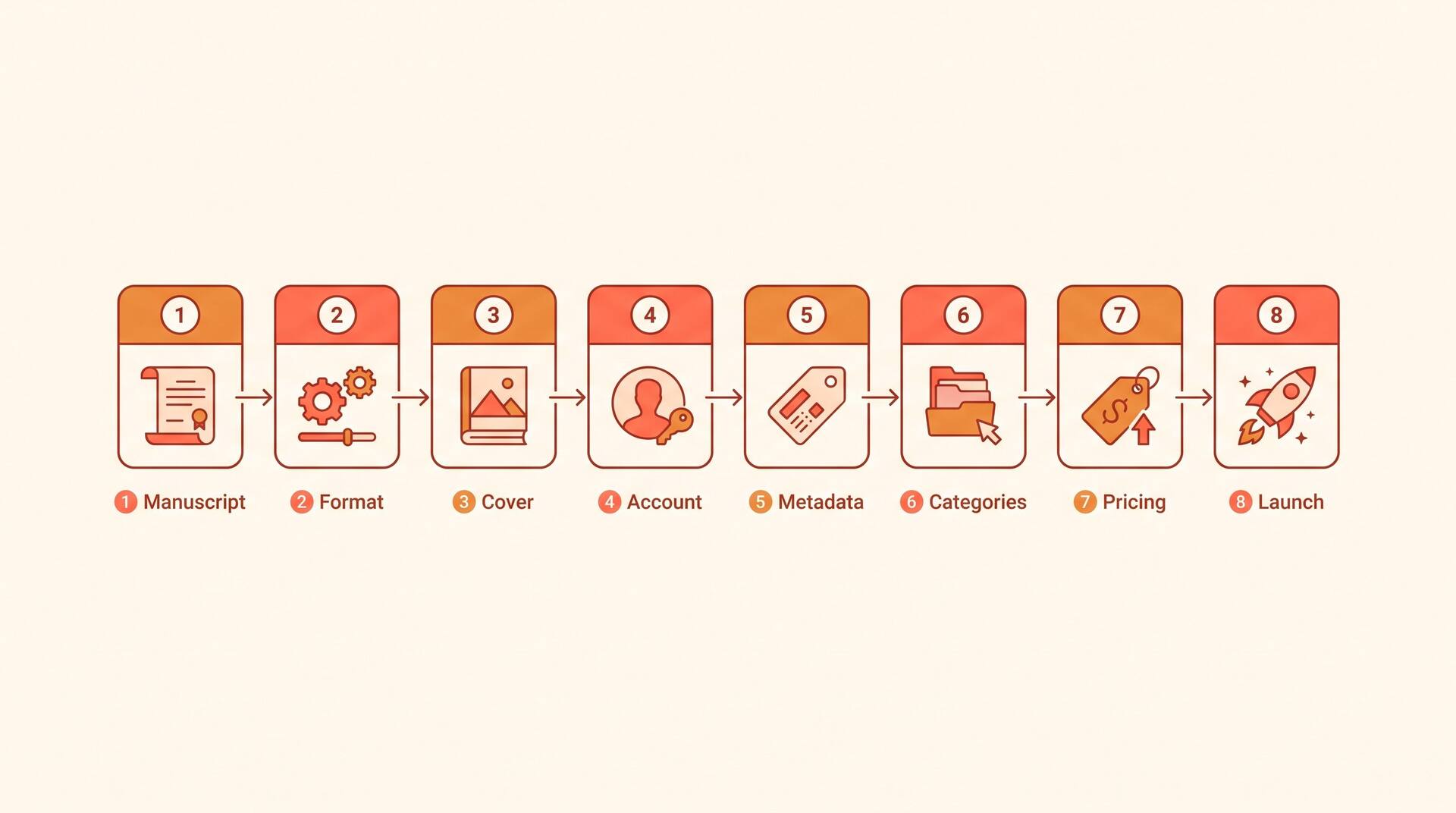
The eight steps, at a glance
Publishing on Amazon is genuinely free at the point of upload. There is no fee to create a listing, and Amazon only takes a cut when a copy sells. What actually decides whether your book sinks or sells is the work you do before you ever touch the dashboard: a clean manuscript, a cover that survives a thumbnail, and metadata that helps the right reader find you. Below is the whole process in order, with the specs and numbers that trip up first-time authors.
The reality check before you start
Four numbers worth internalising before you spend a weekend on this. They change how you price, format, and promote.
$0
to publish
Creating a Kindle or paperback listing on KDP costs nothing. Amazon earns only when a reader buys.
Up to 72h
review time
Most titles clear KDP's review and go live within 24 to 72 hours of hitting publish.
70% vs 35%
royalty bands
Your ebook royalty rate is decided almost entirely by your list price, not by negotiation.
7 + 3
discovery levers
You get seven backend keyword slots and up to three browse categories. They are how readers find you.
Step 1: Prepare your manuscript
A publishable manuscript is more than a finished draft. It needs structural editing (does the argument or story hold together?), line editing, and a proofread for the typos that make a book feel amateur. Build front matter (title page, copyright page, dedication) and back matter (about the author, a call to review). If you are still drafting, AIWriteBook can take you from a one-line idea to a structured outline and full chapters, so you arrive at this step with a complete book rather than a blank page.
Read the whole thing aloud once. Your ear catches clumsy sentences and repeated words that your eye skims over.
Step 2: Format for Kindle and print
Kindle and paperback want different files. For the ebook, a reflowable file (DOCX, EPUB, or KDP's Kindle Create) lets text resize on any device; use real heading styles and page breaks rather than manual spacing. For paperback, you upload a print-ready PDF sized to a trim size such as 5x8 or 6x9 inches, with 0.125-inch bleed if images run to the edge and generous inside margins for the gutter. AIWriteBook exports a clean, formatted file you can hand straight to KDP, which skips the most error-prone part of the process.
Always preview in KDP's online previewer before publishing. It shows exactly how each page renders on phones, tablets, and e-readers.
Step 3: Design a cover that meets Amazon's specs
Your cover does most of the selling, and it has to work as a tiny thumbnail in search results, not just full-size. For Kindle, aim for a 1.6:1 height-to-width ratio (around 2,560 x 1,600 pixels) as a high-quality JPEG or TIFF. Paperback covers are a single wrap-around PDF (back, spine, front) where the spine width depends on your page count and paper, so generate it after the interior is final. AIWriteBook can generate a cover for your title, and you can also use KDP's free Cover Creator if you are starting from nothing.
Shrink your cover to the size of a postage stamp. If the title is still legible and the genre still reads instantly, it works.
Step 4: Set up your KDP account
Go to kdp.amazon.com and sign in with your Amazon account. Before you can be paid you must complete two things: tax information (a short interview that issues the right form for your country) and bank details for royalty deposits. Skip these and your book can still go live, but Amazon will hold your earnings. Once the account is ready, click 'Create' and choose Kindle eBook or Paperback to open a new title.
Non-US authors should complete the tax interview carefully. Claiming your country's treaty rate can cut withholding from 30% to as low as 0%.
Don't have the manuscript yet?
AIWriteBook turns a single idea into a structured outline and full chapters, generates a cover, and exports a KDP-ready file. Write the book, then walk through the steps above.
Step 5: Write metadata and keywords
Metadata is everything Amazon and readers see before the book itself: title, subtitle, series name, author, and the all-important description. Write the description as sales copy, not a summary; lead with a hook and a clear promise. You also get seven keyword fields. Treat them as search phrases a real reader would type ('cozy mystery small town', not single words), and never repeat words already in your title, since that wastes the slot.
Keyword research beats guessing. Type a phrase into the Amazon search bar and note the autocomplete suggestions, those are real searches with real demand.
Step 6: Choose your categories
Categories decide which bestseller lists you can chart in, and Amazon now lets you pick up to three. Specific beats broad: it is far easier to rank #1 in a narrow sub-category than to crack a crowded top-level one, and an 'Amazon #1 Best Seller' badge in any category lifts conversion. Pick categories that genuinely match your book; mismatched categories get books removed and frustrate readers.
Browse Amazon's left-hand category tree to find low-competition niches where a handful of daily sales can earn you the bestseller badge.
Step 7: Set pricing and choose your royalty
For Kindle, your list price decides your royalty rate. Priced between $2.99 and $9.99 you earn the 70% rate (minus a small per-megabyte delivery fee); outside that band you drop to 35%. So a $4.99 ebook earns you roughly $3.40 a copy, while a $0.99 ebook earns only about $0.35. Most fiction and nonfiction settle in the $2.99 to $6.99 range. You can also enrol in KDP Select for 90 days of exclusivity in exchange for Kindle Unlimited page-read income and promotional tools.
Don't reflexively price low. At 35% a $0.99 book needs ten sales to match one $4.99 sale at 70%. Cheap is rarely the profitable choice.
Step 8: Launch day and ads
Hit publish and your book enters review, usually live within 72 hours. The first week matters most: Amazon's algorithm rewards early sales velocity with better visibility. Line up reviews from your network, announce to any email list, and consider a launch discount. Once you have a few reviews, Amazon Advertising lets you bid on keywords and competing titles to keep sales flowing after the launch spike fades.
Start ads small and patient. Run them for at least a week before judging, and track ACOS (ad cost over sales) rather than clicks.
Pricing and royalty math, worked out
The single biggest pricing mistake new authors make is going too cheap. Here is what the two Kindle royalty bands actually pay on the same book.
| List price | Royalty rate | You earn per sale |
|---|---|---|
| $0.99 | 35% only | ~$0.35 |
| $2.99 | 70% | ~$2.05 |
| $4.99 | 70% | ~$3.40 |
| $12.99 | 35% only | ~$4.55 |
The 70% band runs from $2.99 to $9.99 and carries a small per-megabyte delivery fee, which is why a text-only book nets slightly more than an image-heavy one at the same price. Below $2.99 or above $9.99 you are capped at 35%, which is why a $0.99 ebook is almost never the smart play.
Pre-publish checklist
Run through this before you press publish. Skipping any one of these is the most common reason a launch underperforms.
Five mistakes that sink first books
A cover that only works full-size
Readers see your cover as a thumbnail first. If the title is unreadable and the genre is unclear at that size, you lose the click before anyone reads a word.
Treating the description as a synopsis
The product description is your most important piece of sales copy. Spoiling the plot or listing chapter contents kills conversion. Hook, promise, proof.
Wasting keyword slots
Single generic words and terms already in your title burn slots that should hold the multi-word phrases real readers actually search for.
Publishing into silence
Uploading with no launch plan means no early sales, and no early velocity means Amazon's algorithm never surfaces the book. Line up your first readers before you publish.
Pricing on instinct
Defaulting to $0.99 to seem accessible drops you to 35% and undervalues the work. Price inside the 70% band unless you have a strategic reason not to.
Frequently asked questions
The questions first-time authors ask most before publishing on Amazon.
Nothing to create the listing. KDP is free to use, and Amazon takes its cut only when a copy sells. Your real costs are optional and come before upload: editing, cover design, and proofreading if you outsource them.
After you hit publish your book goes into review, which usually takes up to 72 hours. Many titles are live within 24 hours. Updates to an already-published book are reviewed the same way.
Not for a Kindle ebook, which gets a free Amazon identifier called an ASIN. For paperback, Amazon supplies a free ISBN if you want one. You only need to buy your own ISBN if you plan to distribute the same edition through other retailers under your own imprint.
Yes. KDP allows AI-assisted and AI-generated books, but during publishing it asks you to declare whether the content is AI-generated. You stay responsible for the book meeting Amazon's content and quality guidelines, so edit and proofread before you upload.
It varies enormously. Earnings depend on price, royalty band, sales volume, and whether you run ads. A $4.99 Kindle book at the 70% rate nets roughly $3.40 a copy. Most books earn modestly; the ones that do well combine a strong niche, a professional cover, and consistent promotion.
You can do both from the same KDP title, and many authors do. Start with the Kindle ebook if you want to be live fastest, then add the paperback once your interior PDF and wrap-around cover are ready. Offering both widens your audience and makes the ebook look like better value.
From manuscript to live listing
Publishing on Amazon is not the hard part; the dashboard takes an afternoon once your files are ready. The hard part is everything upstream: a manuscript worth reading, a cover that earns the click, and metadata that puts the book in front of the right reader. Get those right and KDP simply does what it is good at, which is putting your book in the world's biggest bookstore.
Treat your first book as the start of a catalogue, not a one-off. Each title you add compounds your visibility and teaches you what your readers respond to.
For the wider picture, see our full guide to publishing and growing on Amazon KDP.