

What's inside
Search 'how to publish a book' and you'll find quotes suggesting it costs anywhere from $500 to $5,000 to get a book out. Almost all of that is optional. Kindle Direct Publishing — Amazon's self-publishing platform — is free to join and free to use. You upload a manuscript and a cover, set a price, and Amazon prints paperbacks on demand only when someone orders one, so you never buy stock. The paid services around it are real and sometimes worth it, but not one of them is required to hit publish. Below, every cost you might be quoted, with the free alternative next to it.
Why publishing on Amazon is genuinely free
Before optimizing the free route, it helps to be precise about what KDP actually charges. The short answer is: nothing to publish. Here is what that means in practice.
No fee to open an account
A KDP account is free. You need a valid tax form and a bank account to receive royalties, but there is no signup, subscription, or listing fee — ever.
No cost to upload or list
Uploading a manuscript file and a cover, filling in your title, description, and keywords, and pushing the book live costs zero. You can also unpublish and re-upload as many times as you want.
Print-on-demand, no inventory
Paperbacks and hardcovers are printed only after a customer buys one. You never order a box of books, never pay for storage, and never risk unsold stock in your garage.
A free ISBN if you want one
Amazon assigns a free ISBN to your paperback and a free ASIN to your ebook. You are not required to buy your own ISBN to publish.
The one thing that isn't free — and it isn't a fee
Print-on-demand paperbacks have a printing cost, which Amazon subtracts from each sale, not from you upfront. A typical 300-page black-and-white paperback costs Amazon roughly $4.50 to print in the US. You never pay it — it just comes out of the sale price before your royalty, so you keep less on print than on ebooks. Publishing stays free; you only 'pay' when a book actually sells, out of the buyer's money.
Free vs paid: the interactive cost breakdown
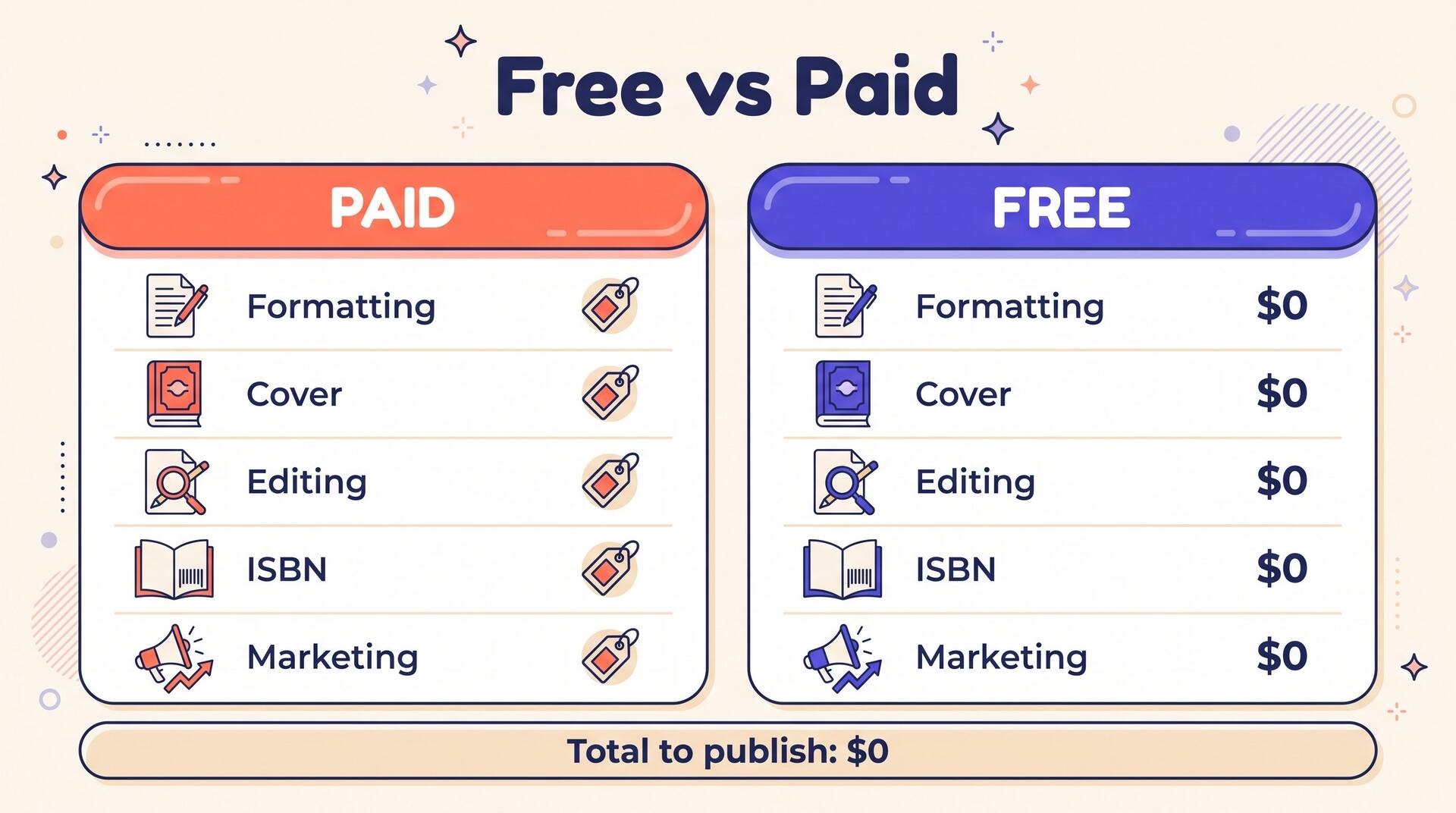
Here is every service authors are commonly told to buy, with a rough market price. Flip any line to 'Paid' to see what a fully outsourced book would run — or leave everything on 'Free' and watch the total stay at zero. Every one of these has a legitimate no-cost route covered later in this guide.
ISBN
Free — use Amazon's assigned ISBN for print and the automatic ASIN for your ebook.
Cover design
Free — KDP Cover Creator, an AI cover tool, or a Canva template.
Interior formatting
Free — Kindle Create, Reedsy's free editor, or a clean Word/Docs template.
Developmental & copy editing
Free — structured self-editing passes, beta readers, and a critique swap.
Book description / blurb
Free — write it yourself or draft it with a free blurb tool.
Proofreading
Free — a fresh read-aloud pass plus a free grammar checker.
Your upfront cost to publish
$0
Fully outsourced, this would cost about $1,724
Prices are typical US market estimates for a full-length book and vary widely by provider and word count. The point isn't the exact figures — it's that the free column publishes an identical book to Amazon.
Curious what you'd actually earn once it's live? Estimate it with the free royalty calculator
Free formatting and interior tools
Formatting is where new authors panic and reach for their wallet. You don't need to. Amazon and a few free tools produce files that pass KDP's review and look professional on every device.
Kindle Create (Amazon's own, free)
Amazon's free desktop app imports a Word document and turns it into a properly styled ebook — chapter breaks, a working table of contents, drop caps, and a live preview across Kindle devices. It exports the file KDP wants with zero guesswork.
Reedsy's free book editor
A browser-based writing tool that exports clean, professional EPUB and print-ready PDF files for free. It applies consistent typography automatically, so your paperback interior looks typeset rather than like a printed Word doc.
A clean Word or Google Docs template
For a straightforward text-only book, a properly styled document — one heading style per chapter, no manual page breaks mid-paragraph, mirrored margins for print — uploads to KDP directly. Amazon's free Previewer then shows exactly how each page will render before you publish.
The one formatting rule that saves reprints
Always run your file through KDP's free online Previewer before publishing, and check the first page of every chapter plus any image-heavy pages. Ninety percent of formatting complaints come from skipping this two-minute step — orphaned headings, blank pages, and cut-off images all show up here while they're still free to fix.
Free cover options (and their limits)
A cover is the single biggest driver of clicks, so this is the line item most worth caring about. You can get a free cover three ways — but each has a ceiling you should know before you rely on it.
KDP Cover Creator
Amazon's built-in tool wraps a template around your title and a stock image at no cost. It's fast and always fits the spine math perfectly. The limit: templates are recognizable, so your book can look like every other Cover Creator book.
AI cover generation
AI tools produce genre-appropriate, original artwork from a prompt in seconds. Great for a distinctive image on a zero budget — just make sure the final file meets KDP's size and DPI requirements and that any typography is crisp.
A Canva template
Canva's free tier has book-cover templates you can restyle. It gives more control than Cover Creator, but you'll need to build a full print wrap (front, spine, back) yourself using Amazon's free cover template for your exact page count.
Free is fine — generic is not
The risk with every free cover route is looking amateur or interchangeable. Study the top 10 covers in your exact category first, match their conventions (fonts, mood, contrast that reads at thumbnail size), and treat the free tool as a way to execute a deliberate design — not a substitute for one. A cover that ignores its genre's visual language costs you sales no matter how free it was.
Want an original, genre-aware cover without opening a design app? Generate one with the free AI book cover tool
Free routes to a well-edited manuscript
Editing is the service most worth paying for and the one most authors can't afford on book one. A free process won't fully replace a seasoned editor, but a disciplined one gets you remarkably close.
Structured self-editing passes
Edit in separate layers, not all at once: first structure (does every chapter earn its place?), then line-level clarity, then a final proofread. Reading the whole manuscript aloud — or letting your device read it to you — surfaces clunky sentences and repeated words that silent reading skips right over.
Beta readers and a critique swap
Five honest beta readers from a genre community or a writing forum will flag confusing plot points, pacing dips, and characters that fall flat — the exact issues a developmental editor charges hundreds for. Swapping full-manuscript critiques with another author costs nothing but your time.
Free grammar and readability tools
A free grammar checker catches typos, comma errors, and accidental repetition at scale. Use it as a safety net on the final pass, not as a stylist — accept the fixes that are clearly right and ignore suggestions that flatten your voice.
Be honest about the ceiling
Free editing has a real limit: you cannot fully catch your own blind spots, and reviews are unforgiving about sloppy prose. If you only spend money on one thing, a single proofread of a manuscript you've already self-edited hard is the highest-leverage dollar in publishing. Everything else in this guide can stay free.
The free ISBN strategy
ISBNs confuse first-time authors because someone always tells you to buy one. For publishing on Amazon, you almost never need to.
Use Amazon's free identifier
KDP assigns your paperback a free ISBN and your ebook a free ASIN at publish time. Both make your book fully sellable and searchable on Amazon. For an author whose goal is a book live on Amazon, this is all you need — cost: zero.
When a paid ISBN makes sense
Your own ISBN (bought from your country's official agency) lists you as the publisher of record and lets you use the same identifier across other stores and print vendors. It matters if you plan to go wide or sell to bookstores — but it's a strategic upgrade, never a requirement to publish free on Amazon.
If you're weighing whether to buy your own, the trade-offs are worth understanding before you decide — here's the full breakdown of getting an ISBN for a self-published book.
Amazon's free publishing flow, step by step
Once your manuscript and cover are ready, the publishing itself is a short, free process inside your KDP dashboard. Here's the whole thing.
Create your free KDP account
Sign up at kdp.amazon.com, add your tax and bank details so Amazon can pay you, and you're in. No card required, no fee.
Start a new title and enter details
Choose ebook or paperback, then enter your title, subtitle, author name, description, keywords, and categories. This metadata is free to set and free to change later — it's also how readers find you, so it's worth doing carefully.
Upload your manuscript and cover
Upload the file you formatted for free, then your cover. KDP's Previewer renders every page so you can confirm it looks right before anyone sees it.
Set your price and royalty
Pick your list price and territories. For ebooks priced $2.99–$9.99 you earn the 70% royalty tier; outside it, 35%. Setting the price costs nothing and you can adjust it anytime.
Submit for Amazon's free review
Hit publish and Amazon reviews the book automatically — usually within 72 hours. Once approved it goes live, gets its free ISBN or ASIN, and starts appearing in search. That review is included at no cost.
Decide what happens after launch (optional, and the only paid part)
Steps one to five cost nothing, but nothing about the listing pushes itself either. When authors do decide to spend, the usual first move is a Sponsored Products campaign, which puts the book in front of shoppers already searching your category. Even a couple of dollars a day tells you quickly whether the cover and description are doing their job. Skip it and the book still sells; it just leans entirely on the free promotion below.
Publishing itself costs nothing from start to finish. For a deeper walkthrough of each screen and the choices inside it, see the complete guide to publishing a book on Amazon.
Free ways to find your first readers
Publishing free is only half the goal — a book nobody sees earns nothing. Fortunately, the highest-leverage early marketing on Amazon is also free.
KDP Select free promo days
Enrolling an ebook in KDP Select unlocks up to five free-download days per 90-day term. A well-timed free run can pile up downloads, reviews, and a ranking boost that keeps selling after the price returns.
A free Author Central page
Amazon Author Central lets you build a free author profile with a bio, photo, and every book linked together. It's free credibility that turns a one-book browser into someone who sees your whole catalog.
Keywords and categories
Your seven keyword slots and category choices are free and they decide who ever finds your book. Getting them right — targeting phrases real readers search — outperforms most paid ads for a debut author.
Your own audience
A short email to friends and any following you have, a post in the right genre community, and a simple launch to whoever already knows you costs nothing and reliably produces the first reviews every new book needs to gain traction.
Not sure which keywords readers actually type? Start there — try the free KDP keyword research tool
Where the real bottleneck is
Notice what's missing from every cost above: writing the book. Publishing is free and fast; producing a finished manuscript worth publishing is the part that stops most people. AIWriteBook turns an idea into a full structured draft — outline and chapters you then edit into your own voice — so the one genuinely hard, time-consuming step gets dramatically shorter. Your first book is on us, which keeps the whole project at zero upfront cost.
Frequently asked questions
Free to publish, on purpose
Publishing a book on Amazon costs nothing, and now you know that every service you're told you must buy has a legitimate free route: Kindle Create for formatting, Cover Creator or AI for the cover, Amazon's free ISBN, structured self-editing plus beta readers, and the free 72-hour review that puts you on the world's largest bookstore. The paid options are real and sometimes worth it — but they're upgrades, never gates.
Publish free first, learn what sells, then reinvest earnings into the one or two things that clearly move the needle. Line up your whole plan against the full Amazon KDP guide, and put the money you save into writing more books instead.