

What's on this page
Most cover uploads fail for boring reasons: the spine is too narrow, the bleed is missing, or the page count typed into the calculator doesn't match the book that was actually printed. The KDP cover calculator removes the guesswork, but only if you feed it the right four inputs. This guide walks through each one, gives you the underlying formula so you can sanity-check the result, and includes a small calculator you can play with right here on the page.
How the KDP cover calculator works
The Amazon KDP cover calculator lives inside your paperback or hardcover setup, on the cover step. It does not look at your manuscript. It takes a handful of specs you type in and returns a full-cover template sized to the exact millimetre, including the spine width and the bleed area that gets trimmed off during binding.
That means the calculator is only as accurate as the four numbers you give it. Change your interior after generating a template and every dimension shifts. Always finalize the manuscript and confirm the final page count before you size the cover.
The four inputs that decide everything
Trim size
The finished page size, like 6 x 9 in. This sets the front and back panel size and the overall height.
Page count
The number of printed pages in the final interior file. This is the single biggest driver of spine width.
Paper type
White, cream, or color. Each stock has a different thickness, so the same page count gives a different spine.
Binding
Paperback or hardcover. Hardcover adds a wrap and hinge allowance, so it uses a separate template.
Calculate your cover live
Enter your specs below to see the spine width and the full-cover dimensions you'd give a designer. These use KDP's published spine multipliers, so they match the calculator inside your account closely. Treat them as a sanity check, not a substitute for the official template.
Spine width
0.676
inches
Full cover width
12.93
inches
Full cover height
9.25
inches
You have enough pages to print text on the spine.
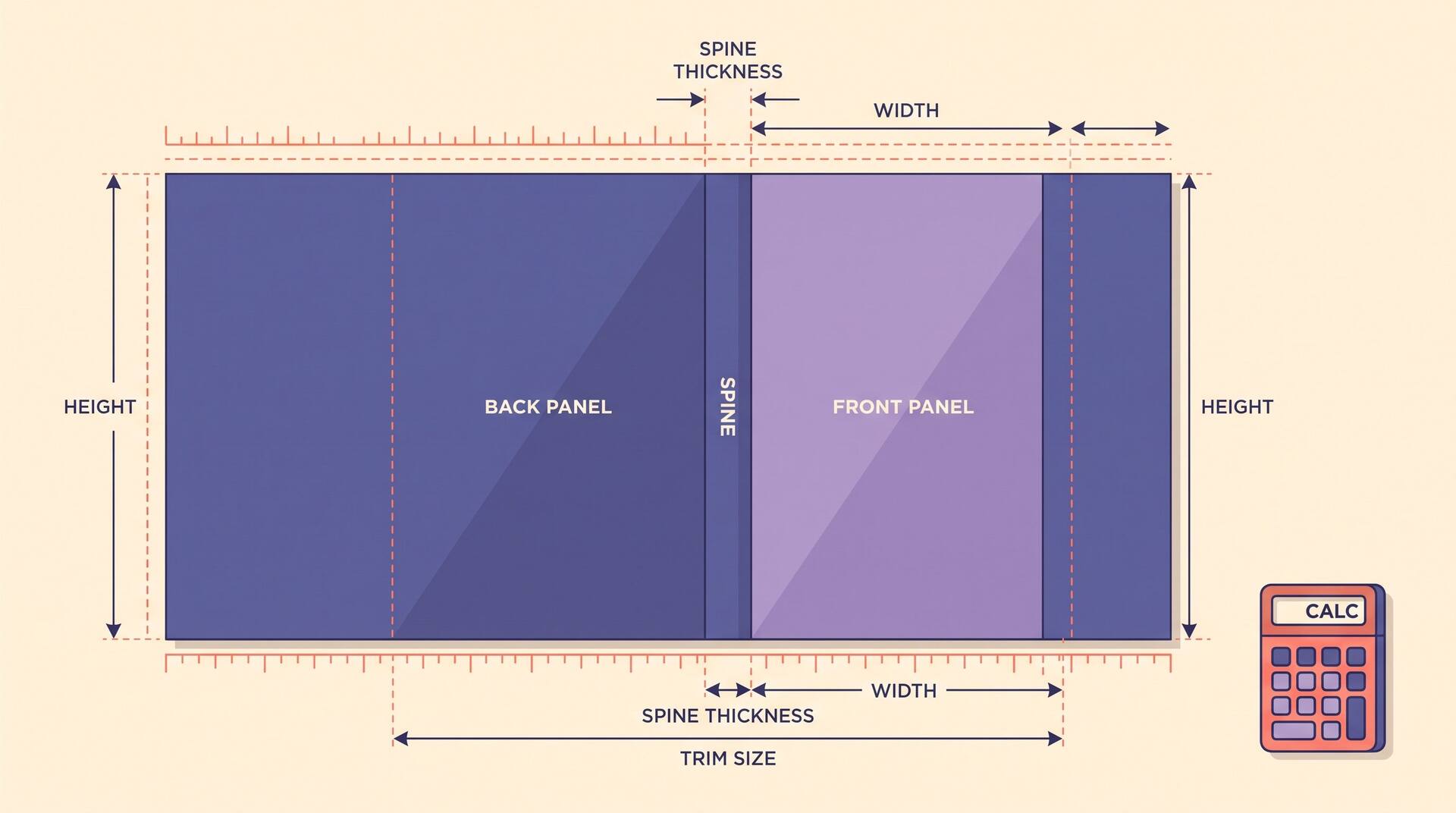
Spine = page count x paper multiplier. Full width = spine + two trim widths + 0.25 in bleed. Full height = trim height + 0.25 in bleed.
Always download the official template from KDP before final export. Printers update specs, and the in-account calculator is the source of truth.
Spine width math
Spine width is page count multiplied by the thickness of a single sheet. KDP publishes a per-page multiplier for each paper stock, so the formula is short: spine width = page count x multiplier. A 300-page book on white paper is 300 x 0.002252, which is about 0.676 in.
Cream stock is thicker than white, so a cream book always has a slightly wider spine at the same page count. That is why the calculator asks for paper type before it shows you anything.
Per-page multipliers
| Paper type | Inches per page | 300-page spine |
|---|---|---|
| White | 0.002252 | 0.676 in |
| Cream | 0.0025 | 0.750 in |
| Standard color | 0.002252 | 0.676 in |
| Premium color | 0.002347 | 0.704 in |
Spine text needs page count
A book needs at least 79 pages before KDP lets you print a title on the spine, and 100-plus is where it starts to look clean. On a thin book, keep the spine a solid color with no text, because the slightest binding shift will smear type onto the front or back.
Bleed and trim, explained
Bleed is the extra margin of artwork that extends past the finished edge so that when the printer trims the cover, no white slivers appear. Trim is where the blade actually cuts. The gap between them is your safety net.
On a KDP cover you add 0.125 in of bleed to every outer edge: top, bottom, and the two outside vertical edges of the back and front panels. You do not add bleed around the spine, since the spine sits in the middle of the wrap.
0.125 in bleed
Extend background art 0.125 in past every outer edge. This adds 0.25 in to both the total width and the total height.
0.125 in safe margin
Keep text and logos at least 0.125 in inside the trim line. Anything closer risks being cut off or crowding the edge.
Match the trim size
Your front-panel size must equal the trim size you chose for the interior. A 6 x 9 book needs 6 x 9 panels, not 5.5 x 8.5.
Quick check: full cover height always equals trim height plus 0.25 in. If your file height isn't trim plus a quarter inch, the bleed is wrong.
Lock your page count, then size the cover
Your spine width depends on a final page count. Draft and format your full interior with AIWriteBook — every export applies KDP-ready interior layout automatically — then confirm the page count and only then generate the template, so the math holds.
Downloading the template
The calculator's real output is a downloadable template: a PNG or PDF with the spine, bleed, and safe zones drawn as guides. Design inside those guides and you cannot get the proportions wrong.
Open the cover calculator
Inside your paperback or hardcover, go to the cover step and choose to upload your own cover. The template tool sits right there.
Enter the four inputs
Trim size, page count, paper type, and binding. Double-check the page count against your final interior file.
Download the guide
Save the template. The pink and blue guides mark the spine and the trim and bleed lines. Keep them on a separate layer.
Design, flatten, upload one PDF
Build your art on the template, hide the guide layer, and export a single flattened PDF for the whole wrap. KDP wants one file, not separate front and back images.
Export at 300 DPI in CMYK if your tool supports it. Print uses CMYK ink, so a bright RGB cover can look duller in your hands than on screen.
Six errors that get covers rejected
Almost every cover rejection traces back to one of these. Tap each to see the fix.
Adding a page, changing trim, or swapping front matter changes the page count and therefore the spine.
Fix: Regenerate the template after the interior is locked, never before.
Hardcover is different
Hardcover covers are not just bigger paperbacks. The case wraps around the boards, so the calculator adds a wrap allowance on every edge plus a hinge gap near the spine. The spine itself sits over thicker board, so the geometry changes.
Wrap allowance
Hardcover art has to extend well past the trim to fold around the board edges, far more than the 0.125 in bleed on a paperback.
Hinge area
Keep important art clear of the hinge gap beside the spine, where the case bends when the book opens.
Its own template
Hardcover comes in a limited set of trim sizes and its own page-count minimums, so always pull a fresh hardcover template.
Never reuse a paperback template for a hardcover edition. The wrap and hinge change the dimensions, and a paperback file will be rejected for hardcover.
Tools that handle the math for you
If you'd rather not redraw guides by hand, these free tools cover the parts around the calculator: write an AI cover prompt, generate the art, mock it up, and check the royalties your trim and page count will earn.
KDP cover calculator FAQ
What is the KDP cover calculator?
It's the tool inside your paperback or hardcover setup that takes your trim size, page count, paper type, and binding and returns a full-cover template with the spine width and bleed lines already drawn. It sizes the single flat image that wraps your back, spine, and front.
How do I calculate the spine width myself?
Multiply your page count by the per-page multiplier for your paper. White and standard color are 0.002252 in per page, cream is 0.0025 in, and premium color is 0.002347 in. A 250-page white-paper book is 250 x 0.002252, about 0.563 in.
What full cover size does a 6 x 9 book need?
Take 6 in for the front, 6 in for the back, add your spine width, and add 0.25 in total bleed for a full width. The height is 9 in plus 0.25 in of bleed, so 9.25 in. For a 300-page white book the full width is about 12.93 in.
How much bleed does a KDP cover need?
0.125 in on every outer edge, which adds 0.25 in to both the total width and the total height. There is no bleed around the spine because it sits in the middle of the wrap.
Why won't KDP let me put text on my spine?
Your book has fewer than 79 pages. Below that the spine is too narrow to hold type reliably, so KDP blocks spine text. Leave the spine a flat color until your page count is higher.
Can I use the same template for paperback and hardcover?
No. Hardcover adds a wrap allowance and a hinge gap that paperbacks don't have, and it offers different trim sizes. Generate a separate hardcover template every time.
Measure once, upload once
The KDP cover calculator is not complicated once you see what it's doing: it turns four inputs into one correctly sized wrap. The failures all come from feeding it the wrong page count or skipping bleed, both of which you can now catch before you ever hit upload.
Lock your interior, confirm the page count, generate the template, and design inside the guides. For the rest of the publishing checklist, from metadata to categories, see our complete Amazon KDP guide.