

In this guide
What public domain means
A work is in the public domain when its copyright has expired or never existed. Anyone may then copy, adapt, translate and sell it without permission or payment. In the United States, every work published in 1930 or earlier is in the public domain as of January 1, 2026, and each new year adds another year of works.
Public domain status is country-specific. Many countries use the author's life plus 70 years, so a book can be free in the US and still protected in the UK or Germany, or the other way around. KDP asks you to confirm you hold rights in every territory you sell in, so set your territories to match. For how copyright works on your own books, see how to copyright a book.
Check a US publication year
Enter the year a work was first published in the United States for a quick first read on its status.
Public domain in the US. Works published in 1930 or earlier have entered the public domain as of 2026.
Translations, illustrations and introductions added later have their own copyright. Use the original text, or a translation that is itself in the public domain.
KDP's public domain rules
KDP's content guidelines treat public domain books differently from original work. Three rules matter most.
1
Differentiate or be blocked
If a free version of the same work is already sold on Amazon, KDP accepts your edition only if it is differentiated, for example annotated, translated or illustrated, and the title says so.
2
35% royalty only
Public domain ebooks are only eligible for the 35% royalty option, not 70%. Our explanation of KDP royalties shows how that changes your price.
3
No KDP Select
Public domain content cannot be enrolled in KDP Select, so it is not in Kindle Unlimited. That frees you to sell the same edition on every other store.
What counts as added value
KDP names the kinds of differentiation it accepts. Each one also needs a label in the title, so readers know what they are buying.
Accepted
- A new translation, labelled "(Translated)" with the translator named
- Annotations: a unique introduction, notes, a study guide or critical essays, labelled "(Annotated)"
- At least ten unique illustrations that relate to the text, labelled "(Illustrated)"
- A collection organized around a clear theme, with new editorial material
Not enough
- A cover change or new formatting on the same text
- A short generic preface that could sit in front of any book
- Stock illustrations or images unrelated to the story
- Bundling several free texts with no new work
The workflow, step by step
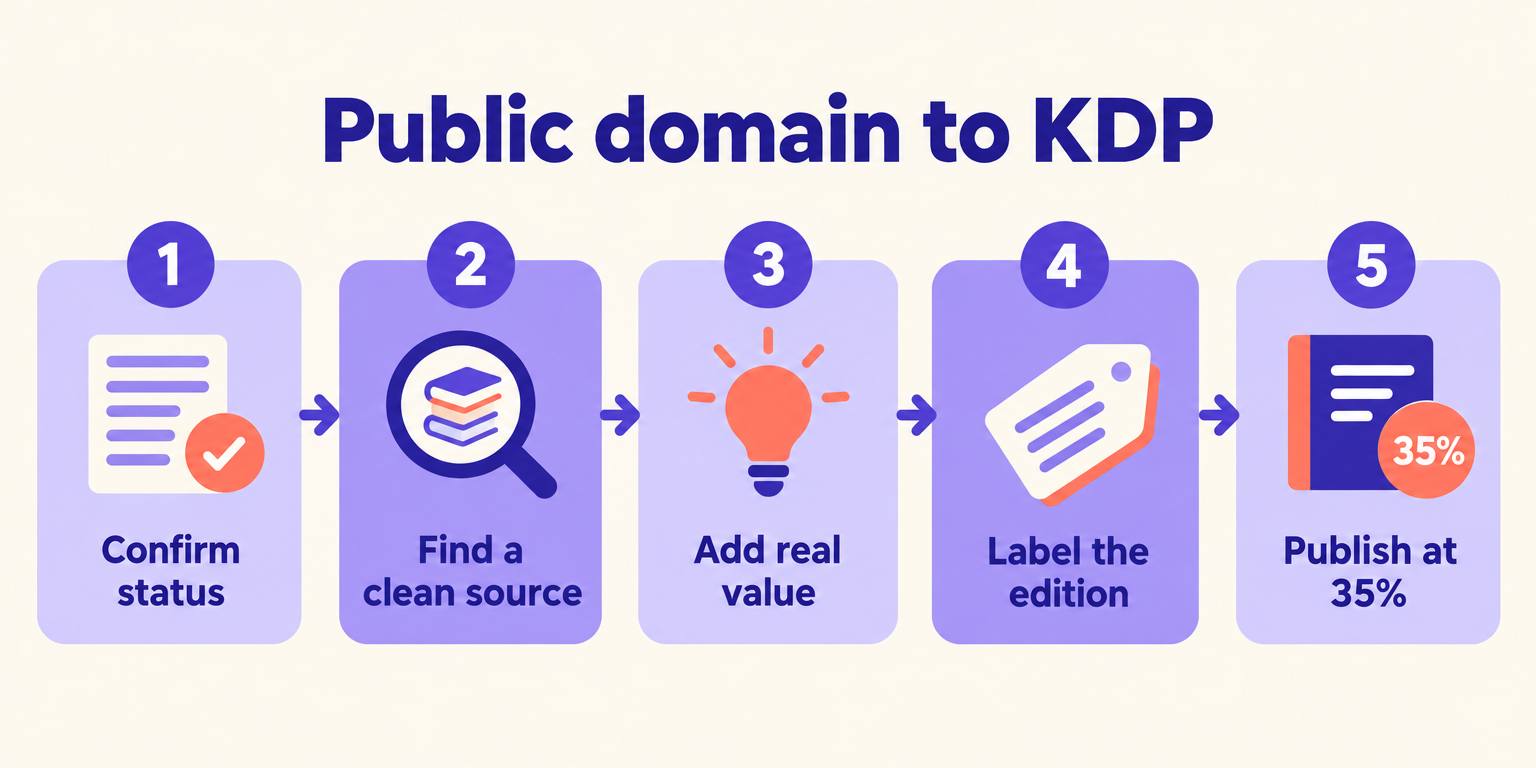
- 1
Confirm the status
Check the publication year and, for anything after 1930, renewal records. Confirm the status in each territory you plan to sell in.
- 2
Find a clean source
Use a reliable scan or transcription of the original edition. If you use a Project Gutenberg file, remove its license header and trademark, as its terms require for commercial editions.
- 3
Add real value
Write an introduction and notes, commission or create illustrations, or translate the work into a new language.
- 4
Label the edition
Put the differentiator in the title, list the translator, annotator or illustrator as a contributor, and add a copyright page that states what is new.
- 5
Publish at 35%
Choose the 35% royalty, set territories where the work is public domain, and write a description that says exactly what your edition adds.
Where AIWriteBook helps
Translation is the most valuable differentiator, because a new-language edition reaches readers who have no free alternative. AIWriteBook's book translation translates a full manuscript into 30+ languages, and you can import the source text as a manuscript first. To test a chapter, use the free book translator.
A new cover matters too, because it is the first thing that separates your edition from the free copies. The AI book covers feature designs one from your title and description, and the blurb generator drafts a description that spells out what your edition adds. Review every translation and note yourself before publishing; the added value is yours to stand behind.
Turn a classic into a new edition
Import a public domain text, translate it into another language, design a new cover, then export print and ebook files for KDP.
Common mistakes
Uploading the free text as is
KDP blocks undifferentiated public domain copies, and repeated violations can affect your account.
Copying a modern edition
A 2005 translation of a 19th-century novel is protected by the translator's copyright, as are modern introductions and notes.
Ignoring other countries
A book that is free in the US may still be protected in Europe. Limit territories accordingly.
Using trademarked names
Characters can be public domain while later versions, logos and series names are still trademarks. Stick to the original text.
Public domain FAQ
Yes, if your edition is differentiated from free versions with a translation, annotations or illustrations, and the title says so. Undifferentiated copies are blocked.
Only the 35% royalty option is available for public domain content. It is also not eligible for KDP Select or Kindle Unlimited.
In the United States, every work published in 1930 or earlier, plus later works that lost copyright for lack of notice or renewal. Other countries usually use the author's life plus 70 years.
You own the copyright in what you added, such as your translation, notes or illustrations. The original text stays in the public domain and anyone else can use it.
Add something only your edition has
Public domain publishing on KDP works when your edition gives readers something the free copy does not: their language, a guide through the text, or pictures that bring it alive. Do that, label it honestly and price it for the 35% royalty.
Learn everything else about publishing on Amazon in our Amazon KDP guide.