

That process still makes sense for demanding production work. For authors, it was simply out of reach. A novelist who wants to see the armour her knight wears, the ship his crew sails or the creature that guards the gate rarely has the budget to commission a 3D artist, let alone the weeks to learn the software.
AI 3D generation is beginning to close that gap. This guide explains where Tripo fits, the two workflows that matter most for writers, and where human judgment still has to step in.
Where Tripo Fits
Tripo is an AI-powered platform that turns text descriptions, single images or multi-view references into 3D models. Instead of starting with an empty viewport, you start with what you already have: a paragraph from your character notes, a sketch, a piece of commissioned concept art or a photo of a real object.
It does not remove every stage of 3D production. It changes where the work begins. The first result can serve as a visual reference while you draft, a prototype for a cover scene or a base asset that an artist refines later.
The practical benefit is speed at the earliest and most uncertain stage. You can compare shapes, styles and proportions in minutes, and keep writing instead of waiting on a commission to see whether an idea works.
Where Authors Can Use AI-Generated 3D
The value of a fast 3D model depends on what you do with it after it is created. These are the uses that make the most sense for writers.
Characters and creatures you can walk around
Describing a character consistently across 90,000 words is easier when you can turn them around on screen. A model shows how a costume layers, where a scar sits and how big a creature really is next to a person. Pair it with your character development notes and continuity mistakes, like a sword that changes hands between chapters, become easier to spot.
Settings, props and scene planning
Fantasy and science fiction writers can block out a throne room, a market stall or a ship deck and test sightlines before writing a fight or a chase. A model that is not ready for any final use is still useful for checking what a character could see from a window or how long a corridor feels. It also fits neatly into a worldbuilding process where every location has rules.
Cover concepts and promotional art
A posed 3D character gives you control over angle and lighting when you test cover ideas or brief a designer. You can show the designer exactly the pose you want instead of describing it. Read our guide to AI book cover generation for the rights and quality checks a cover still needs.
Book trailers and BookTok clips
A model can be rendered from several angles for a short trailer or a mood clip. That is handy when you post on video platforms but do not want to show your face. Our BookTok strategy guide covers how to turn clips like these into a posting routine.
Merch and 3D printing
Generated geometry can be a starting point for a figurine of your main character, a desk ornament for a launch giveaway or a prop for a signing table. Before printing, check that the mesh is closed, correctly scaled, thick enough and suited to the printer and material you plan to use.
Two Core Tripo Workflows
Tripo supports several production paths, but two are especially easy to understand.
Text to 3D
The text to 3D workflow starts with a written description, which makes it a natural fit for writers. The prompt can specify the subject, style, materials, structure and other visible details. For example, you might ask for a weathered knight in dented plate armour with a leather sword belt and a cloth mask.
This workflow is useful when the idea exists only in your manuscript and no reference image is available. It is also good for quick exploration, because you can revise the prompt to test another direction. Clear, concrete descriptions give more guidance than short, abstract phrases, but results still vary. Trying another result is part of the process, not a sign that the tool has failed.
Image to 3D
Image to 3D begins with a photo, a sketch or a piece of concept art. The image gives the system stronger guidance about silhouette, colour and surface detail. If the back or sides of an object are unclear, extra front, side and back references give it more information about structure and depth.
This suits authors who already have character art from an illustrator, a map sketch or approved concept pieces. The quality of the source matters: a clear subject, a readable silhouette and little visual clutter make the intended form easier to interpret. You can then preview the model, refine it and choose an export format that fits what you will do next.
The two workflows complement each other. Text is strongest for open-ended exploration, images are stronger when the look is already decided. In both cases, treat the generated model as a working result rather than a final answer.
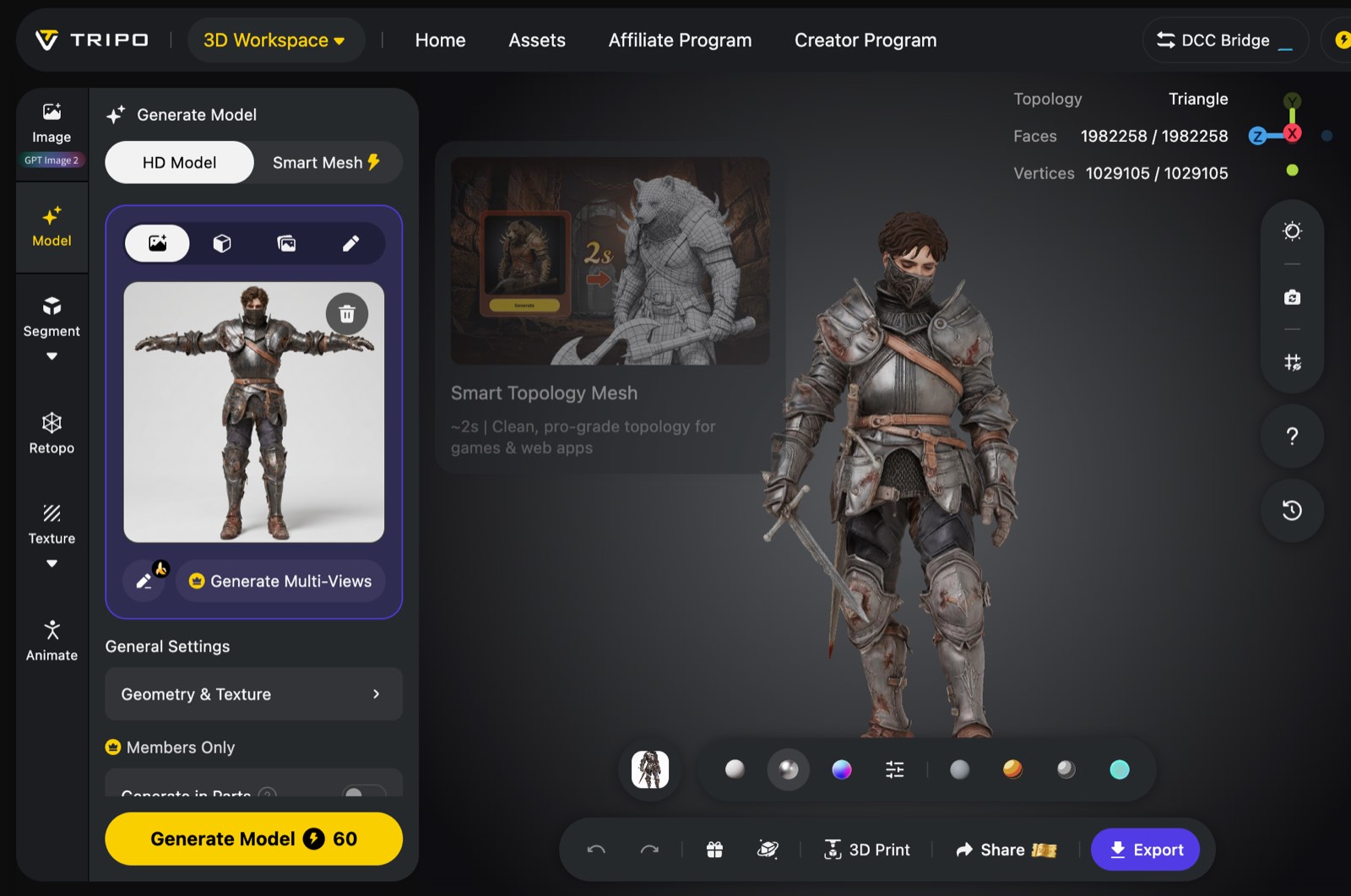
A reference image and the generated character model in the Tripo Studio workspace. Image courtesy of Tripo.
Human Judgment Still Matters
Tripo shortens the time between an idea and a visible 3D model, and it makes 3D experiments possible for people who do not want to learn a full modelling suite first. For authors working alone, that is a meaningful advantage.
AI cannot know every requirement, though. A cover designer may need a higher-detail render than a quick model provides. A printing service has to check geometry and supports. And you have to confirm that any reference images you upload, and the model you get back, can be used legally for a cover, a trailer or merchandise you sell.
The strongest workflow is collaborative: use AI to generate and explore, then use your own eye, and an artist's where it counts, to evaluate, correct and approve. The model is there to help you see your story more clearly, and the writing is still yours to do.
FAQs
Does Tripo replace a cover designer or 3D artist?
Not completely. It speeds up concepting and gives you a useful starting model, but a final cover, a polished trailer or a print-ready figurine may still need a specialist for detail, composition and technical accuracy.
Should I use text or an image?
Use text when the character or object exists only in your manuscript. Use an image when silhouette, proportions, colours or style are already decided, for example when you have commissioned character art. Multi-view references help when one image hides too much of the object.
Can I use a generated model on my book cover?
It can work as a cover concept or a reference for your designer. Before you publish it, check the platform's terms for commercial use, make sure any reference images you uploaded are yours to use, and confirm that the render is sharp enough at print size.
Can I 3D print a model of my character?
Often, yes, as a starting point. Before printing, inspect the mesh from every angle and check that it is closed, correctly scaled and thick enough for your printer and material.
What should I review before exporting a model?
Look at the model from every angle. Check the silhouette, hidden surfaces, scale, texture alignment and the requirements of wherever it is going next, whether that is a cover file, a video editor or a print service.