

ChatGPT is the cheapest, most accessible entry point into AI-assisted book writing. You can take a fuzzy idea on a Tuesday morning and have an outline, a few chapters, and a working title by the weekend. This guide walks through the exact prompts to use, in order, to do that — and is upfront about where the workflow breaks down. By the end you will know what ChatGPT can do for your book, what it cannot, and how authors stitch around the gaps.
Before you open ChatGPT
Three decisions to make on paper first. They take five minutes and will save you hours of back-and-forth later.
Pick one genre, not a blend
ChatGPT writes more confidently when the genre is concrete. "Cozy mystery set in a coastal bakery" produces tighter output than "a mystery with literary and romance elements."
Decide your target length
Novella (20–40k words), standard novel (60–80k), or nonfiction guide (30–50k). Length drives chapter count, which drives every prompt downstream.
Choose your model tier
The free tier works for outlines and editing. For long chapter drafts, the paid tier is worth it — longer context windows mean ChatGPT forgets your characters slightly later in the book.
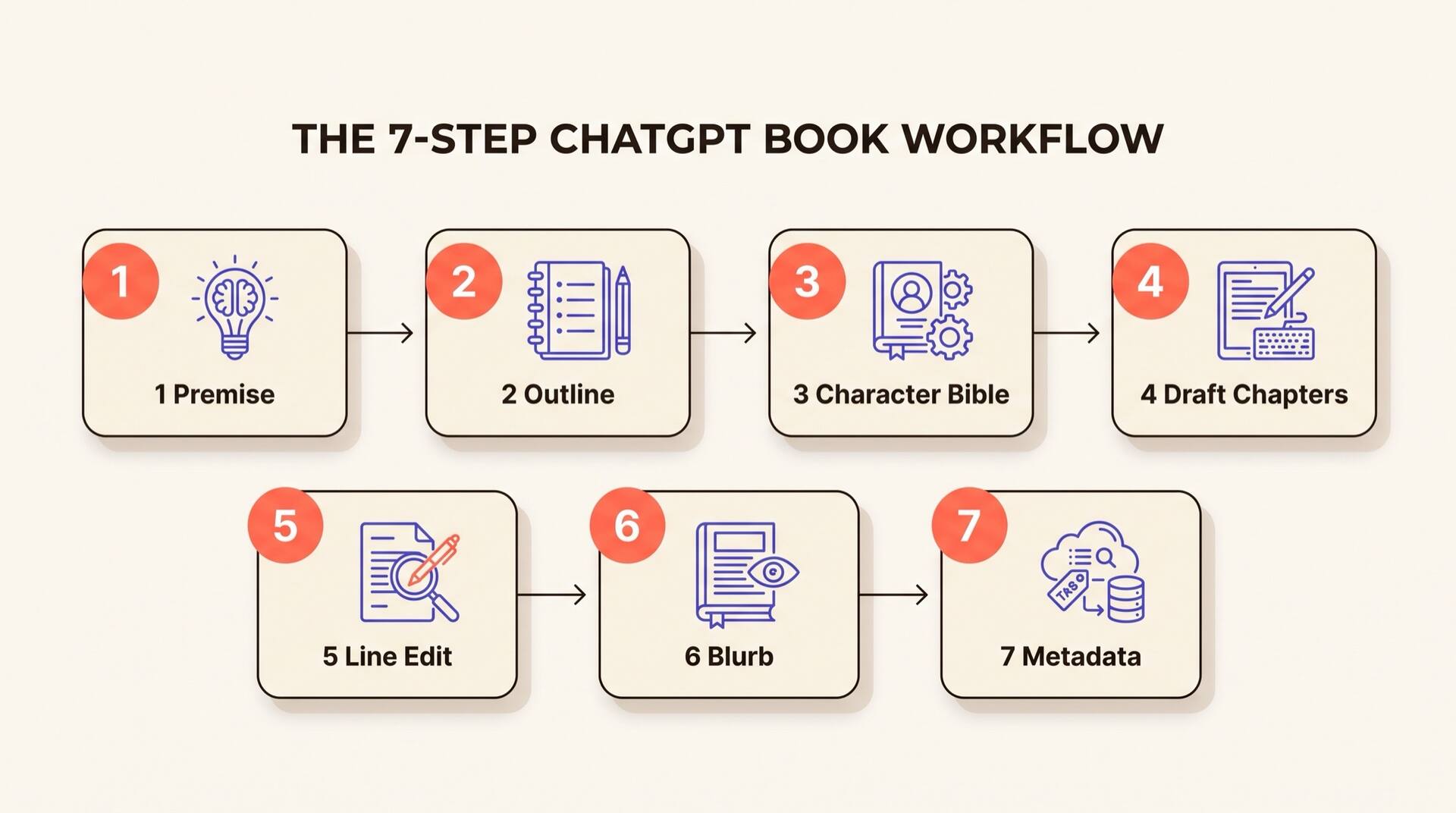
The seven-step ChatGPT book workflow
Each step has a copy-ready prompt. Replace anything in [brackets] with your own details.
Sharpen the premise
Start by forcing ChatGPT to interrogate your idea before it tries to write anything. This is the single highest-leverage prompt in the whole workflow — a vague premise produces a vague book.
I want to write a [genre] book with this rough premise: [one or two sentences]. Act as a senior developmental editor. Ask me ten sharp questions, one at a time, that will help me turn this into a publishable premise. After my answers, write a one-paragraph logline, a comp-titles list (3 books), and a one-sentence promise to the reader.
Answer one question at a time. Do not paste all ten answers in one block — ChatGPT writes better follow-ups when it sees you thinking.
Generate a chapter-by-chapter outline
Once the premise is locked in, the outline is the spine that every later prompt will reference. Get it right here and the chapters basically write themselves.
Using the locked premise above, write a chapter-by-chapter outline for a [target word count] [genre] book. For each chapter give: chapter number, working title, point-of-view character, the scene goal, the obstacle, the turn at the end, and a one-line hook into the next chapter. Aim for [20] chapters. Keep the three-act structure visible.
If the middle sags, ask: "Chapters 8–14 feel flat. Add one subplot reversal and one character secret that lands in chapter 12." Iterate until the midpoint feels load-bearing.
Build the character bible
This is the single most important document for fighting ChatGPT's memory loss. You will paste this into every new chat for the rest of the project.
From the outline above, generate a character bible. For each named character include: full name, age, physical description (3 specific details), speech pattern (one quirk), wound/backstory, goal in the book, secret, and one prop or habit that should recur. Output as a numbered list I can paste back to you later.
Save the output in a notes file. When you start a fresh chat tomorrow, your first message should be: "Here is the character bible for the book I am writing. Reference it before answering. [paste]".
Draft chapters one at a time
Do not ask ChatGPT to write the whole book in one go — it cannot, and quality collapses past ~2,000 words per response. One chapter per prompt, with the bible and outline pasted in.
Below is my character bible and full outline. Write Chapter [N], titled [title], in [POV character]'s POV, ~[2500] words. Hit the scene goal, obstacle, and end-of-chapter turn from the outline. Match the tone of [comp title]. Use vivid sensory detail. Show, do not tell. End with the hook from the outline.

CHARACTER BIBLE: [paste]
FULL OUTLINE: [paste]
Generate, read, then either accept or ask for one targeted revision: "Rewrite this chapter with tighter dialogue and cut the second flashback." Avoid open-ended "make it better" prompts — they make it worse.
Run a line-edit pass
Once a chapter is structurally right, switch ChatGPT into editor mode. Editing prompts and writing prompts are different jobs — do not mix them.
Act as a line editor for [genre] fiction. Edit the chapter below for: weak verbs, filter words ("saw," "felt," "heard"), telling-not-showing, dialogue tags beyond "said/asked," and any sentence over 30 words. Return the full edited chapter with changes inline — do not summarize what you changed.

[paste chapter]
Run this pass once per chapter. Running it twice produces over-edited, sterile prose.
Write the blurb and back cover copy
ChatGPT is genuinely strong at marketing copy. This is one of the steps it does better than most human first-timers.
Write a 150-word Amazon book description for the book described in this outline and character bible. Structure: one-line hook, two-paragraph setup ending on a question, then comp-title positioning. Match the voice of bestsellers in [subgenre]. No spoilers past the midpoint.
Generate five versions and pick the one that makes you want to keep reading after the first line. Do not let ChatGPT decide — this is a taste call.
Generate keywords, categories, and a title shortlist
ChatGPT does not have live access to KDP, but it knows the publishing playbook well enough to suggest categories and keyword angles you can verify yourself. For the disclosure and copyright side, see our guide to publishing ChatGPT books on KDP.
For the book described above, give me: (1) ten title options graded for searchability vs. literary feel, (2) seven KDP keyword phrases I should test, (3) three primary and three secondary Amazon categories that fit. Explain each pick in one sentence.
Verify every category and keyword on Amazon directly — ChatGPT's category data lags reality by months.
Where the ChatGPT-only workflow breaks down
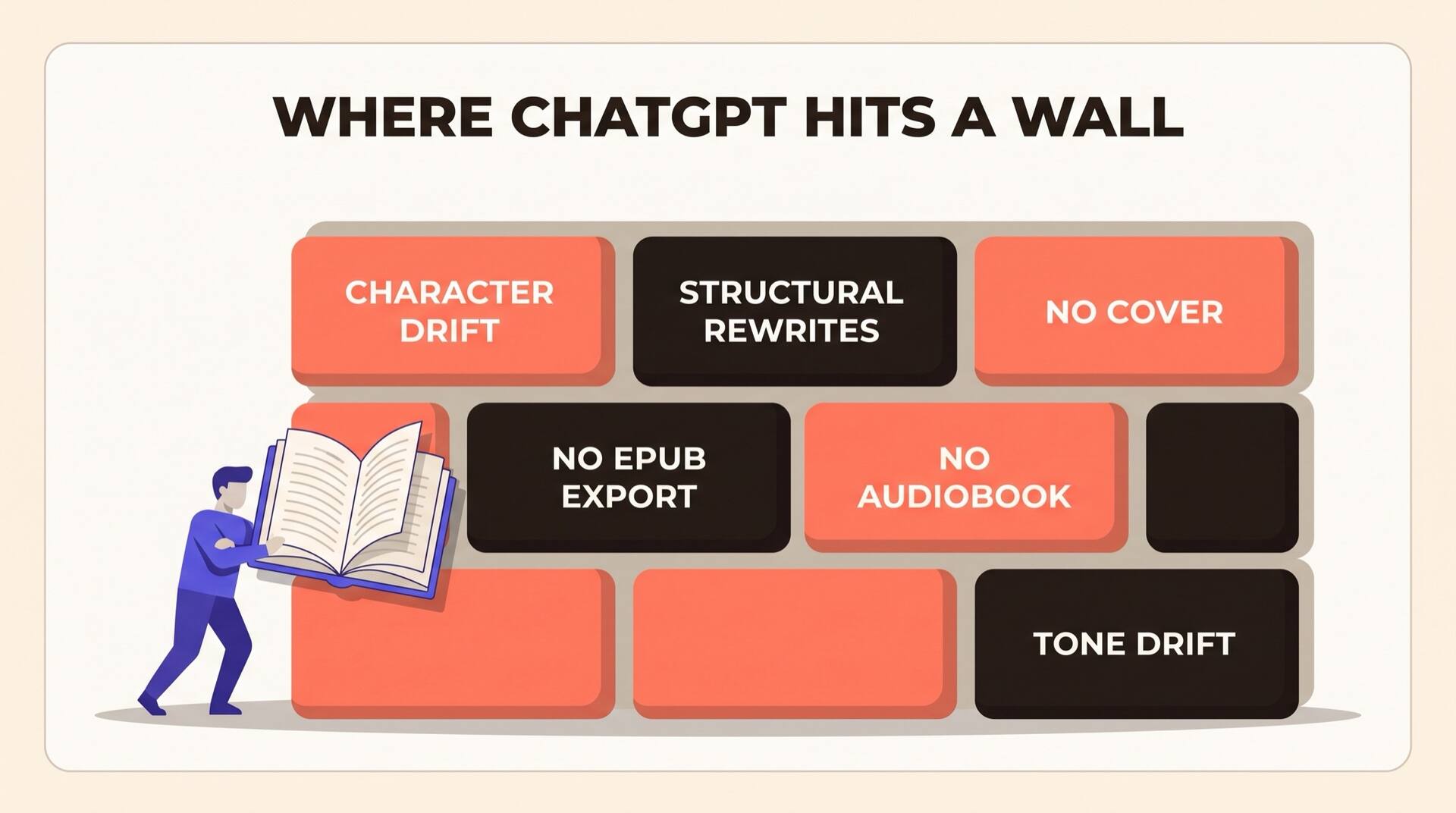
If you stop here you will have a manuscript. You will not have a book a reader can buy. These are the walls every author hits — in roughly this order.
Character drift starts around chapter 8
ChatGPT's context window is large but not infinite. Past chapter 8 or so, your protagonist's speech pattern starts shifting, secondary characters get their backstories mixed up, and a side character's eye color quietly changes. You will spend more time policing consistency than writing.
Structural rewrites are painful
When you realize chapter 12 needs to land before chapter 9, ChatGPT cannot "reshuffle the manuscript." You have to manually re-prompt every affected chapter with the new context. Most authors give up and ship the weaker structure.
No cover, no formatting, no audiobook
ChatGPT outputs plain text in a chat window. Getting from there to a KDP-ready EPUB with a 1600×2560 cover, a properly mastered audiobook, and clean front/back matter is a separate stack of tools — and the integration work is on you.
Tone consistency requires constant prompting
Every new chat resets ChatGPT's sense of your voice. You will paste the same "match the tone of [comp title]" instruction so many times you can recite it. There is no learned style — only repeated reminders.
No publishing pipeline at all
ChatGPT will not export to EPUB or DOCX with proper styles, will not push to KDP, cannot generate matching audiobook narration, and has no awareness of category limits or KDP keyword rules. Every step from manuscript to listing is manual.
No translation memory for a series
If your book becomes a series, ChatGPT cannot remember book one's terminology while you write book two. Magic system terms, location spellings, and named relationships all drift unless you maintain a glossary by hand.
The prompt cheat sheet
Bookmark this section. These are the seven prompts above, condensed into one place so you can paste them sequentially.
- 1
Premise: Act as a senior developmental editor. Ask me ten sharp questions about my premise, one at a time.
- 2
Outline: Write a chapter-by-chapter outline. For each chapter give POV, goal, obstacle, turn, hook.
- 3
Character bible: Generate a character bible with name, age, three physical details, speech quirk, wound, goal, secret, recurring prop.
- 4
Chapter: Write Chapter [N] in [POV], ~2500 words, matching [comp title], ending on the outline's hook.
- 5
Line edit: Edit for weak verbs, filter words, telling-not-showing, dialogue tags, long sentences. Return full chapter inline.
- 6
Blurb: 150-word Amazon description. Hook, setup-ending-on-question, comp positioning.
- 7
Metadata: Ten titles, seven KDP keywords, three primary and three secondary categories, with reasoning.
So — can you actually write a book with ChatGPT?
Yes — and many authors already have. If your goal is a finished manuscript you can read, the workflow above will get you there in roughly two to four weeks of evenings.
If your goal is a published book — listed on Amazon, with a cover that does not look generic, audiobook narration, and a series-ready foundation — ChatGPT alone leaves a long tail of manual work. The drift, the structural rewrites, the formatting, and the publishing pipeline are real, and they compound.
The pragmatic answer most working authors land on: use ChatGPT for the parts it is best at (premise, brainstorming, blurbs) and use a dedicated book tool for the parts it is worst at (consistency, structure, cover, export, publishing).
The hybrid workflow most authors end up using
Once you have hit two or three of the walls above, you have a choice: keep stitching ChatGPT together with cover generators, formatters, and consistency spreadsheets — or move the manuscript into a tool built for book-length work. The hybrid pattern (ChatGPT for ideation, AIWriteBook for the actual book) is covered in detail in our upcoming companion guide.
Read the hybrid workflow guide