

The short answer
- $2.99–$12.99
- KDP's 70% band on Amazon.com since July 7, 2026
- 70% flat
- Apple Books, at every price, no delivery fee
- 90 days
- Length of each KDP Select exclusivity term
- 250
- Free Apple promo codes per ebook
Per copy sold, Apple Books pays the same or more than KDP at every price point, because it has no delivery fee and no price band. Per reader reached, KDP wins by a mile, and KDP Select adds a second income stream (Kindle Unlimited page reads) that Apple has no equivalent for.
So the honest verdict is: go exclusive when most of your readers borrow through Kindle Unlimited, go wide when a meaningful share of them buy on phones, iPads and Macs, or outside the US. The calculator below turns that into a number for your own book.
Why this decision matters
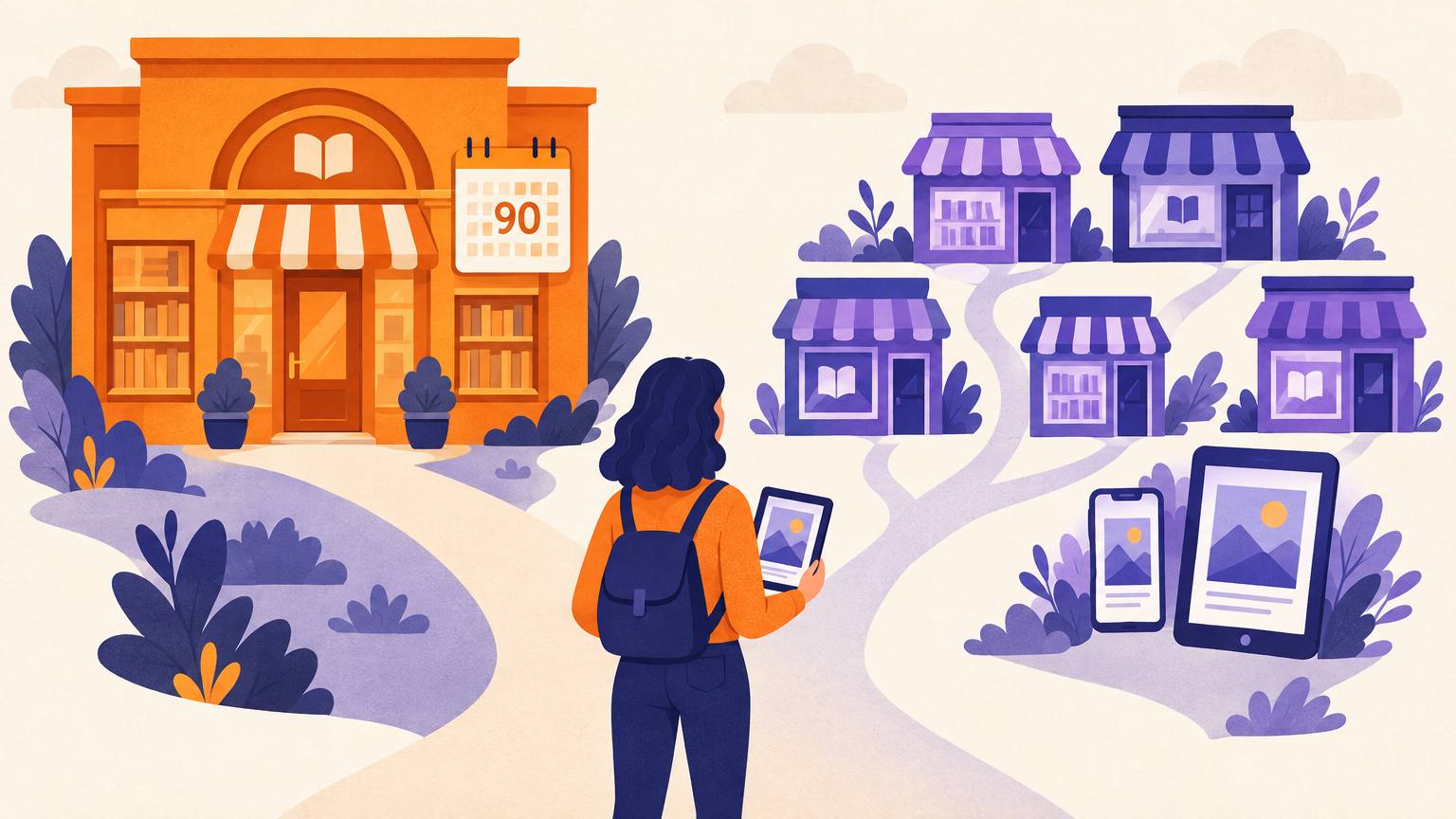
KDP Select is a free, 90-day program that covers the Kindle ebook only. While a title is enrolled, its digital edition cannot be sold anywhere else, Apple Books included. Your paperback and hardcover are untouched, so the fear that going exclusive locks up the whole book is misplaced.
The decision matters because the two stores pay in different currencies. Apple pays per sale. Amazon pays per sale plus, if you are in Select, per page read out of a monthly fund. That fund has sat between roughly $61 million and $68 million a month in 2026, and the per-page rate has moved between about $0.0042 and $0.0052. A book that readers binge in Kindle Unlimited can earn more from borrows than from sales. A book that readers buy once and keep rarely does.
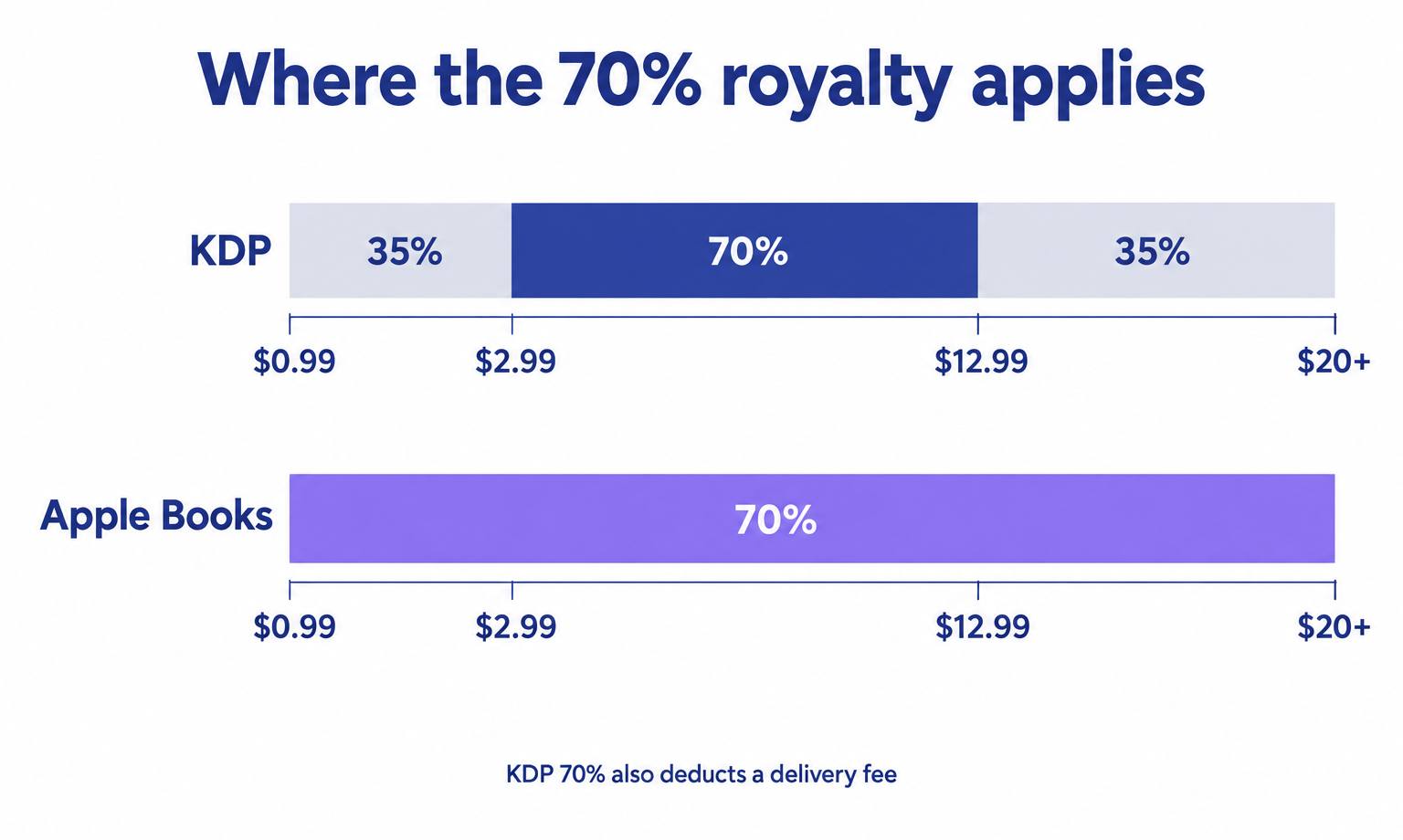
There is one more 2026 wrinkle. On July 7, Amazon raised the top of its 70% band from $9.99 to $12.99 on Amazon.com, the first change since 2007. Before that, pricing a nonfiction ebook at $11.99 meant 35% on Kindle and 70% on Apple, which made going wide an easy call for pricier books. That gap has narrowed. For the royalty mechanics in full, read KDP royalties explained.
Royalty calculator: exclusive vs wide
Enter your list price and a realistic month. The calculator uses Amazon.com rules (70% between $2.99 and $12.99 minus a $0.15 per MB delivery fee, 35% otherwise, and whichever is higher when both are allowed) and Apple's flat 70%. VAT, price matching and currency are left out so the comparison stays clean.
Royalty per copy
Kindle
$3.28
70% rate, after $0.30 delivery fee
Apple Books
$3.49
70% of list price
Exclusive (KDP Select)
Kindle sales plus Kindle Unlimited page reads
$601.98per month
Wide (KDP + Apple Books)
Kindle sales plus Apple Books sales
$249.38per month
Exclusive earns $352.60 more a month on these numbers.
To replace your Kindle Unlimited income, you would need about 116 Apple Books sales a month.
Apple is only one wide store. Kobo, Google Play Books and library platforms add to the wide column, and KDP Select can lift Kindle visibility, so treat this as a floor for both sides.
KDP vs Apple Books, side by side
The rows below are the terms that actually change what you earn or how you launch. Everything is for the ebook edition unless it says otherwise.
| Term | Amazon KDP | Apple Books for Authors |
|---|---|---|
| Ebook royalty | 70% from $2.99 to $12.99 on Amazon.com, 35% outside that band | 70% at any price |
| Delivery fee | $0.15 per MB on 70% sales in the US store | None |
| Exclusivity | Only if you enroll in KDP Select, in 90-day terms, ebook only | Never |
| Subscription income | Kindle Unlimited page reads, Select titles only | None |
| Making a book free | Up to 5 free days per Select term, or a price match | Set to free in your dashboard at any time |
| Preorders | Up to 18 months ahead for preorders created from September 2, 2026; final file due 72 hours before release | Up to 12 months ahead |
| Promotion tools | Countdown Deals and free days (Select), Amazon Ads | 250 promo codes per ebook, promotional pricing requests to Apple |
| Price rule | For 70%, the ebook must be at least 20% below your print list price | No price band |
| Other formats | Paperback and hardcover | No print; AI-narrated audiobooks through Apple's digital narration partners |
| Where you publish | kdp.amazon.com | authors.apple.com from any browser, no Mac required |
One trap sits in row 1: in Brazil, Japan, Mexico and India, Amazon pays 70% only on books enrolled in KDP Select. Leave Select and sales in those four stores drop to 35%.
A five-step way to decide
This is the order we would work through it for a single title. Run it per book, not per author: a series starter and a standalone can reasonably end up on different paths.
- 01
Find out where your readers borrow or buy
Look at your last 90 days of KDP reports. If page reads already out-earn sales, your readers live in Kindle Unlimited. If you have no history, look at the top 20 books in your exact subgenre: count how many carry the Kindle Unlimited badge.
- 02
Price the book first, then compare
Settle the list price before you pick a path. Between $2.99 and $12.99 the per-copy difference is small; below $2.99 or above $12.99 Apple pays roughly double per copy.
- 03
Run your numbers in the calculator
Use real or honestly estimated sales, and note the Apple sales count needed to replace your page reads. That single number is usually the decision.
- 04
Check what you would give up in each direction
Exclusive gives up every non-Amazon ebook store, direct sales from your own site, and library ebook platforms. Wide gives up Kindle Unlimited, Countdown Deals, free days and 70% in Brazil, Japan, Mexico and India.
- 05
Commit for one full cycle, then review
Give exclusive one 90-day term, or give wide at least two or three months. Wide stores build slowly; judging Apple on its first month is the most common reason authors retreat to Select too early.
Worked examples
Four price points, calculated with the same rules the calculator uses, for a single copy sold on Amazon.com and on Apple Books direct.
Before July 7, 2026 the $11.99 nonfiction book would have earned $4.20 on Kindle at 35%. That one change is why many authors who went wide for pricing reasons are re-running the math this year.
The month that actually decides it
Take a $4.99 romance novel, 2 MB, selling 60 copies a month on Kindle with 90,000 Kindle Unlimited pages read at $0.0045. Exclusive earns about $197 from sales plus $405 from page reads, roughly $602. Going wide keeps the $197 but has to find $405 elsewhere. At $3.49 per Apple copy, that is about 116 Apple Books sales every month just to break even, before any other wide store counts.
For a binge-read genre with strong page reads, that bar is high. For a book with thin page reads, the same arithmetic runs the other way and a dozen Apple sales can tip it.
Common mistakes
Leaving the ebook live on Apple while enrolling in Select
Amazon checks for exclusivity. Unpublish from Apple and every aggregator first, and confirm the listing has actually disappeared before you enroll.
Forgetting that Select auto-renews
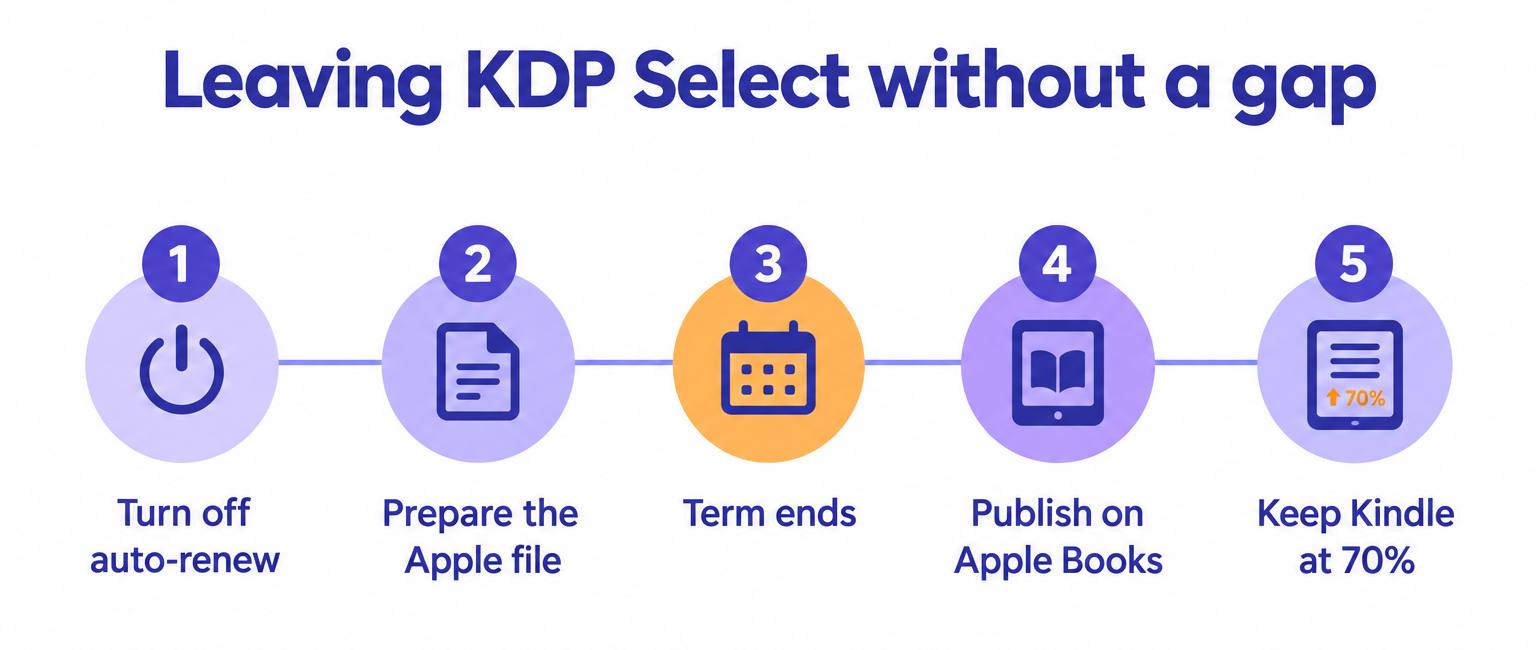
Each 90-day term renews automatically. If you plan to go wide, switch off auto-renewal early in the term, not the day before it ends.
Sending Apple a file full of Amazon links
Apple can refuse a book whose back matter links to a rival store. Keep one EPUB per store, with buy links that match the store it is sold in, or link to your own website instead.
Judging wide on month one
Apple's charts, promo codes and preorders reward consistency across several releases. One book, one month, is not a test.
Ignoring the 20% print rule
If your paperback is $12.99, a $11.99 ebook does not qualify for 70% on KDP. The ebook has to sit at least 20% below the print list price.
Assuming a price is fine everywhere
Amazon can match a lower price it finds elsewhere and pay you on that price. Keep your Apple price at or above your Kindle price unless the discount is deliberate.
The AI-assisted shortcut
Most of the real work in going wide is file and metadata work, not strategy. You need a clean EPUB that passes Apple's validation, a Kindle-ready copy, and store-specific back matter. AIWriteBook's book formatter exports EPUB, print PDF and DOCX from one manuscript, runs epubcheck validation before you download, and includes a front and back matter builder. Back matter belongs to the book rather than to one export, so swap the buy links for Apple ones before you export the Apple file, then switch them back before the Kindle export.
Before you choose, put your own prices through our free royalty calculator to see Kindle, paperback and ebook earnings in one place. And since Apple sells in about 50 countries, a translated edition is one of the few wide-only levers that can move the needle: the book translation tool translates chapters, characters, outline and metadata into 30+ languages from a book you already have on the platform.
If you are still at the manuscript stage, the writing, formatting and export all happen in the same place.
Switching template: leaving Select without a gap
Copy these dates into your calendar the day you decide to go wide. They keep the Kindle edition selling the whole time and put the Apple edition live the day exclusivity ends.
Want the full upload walkthrough? Our step-by-step guide to publishing on Apple Books covers every screen, and if you would rather manage one dashboard for Apple, Kobo and the rest, compare the trade-offs in how to publish on Draft2Digital.
Frequently asked questions
Yes, as long as the ebook is not enrolled in KDP Select. Without Select, KDP is non-exclusive and you can publish the same ebook on Apple Books, Kobo, Google Play and anywhere else.
No. KDP Select covers the Kindle ebook only. Your paperback and hardcover can be distributed through any printer or store, including IngramSpark, while the ebook is enrolled.
Apple Books pays the same or more at every price: a flat 70% with no delivery fee. KDP pays 70% only between $2.99 and $12.99 on Amazon.com, minus a delivery fee of $0.15 per MB, and 35% outside that band.
Yes. On July 7, 2026, Amazon raised the top of the 70% ebook band on Amazon.com from $9.99 to $12.99, with equivalent changes in other marketplaces. Existing books are not repriced automatically.
No. Apple Books for Authors runs in any browser at authors.apple.com. You need an Apple Account, plus tax and banking details to sell paid books.
On Apple Books you can set a book to free directly. On KDP you cannot set a price below $0.99; a Kindle book only becomes free through KDP Select free days or when Amazon matches a free price it finds on another store.
Often not on its own. Wide stores reward a backlist and steady releases. Many authors start a debut in KDP Select, then go wide once they have several books and a newsletter to send readers to Apple.
The bottom line
Apple Books is the better-paying store per copy, and since July 2026 KDP is closer to it than it has been in two decades. KDP Select is the better-paying program when your readers borrow. Decide with your page-read income, not with a feeling about Amazon.
If print distribution is your next question, KDP vs IngramSpark covers the paperback side, and our KDP Select breakdown goes deeper on page reads and promotions. For everything else about selling on Amazon, start with the complete Amazon KDP guide.
Sources: KDP Help (eBook list price requirements, pricing page, pre-orders, KDP Select), Apple Books for Authors support pages (pre-orders, promo codes, web publishing), Written Word Media's KDP Global Fund tracker. Checked September 2026.