

On this page
Why the clock matters
Amazon gives KDP Select authors two promotional tools: Free Book Promotions and Kindle Countdown Deals. Free days move downloads. Countdown days move paid sales, and paid sales are what lift your Best Sellers Rank on the paid charts, where browsing readers actually shop.
During the deal your product page shows the regular price struck through, the deal price, and a timer telling the reader how long the price lasts. Urgency is built into the page. Your job is to bring readers to that page while the timer is running.
The second reason is money. Drop a $4.99 book to $0.99 the normal way and Amazon pays you 35%, because $0.99 sits below the $2.99 floor of the 70% band. Drop it through a Countdown Deal and you keep 70%. Everything else in this guide builds on that fact.
The 2026 rules, in one table
These come straight from KDP's help pages. Every one of them has tripped up an author who scheduled a deal from memory.
| Rule | What it means in practice |
|---|---|
| Enrolled in KDP Select for 30+ days | A book you enrolled last week cannot run a deal yet. In a first term, your window opens on day 31. |
| List price $2.99 to $24.99 (US) or £1.99 to £15.99 (UK) | Books priced at $0.99 or $1.99 are not eligible. Neither is anything above $24.99. |
| Price unchanged 30 days before and 14 days after | Touch the list price in that window and the deal greys out. Plan price tests around it. |
| Amazon.com and Amazon.co.uk only | You can run a separate deal in each store, each with its own currency rules. |
| Discount at least $1.00 or £1.00 | A $2.99 book can only drop to $1.99 or $0.99. |
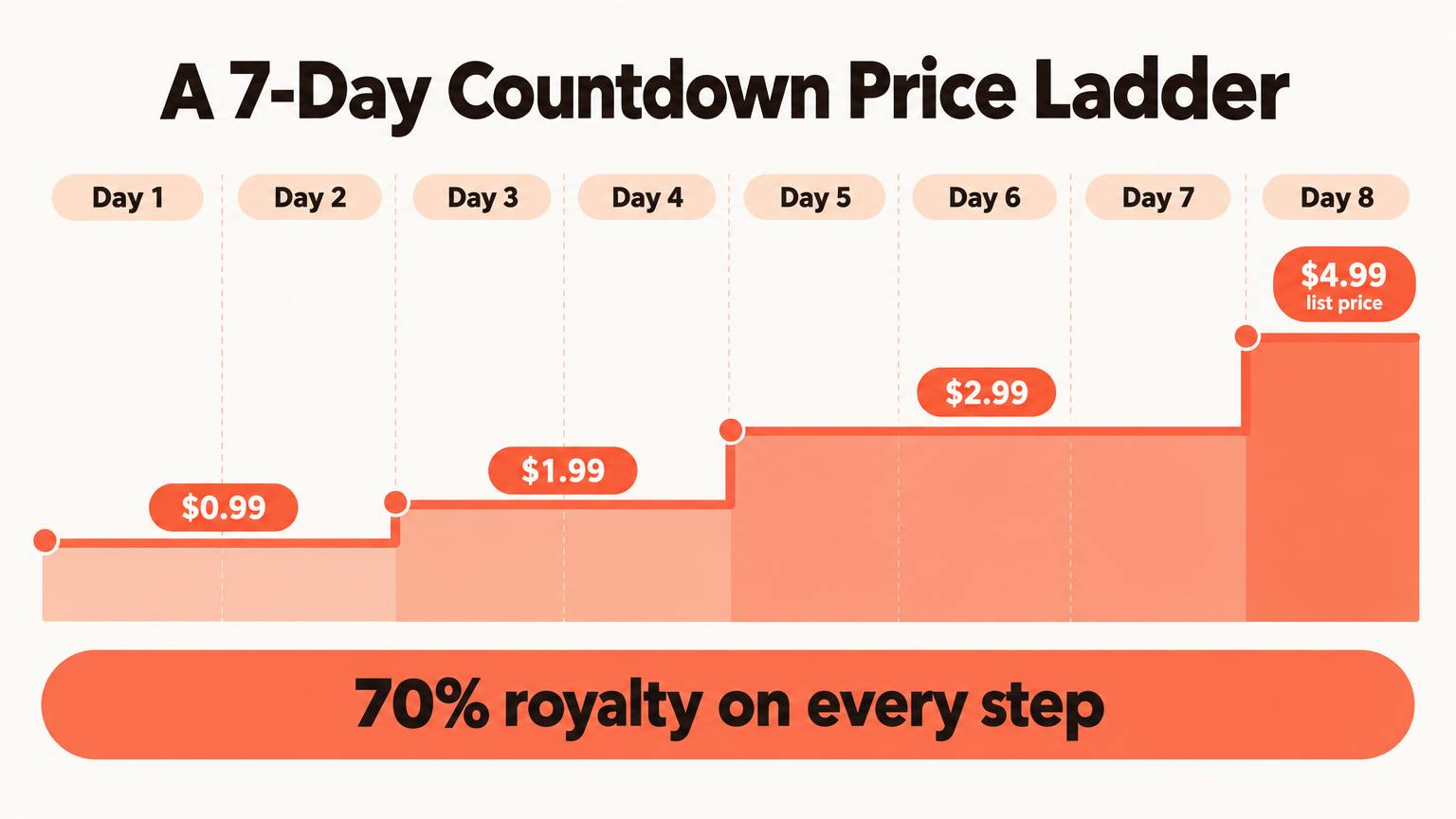
| Up to 5 price increments, 1 hour to 7 days | You can step the price back up in stages instead of one flat discount. |
| Schedule at least 24 hours ahead | You also cannot edit or cancel a deal within 24 hours of its start. |
| Must end 14 days before your Select term ends | In a first 90-day term, the usable window runs roughly from day 31 to day 76. |
| One Countdown or Free promo per Select term | You pick one tool per 90 days. You cannot run both in the same term. |
The royalty math, live
On the 70% option, Amazon first subtracts a delivery fee based on your file size (about $0.15 per MB on Amazon.com), then pays you 70% of what is left. A Countdown Deal keeps that formula at any deal price. A normal price cut below $2.99 drops you to a flat 35%.
Plug your own numbers in. The comparison that matters is the middle column: what a Countdown sale pays against what the same price would pay without one.
Full-price sale
$3.39 per sale
Countdown sale
$0.59 per sale
Plain price cut
$0.35 per sale
A Countdown sale at this price pays 70% more than a plain price cut would.
You need 6 deal sales to earn what one full-price sale pays.
The calculator surfaces a quiet trap. If your deal price is $2.99 or more, the royalty advantage disappears, because the normal 70% band already covers it. The deal still buys you the timer and the visible discount, but you also accept the 30-day and 14-day price freezes. For full royalty rules across formats and stores, see KDP royalties explained or run the numbers in the free royalty calculator.
Three price ladders you can copy
Up to five increments means you can open low to grab rank and then step up while momentum carries you. Pick the ladder that fits the book's job.
Best for
Book 1 of a series with at least two more books live.
The plan
$0.99 for all 7 days, list price $3.99 to $4.99.
Why it works
You are buying readers, not royalties. The money comes from read-through to books 2 and 3 at full price, so keep the price at the floor for the whole week and push every newsletter you can book.
Whatever ladder you choose, write it down with exact dates in your store's time zone. KDP schedules in Pacific Time for Amazon.com and GMT for Amazon.co.uk, and a newsletter that mails a day before your price drops wastes the placement.
Before the clock starts
Give the deal a page worth landing on
Countdown Deal vs Free Book Promotion
Because you only get one per Select term, this is a real choice. Neither tool is better in general. They do different jobs.
| Compare | Countdown Deal | Free Promotion |
|---|---|---|
| Price to reader | Discounted, at least $1 off | $0.00 |
| Royalty during promo | Your normal rate, 70% kept even below $2.99 | None on the free copies |
| Length | 1 hour to 7 days, up to 5 price steps | Up to 5 days per 90-day term |
| Where it ranks | Paid Best Sellers charts | Free charts, separate from paid |
| Stores | Amazon.com and Amazon.co.uk | All Amazon stores |
| Best for | Books with reviews and a series behind them | Brand-new authors collecting first reviews and readers |
A simple rule: if you have fewer than about ten reviews, free days usually do more for you. Once the book has social proof and a next book to sell, the Countdown's paid rank and full royalty pull ahead. For the bigger exclusivity question, read KDP Select: when exclusivity pays, and for borrow income during the deal, see our Kindle Unlimited strategy. Countdown pricing does not change what Kindle Unlimited pays per page read.
Stacking the deal with ads and newsletters
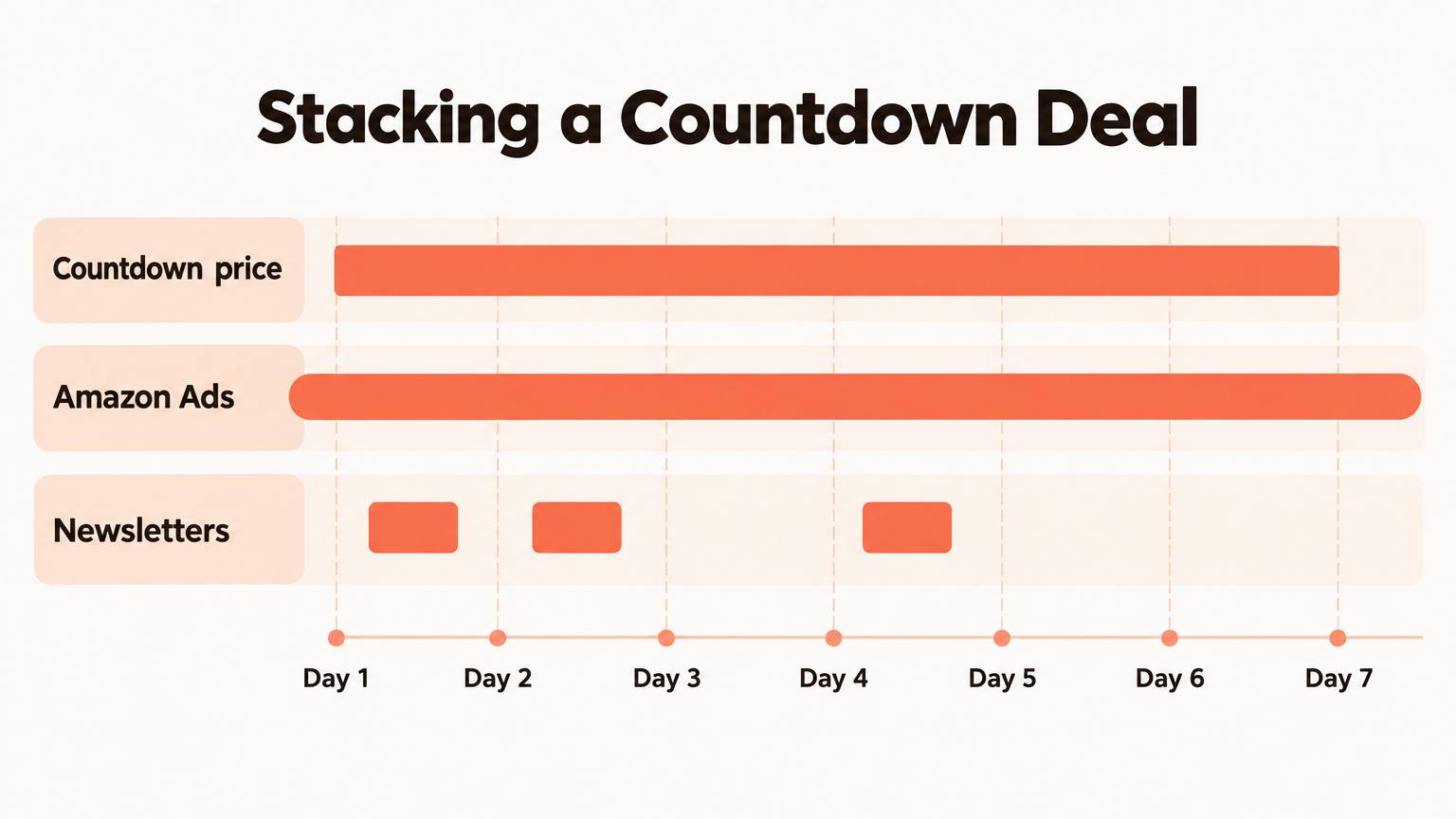
A Countdown Deal on its own is a sign on a door nobody walks past. The timer converts readers who arrive; the sales volume comes from the traffic you send. Stack three layers.
- 1
Layer 1: Amazon Ads before and during
Start Sponsored Products campaigns at least a week before the deal so Amazon has click data on your keywords. On day one, raise budgets and bids on the keywords that already convert. Conversion jumps when the price drops, so the same click is worth more. Keep the ads running a few days after the deal ends to catch the rank tail. New to ads? Start with Amazon Ads for books.
- 2
Layer 2: Promo newsletters, staggered
Book paid newsletter features for days 1, 2 and 4 rather than stacking them all on day one. Spreading them keeps daily sales up across the week, which holds rank longer than one big spike. Lists that cover discounted (not free) books include BookBub Featured Deals, Bargain Booksy, The Fussy Librarian and Robin Reads. BookBub is the hardest to land; our BookBub promotion tips cover how to get accepted.
- 3
Layer 3: Your own readers
Your mailing list converts better than any paid list because those readers already chose you. Email them on day one, and again on the last day when the timer gives you a real reason to write.
Book newsletter dates only after KDP shows the deal as scheduled. Since a deal cannot be edited within 24 hours of its start, a typo in the date can strand a paid feature on the wrong day.
Common mistakes (tick the ones you've already avoided)
0 of 8 avoided
The AI-assisted shortcut
A deal amplifies the product page you already have. If the description is flat, a 70% royalty on $0.99 is 70% of very little. Before you schedule anything, tighten what the clicks land on.
Rewrite your description with the free blurb generator, then check it against your target keywords with blurb SEO. If your seven keyword slots are stale, the KDP keyword research tool pulls real Amazon data so your ads and listing target the same terms.
For the deal itself, make announcement images with social graphics and send the news to the readers who signed up on your author page, which collects emails and lets you broadcast to that list. And if the plan is a series-starter deal but book 2 is still a draft, AIWriteBook's series support carries characters and plot from book 1 into book 2 so the next book is ready before you spend on promotion.
FAQ
No. Countdown Deals apply only to the Kindle ebook edition. Your paperback and hardcover prices stay as they are.
Yes, if your book is on the 70% royalty option. KDP applies your chosen rate to the promotional price, minus the usual delivery fee, instead of dropping you to 35%.
Once per 90-day KDP Select term, and only if you do not use Free Book Promotion days in that same term.
Yes. You set up a separate deal for each marketplace, and each one follows that store's price range and minimum discount.
No. Page-read payments from Kindle Unlimited are calculated the same way during the deal. Higher visibility often brings more borrows as well as sales.
The short version
Use the Countdown Deal when you have something to sell after the discount: a series, a strong backlist, or reviews that turn a cheap click into a fan. Price below $2.99 so the 70% rule actually helps you, step the price up if the book can carry it, and line up ads and newsletters before the clock starts.