


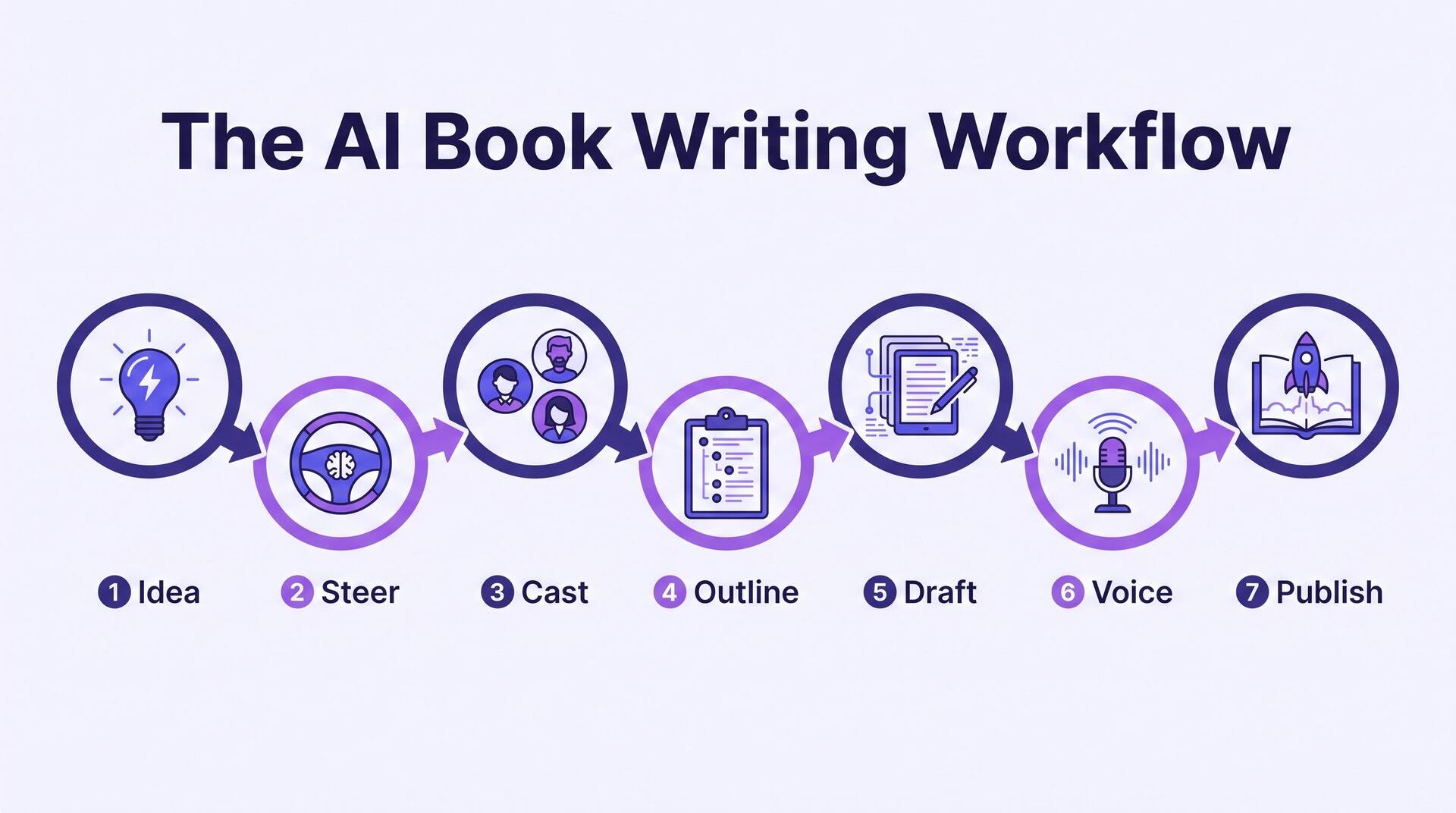
There is a version of "write a book with AI" that means typing one prompt and pasting the result into a document. It produces something book-shaped that no one wants to read. The workflow below is the opposite: a repeatable pipeline where AI does the heavy lifting on structure and first drafts, and you make every decision that determines whether the book is any good. It's tool-agnostic — the seven steps hold whether you use a chat assistant or a purpose-built app — but at each step we show exactly how AIWriteBook handles it, because the app is built around this pipeline end to end. For the conceptual why-it-works background, our complete guide to AI book writing goes deeper; if you specifically want the prompt-by-prompt chat approach, the ChatGPT walkthrough is your post. This one is the map of the whole route.
Read this before you start
A book is not a long prompt. It's a chain of decisions — idea, audience, structure, character, voice — where each choice constrains the next. AI is spectacular at generating options and drafts inside constraints you set, and useless at setting the constraints for you. The single biggest reason AI books read as slop is that the author skipped the setup and let the model guess. Do the first three steps properly and the drafting almost writes itself. Skip them and you'll spend more time fixing generic output than you'd have spent writing.
Your write-a-book-with-AI checklist
0 of 7 doneTick each step as you finish it. Progress is remembered only for this visit — it's a working tracker, not a saved to-do list.
Start with a specific idea, not a genre
"A fantasy novel" is not an idea; it's a shelf. AI can generate a thousand generic fantasy novels and every one will feel like the others. What steers a model toward something distinctive is a concrete premise: who the story is about, what they want, what stands in the way, and the one twist that makes it yours. Write that as five plain sentences before you touch any generator. This is the single most leveraged thing you'll do — every later step reads from it.
In AIWriteBook, this becomes the Book Description on the Basics step, the field the entire wizard is built around. You pick a book type (Fiction, Non-Fiction), add a title and genre chips, then write that five-sentence description — or tap Generate Description to draft one and edit it down. Everything downstream, from the outline to individual chapters, is generated against this text, so a vague description guarantees vague chapters. Treat it as the book's DNA and get it right first.
Weak idea vs. usable idea
Weak: "A detective solves a murder in a small town." Usable: "A burned-out forensic accountant returns to her dying hometown to bury her estranged mother and discovers the woman's will names a stranger — forcing her to audit twenty years of small-town lies before the stranger inherits everything, including a secret worth killing for." The second one gives the AI stakes, character, setting, and a ticking clock to build on.
Set the details that steer the AI
Before any drafting, tell the model who the book is for and how it should sound. This is where most of your "voice" control actually lives — not in editing later, but in the parameters you set now. Audience changes vocabulary and complexity; tone changes atmosphere; style changes pacing and sentence rhythm. An AI software agency can help refine these parameters when developing tailored AI writing workflows, ensuring the output stays aligned with a specific audience and brand voice. Set these deliberately and the AI stops guessing.
AIWriteBook collects these on the Details step: Target Audience, Tone (a chip-picker with dozens of moods, plus your own), Writing Style, and a "what makes this book great" field. There's also an optional Author Writing Style box where you can paste a sample of prose you want the book to echo. It's one textarea, not a magic voice-cloner — but pasting two paragraphs of the voice you're after visibly shifts the drafts that follow.
Target audience
Adjusts vocabulary, theme complexity, and content maturity. "Adults who read literary thrillers" writes nothing like "reluctant teen readers."
Tone
The emotional weather of the book — cozy, gritty, suspenseful, bittersweet. Pick two or three that genuinely coexist, not ten that fight.
Writing style
How chapters are structured and paced. Short punchy scenes or long immersive ones — this shapes rhythm more than any later edit.
Build your cast or structure
Fiction lives or dies on characters; nonfiction on structure. Either way, this is the layer that gives the outline something to hang on. For a novel, define your key people — not just names, but wounds, motivations, the internal conflict that drives them, and how they speak. Characters with a clear internal contradiction generate scenes; cardboard characters generate filler.
AIWriteBook's Characters step (Structure for nonfiction) is a set of expandable cards with fields for personality, motivation, internal and external conflict, stakes, arc, and voice. You can write them yourself, generate them all from the description, or Edit With AI card by card. This card set doubles as your Story Bible — the reference the chapter editor pulls from later so the AI keeps everyone consistent across the whole book, not just within one chapter.
Give at least your protagonist and antagonist a specific Voice & Speaking Style note. It's the cheapest way to stop every character sounding like the same articulate narrator — the most common AI-fiction tell.
Generate and fix the full outline
Here's the step people skip, and it's the one that makes AI books coherent. Generate the entire outline — every chapter, in order — before you draft a single word of prose. The AI writes each chapter against the outline, so a weak or contradictory outline compounds across the whole book. It is far cheaper to fix a plot hole in a one-line chapter summary than in a finished 3,000-word chapter. If you want this stage broken out on its own, building a full novel outline with AI walks it start to finish.
In AIWriteBook the Outline step produces a Story Synopsis plus a card per chapter, each holding plot events, hooks and twists, character interactions, locations, and a target word count. Books longer than 20 chapters generate in batches, so a 40-chapter epic comes in two passes. Read every card. Reorder, merge, split, and regenerate individual chapters until the spine makes sense. This is your last cheap chance to catch pacing problems.
The outline is the contract
Once you start drafting, the outline becomes the instruction set for every chapter. Sagging middle, rushed ending, a subplot that vanishes — you'll see all of it at the outline stage as an uneven row of summary cards. Fix it here and the drafts inherit a solid structure automatically.
Draft chapters against the outline
Now the AI earns its keep. With the outline locked, you generate chapters one at a time — each drafted from its outline card, the character bible, and your style settings. Work in order so continuity carries forward, and read each chapter before moving on. Don't batch-generate the whole book and hope; read, react, regenerate the ones that miss.
The AIWriteBook AI chapter generator gives you a model selector so you can match the tool to the job, an Additional Instructions box for standing rules, and an AI Editor sidebar where you type a change in plain language and the suggested edits appear highlighted in the text. On the free plan you can plan the entire book and draft the first chapter; the rest unlock with credits or premium — so you can test the whole workflow on a real chapter before committing. Once that loop is settled, it is worth writing it down as a process rather than rebuilding it from memory every session — the same thinking behind Workflow Automation tools, which exist to make a repeatable sequence of steps run the same way every time.
Gemini
Good all-round quality and the best at following detailed instructions. The safe default for most chapters.
Claude
The strongest prose quality — reach for it on your emotional peaks, key scenes, and anywhere the writing has to sing.
Grok
Best when a scene needs to go further than the others will. Switch per chapter; you're not locked to one model.
Use the Additional Instructions box for rules that apply to every chapter — "never use em dashes," "short sentences in action scenes," "stay in deep third person." It's the fastest lever for enforcing a consistent voice without re-editing each chapter.
Run this whole workflow on a real book
You can plan the entire book and write the first chapter free — idea, details, characters, full outline, and a drafted chapter — before deciding anything. The fastest way to understand the pipeline is to do it.
Edit for voice and continuity
This is the step that separates a finished book from a first draft, and it's the part AI can't do for you. AI drafts are competent and slightly generic by default; your job is to make them sound like a person — specifically, like you. Read the whole manuscript straight through, out loud where you can. You'll hear the repeated phrases, the too-tidy transitions, and the places where a character says something they never would. If a passage still reads flat and machine-even after your own pass, running it through a dedicated AI Humanizer can break up the uniform rhythm before you go back in and put your own voice on top. When you want a second opinion on which passages still read machine-even, a free AI detector will point you straight at the paragraphs worth another pass.
Do voice and continuity as two separate passes, because they use different parts of your attention. On the voice pass you're rewriting for rhythm and personality; on the continuity pass you're checking that eye colours, timelines, and plot promises hold across chapters. Use the AI Editor to execute your instructions — "rewrite this in a dryer, more sardonic voice," "cut the throat-clearing at the start" — then accept, reject, or tweak what it highlights. You direct; it types.
Voice pass
- Read aloud and flag anything you'd never say — stiff phrasing is easier to hear than to see.
- Kill repeated crutch words and identical sentence openings across chapters.
- Rewrite the opening and closing lines of key chapters by hand; those carry the most voice.
Continuity pass
- Track names, ages, and physical details — the AI can drift on them across a long book.
- Confirm every hook or twist you planted actually pays off later.
- Check the timeline: days of the week, seasons, and how much time passes between scenes.
Cover, format, and publish
A finished manuscript still needs a cover, store metadata, and the right file format before it's a book anyone can buy. Don't treat this as an afterthought — on Amazon the cover and blurb do most of the selling, and the file format determines whether it renders cleanly on a Kindle. Handle all three before you upload anywhere.
AIWriteBook's Publish step generates a cover from 21 art styles at KDP-ready aspect ratios (or you upload your own), plus a store blurb, categories, and keywords. The Export step then produces EPUB, print-ready PDF with trim-size options, and DOCX. From there you upload to your platform of choice — there's no automatic push to Amazon, so you stay in control of pricing and publish timing. For the launch itself, a short animated teaser built with an AI animation generator gives you something to post alongside the cover reveal.
AIWriteBook exports the files; it does not upload to KDP for you. You download the EPUB or PDF and publish it through your own KDP, Apple Books, or Kobo account — which is exactly what you want, because you set the price and hit publish yourself.
A realistic four-week plan
You can generate a rough draft in an afternoon, but a book worth reading takes a few weeks of real attention. Here's a sane cadence that front-loads the decisions and leaves room for the human editing pass that actually matters.
Setup and skeleton
Steps 1–4: nail the idea and description, set audience and tone, build characters, and generate and fix the full outline. Don't rush this — it's the whole foundation.
Draft the chapters
Step 5: generate chapters in order, reading and regenerating as you go. Aim for a steady daily count rather than a heroic weekend. Switch models where the scene calls for it.
The human pass
Step 6: read the whole thing aloud, do separate voice and continuity passes, and rewrite the moments that carry the most weight by hand.
Cover and ship
Step 7: generate or commission the cover, write the blurb, export the files, and upload to your platform. Then start the next one.
Mistakes that make AI books read as AI
Drafting before the outline is done
Generating chapters against a half-baked outline bakes every structural flaw into finished prose. Finish and fix the outline first; it's the cheapest place to change your mind.
Skipping the read-aloud pass
Default AI prose is smooth and characterless. If you never read it aloud, you'll ship the repeated phrases and too-perfect rhythm that scream "generated." Your ear catches what your eye skims.
Letting every character sound identical
Without distinct voice notes, the AI writes everyone as the same articulate narrator. Give each major character a speaking style and enforce it in the editing pass.
Treating the description as a formality
The whole book is generated from your description and settings. A lazy setup produces generic chapters no amount of editing fully rescues. Spend your best effort at the start, not the end.
The honest part: disclosure and ownership
Writing with AI is legitimate, but it comes with responsibilities. Here's the short version of doing it straight.
You are the author and the editor. AI generates drafts inside your decisions; the judgment, the revisions, and the final call are yours. Read every word before it ships — you're responsible for all of it.
Disclose where it's required. Amazon KDP asks whether AI-generated content is involved when you publish, and answering honestly is part of the deal — our guide to publishing AI-generated books on Amazon legally covers exactly what to declare. Check your platform's policy and comply.
Fact-check everything in nonfiction. AI can state a wrong date or invent a citation with total confidence. Verify names, numbers, quotes, and sources before you publish anything factual.
Free tools for the setup steps
The first three steps are where the quality is won, and each has a free tool that gets you unstuck without touching credits.
Book ideas generator
Turn a vague interest into a handful of specific, buildable premises — the raw material for Step 1.
Outline generator
Draft a chapter-by-chapter outline you can refine before drafting, exactly as Step 4 prescribes.
Character creator
Build characters with wounds, motivation, and voice so Step 3 gives your outline something to hang on.
Writing a book with AI: FAQ
Can AI really write a whole book?
It can draft one, chapter by chapter, from an outline and character bible you approve. What it can't do is decide whether the book is good — that's the editing pass, and it's yours. Think of AI as a fast, tireless drafter working inside your creative decisions, not a replacement for them.
How long does it take to write a book with AI?
A rough draft can come together in a few days; a book actually worth publishing takes a few weeks once you include the human editing pass. The four-week cadence above front-loads the setup and leaves real time for voice and continuity work, which is where the quality lives.
Will readers be able to tell it was written with AI?
Only if you skip the editing pass. Unedited AI prose has tells — repeated phrasing, too-smooth transitions, characters who all sound alike. A proper read-aloud voice pass, distinct character voices, and hand-rewritten key moments erase those tells. The setup and the edit are what make it read as human.
Do I need to be a good writer to use this workflow?
You need to be a good reader and a decisive editor more than a fast writer. The AI handles sentence-level drafting; your job is judgment — spotting what's flat, what's off-voice, and what a character would never do. Those skills sharpen quickly once you're editing real drafts.
Which AI model should I use for the chapters?
In AIWriteBook you can switch per chapter. Gemini is the reliable default and best at following instructions; Claude gives the strongest prose for emotional or important scenes; Grok goes furthest when a scene needs it. Match the model to the chapter rather than picking one for the whole book.
Is it legal to sell a book written with AI?
Yes, on major platforms including Amazon KDP, provided you disclose AI involvement where asked and the content is yours to publish. Rules evolve, so check your platform's current policy. For nonfiction, verify every fact — you're accountable for accuracy regardless of how the draft was produced.
The workflow is the whole trick
Writing a book with AI isn't about finding the perfect prompt. It's about running a disciplined pipeline: a specific idea, deliberate settings, a real cast, a finished outline, chapter drafts, a human editing pass, and a proper publish. Get the order right and the AI amplifies you at every stage. Get it wrong — skip the setup, skip the edit — and you get the generic output the internet is already tired of.
Do the first four steps carefully and the rest gets easy. For the deeper reasoning behind why this works, and how it compares to other approaches, see our AI writing assistant guide.