

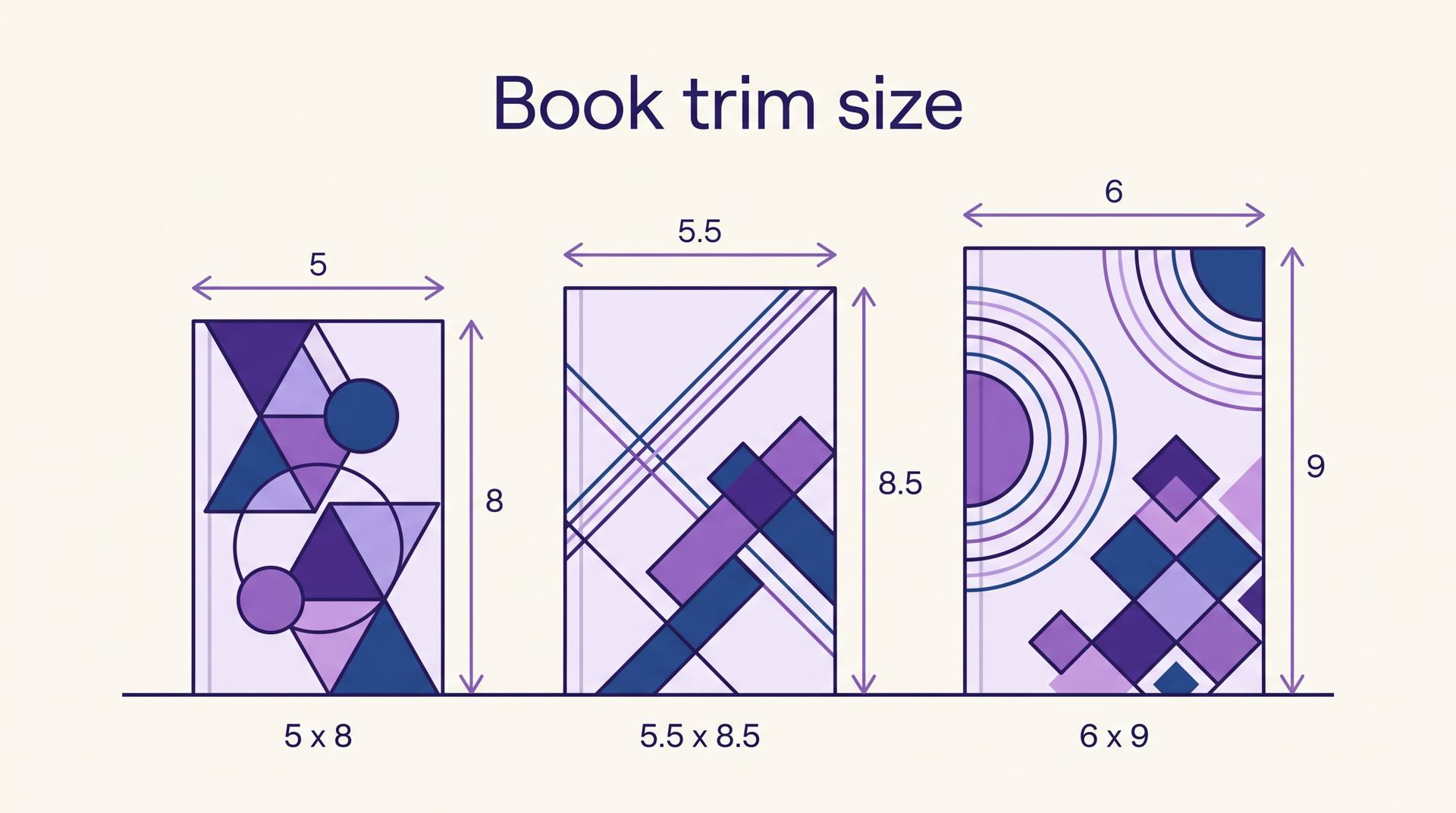
The sizes KDP actually offers
KDP publishes a fixed menu of paperback trim sizes, from 5" x 8" at the small end up to 8.5" x 11" and A4 (8.27" x 11.69"). You cannot invent your own dimensions. Hardcover is stricter still — a short list built around 5.5" x 8.5", 6" x 9", 6.14" x 9.21", 7" x 10" and 8.25" x 11". These are the ones that come up again and again:
| Trim size | Usually used for | Worth knowing |
|---|---|---|
| 6" x 9" | Novels, memoir, business and self-help | The default. Fits the most words per page, so it keeps page count and printing cost down. |
| 5" x 8" | Novellas, poetry, pocket-sized non-fiction | Feels intimate in the hand, but pushes the same manuscript ~30% more pages. |
| 5.5" x 8.5" | Trade paperbacks, journals, workbooks | A middle ground; also one of the few sizes offered in hardcover. |
| 5.25" x 8" | Literary fiction, gift editions | Slightly wider than 5" x 8" and less common, which is part of the appeal. |
| 7" x 10" | Children's books, comics, illustrated non-fiction | Room for full-page art without an unwieldy shelf footprint. |
| 8.5" x 11" | Workbooks, planners, coloring and activity books | Letter-sized, so readers can photocopy or write on the pages. |
Two limits are easy to trip over. A KDP paperback has to land between 24 and 828 pages on black ink and white paper, and colour interiors cap out lower — a short picture book below the floor simply cannot be printed. And not every trim size qualifies for Expanded Distribution to bookstores and libraries, so if that channel matters, check eligibility before you commit.
Why the choice costs you money
Trim size is not a taste decision that stops at taste. It sets off a chain: a smaller page holds fewer words, fewer words per page means more pages, more pages means a thicker spine and a higher printing cost, and printing cost comes straight off your royalty on every single copy sold.
Here is the same 80,000-word novel run two ways. At 6" x 9" with a normal 11pt body, a page holds roughly 280–300 words, so the book lands around 270 pages. At 5" x 8" the same text takes about 220 words per page and swells to roughly 365 pages.
| 6" x 9" | 5" x 8" | |
|---|---|---|
| Page count | ~270 pages | ~365 pages |
| Spine width (cream paper) | 0.68" | 0.91" |
| US printing cost per copy | $4.24 | $5.38 |
That $1.14 gap repeats on every copy. At KDP's US black-ink rate for books of 110 pages or more — a $1.00 fixed charge plus $0.012 per page at the time of writing — the smaller, cuter book quietly costs you over a thousand dollars across a thousand sales. Run your own numbers through the KDP royalty calculator before you fall in love with a size, and if you want the word-count-to-page-count maths in more depth, how many words fit on a page works through it.
The spine maths is public: multiply your page count by 0.0025" for cream paper, 0.002252" for white, or 0.002347" for colour. Get it wrong and the cover art wraps onto the front. Our guide to the KDP cover calculator walks through building the full wrap at the right size.
Bleed vs no bleed
Printers cannot cut paper to a perfect line. Bleed is the safety margin that absorbs the wobble: you extend any ink meant to reach the paper's edge past the trim line, so that when the blade lands a fraction off, there is still colour where the edge should be rather than a thin white sliver.
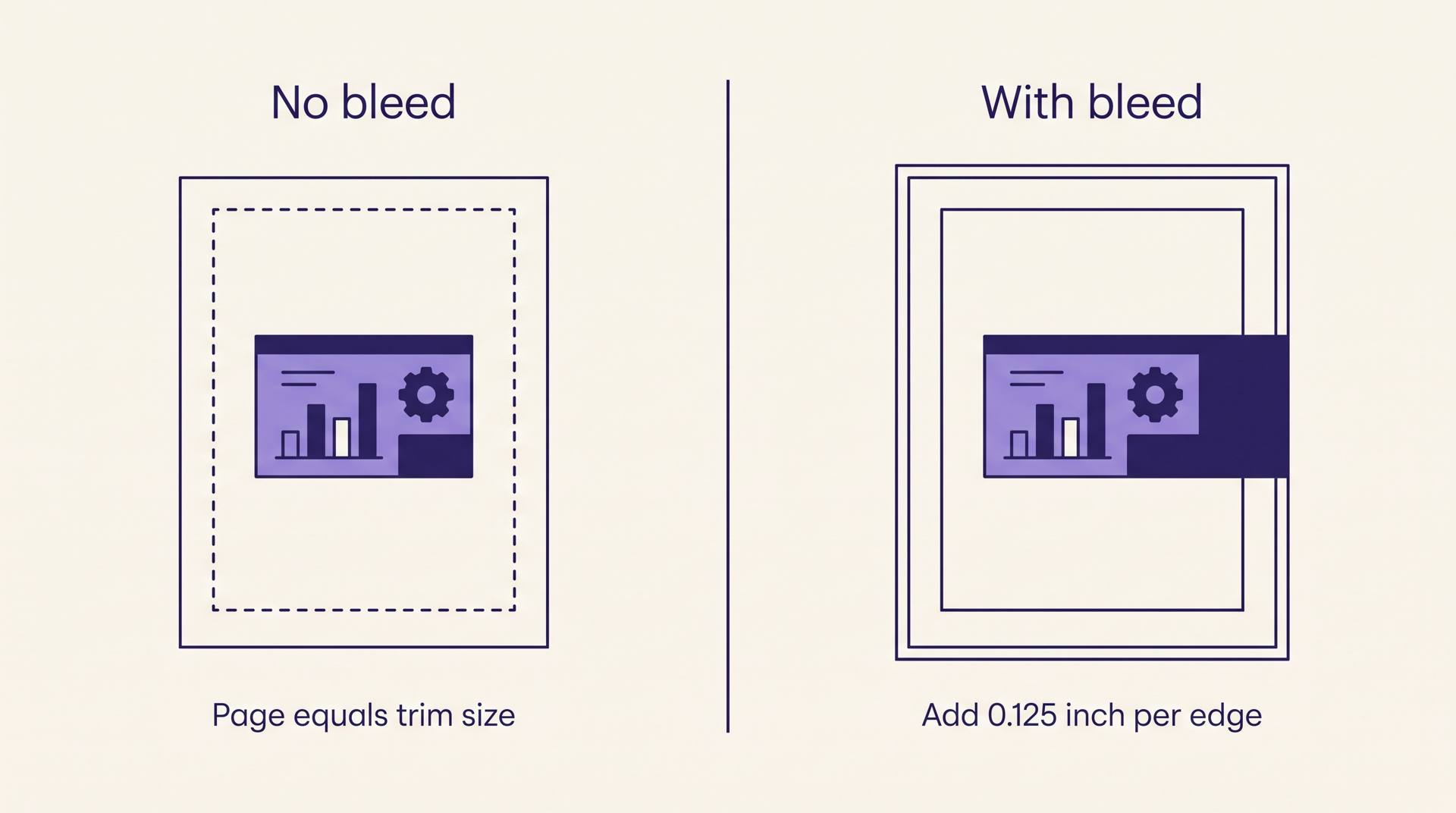
KDP wants 0.125" of bleed added to the top, bottom and outside edge — never the spine side, which is bound. A 6" x 9" interior submitted with bleed is therefore a 6.125" x 9.25" PDF. A no-bleed interior is exactly 6" x 9", full stop.
Plain prose needs no bleed at all; text stops well short of the edge anyway. You want bleed when illustrations, photographs, full-page background colour or chapter-opener art run to the paper's edge — which is most children's books, cookbooks and photo-heavy non-fiction. Choosing bleed you do not need is harmless. Forgetting bleed you do need means a printed book with white hairlines down the margins.
Three ways authors get burned
Treating it as reversible
KDP will not let you change the trim size of a published paperback. Changing your mind means creating a brand-new listing, which starts over with no reviews, no sales rank and no ranking history. Decide before you hit publish.
Designing the cover before fixing the interior
The spine width depends on the final page count, which depends on the trim size and the font. Every time you edit the interior the spine moves. Lock the trim size, finish the interior, get the real page count, then build the cover wrap.
Copying a trim size that does not fit the genre
Browse the top of your category and you will find one shape dominating it. A 8.5" x 11" thriller looks like a manual on a shelf next to its rivals. Matching the genre's convention is not conformity; it is the cheapest signal you have that this is a real book of its kind.
How this works inside AIWriteBook
When you export a finished book, the print-ready PDF step asks for a trim size — 5" x 8", 5.5" x 8.5" or 6" x 9" — and a bleed toggle that adds the 0.125" margin on every edge. The PDF comes out laid out one trim page per sheet with proper margins and a binding gutter, so it uploads to KDP as-is instead of needing a pass through separate formatting software.
Illustrated titles work the other way round. In Visual Books you pick the trim first, on the basics step, because the whole page layout is designed around it — square picture-book shapes, 7" x 10" for comics, 8.5" x 11" for workbooks. It locks once pages are created, for the same reason KDP locks it after publishing: everything downstream is built to that rectangle. If the rest of the KDP file-prep process is still fuzzy, our walkthrough of formatting a book for KDP covers the steps around this one.
Related terms
Trim size sits alongside the other identifiers and file specs you meet on the way to a live listing:
Frequently asked questions
The questions authors ask right before they commit to a size.
6" x 9" is the default for adult fiction and non-fiction on KDP, and it is what most novels, memoirs and business books use. It holds the most words per page of the popular sizes, which keeps page count, spine width and printing cost down.
No. KDP locks the trim size once a paperback is live. To publish the same book at a different size you have to create a new listing, and it starts from zero on reviews, sales rank and ranking history. Pick the size before you publish.
No. Trim size is a print concept only. An EPUB reflows to whatever screen it is opened on, so there are no fixed page dimensions — which is why a Kindle edition shows estimated pages rather than a real page count.
Almost never. Bleed only matters when ink is meant to reach the edge of the paper. Straight prose keeps text inside the margins, so a no-bleed PDF at exactly your trim size is correct. Add bleed for full-page images, background colour or edge-to-edge chapter art.
Usually yes, per copy, because a larger page holds more words and cuts the page count — and KDP's black-ink printing cost is driven mostly by pages, not by page area. The trade-off is that oversized books look wrong in genres where readers expect a standard paperback.
Trim size is one of the few publishing decisions that is genuinely permanent, and it quietly prices every copy you will ever sell. Pick the shape your genre already wears, check the page count and spine before you touch the cover, and move on to the rest of the Amazon KDP guide.