

Why audio is worth the trouble
Audiobook listening is the one format where the buyer is doing something else — commuting, cooking, walking a dog — which means it does not compete for the same hour as your ebook. Authors who add audio are not splitting one reader across formats; they are reaching an audience that was never going to sit down with the paperback.
It also changes the economics of a backlist. A finished manuscript you already own is the expensive part. Turning it into a listenable file is now a production problem with a known cost, and a title that earns modestly in ebook can quietly double its lifetime revenue in audio because the list price of an audiobook is several times the price of the ebook.
The catch is that Audible's gatekeeping is technical rather than editorial. Nobody at ACX judges your prose. They measure your waveform. That is good news for a careful author and bad news for anyone who records into a laptop microphone at the kitchen table.
The one decision that sets your royalty
Before you upload a single file, ACX asks whether you want to distribute exclusively or not. This is the choice that determines what you earn per sale and where the book can ever appear, so make it deliberately rather than clicking through it.
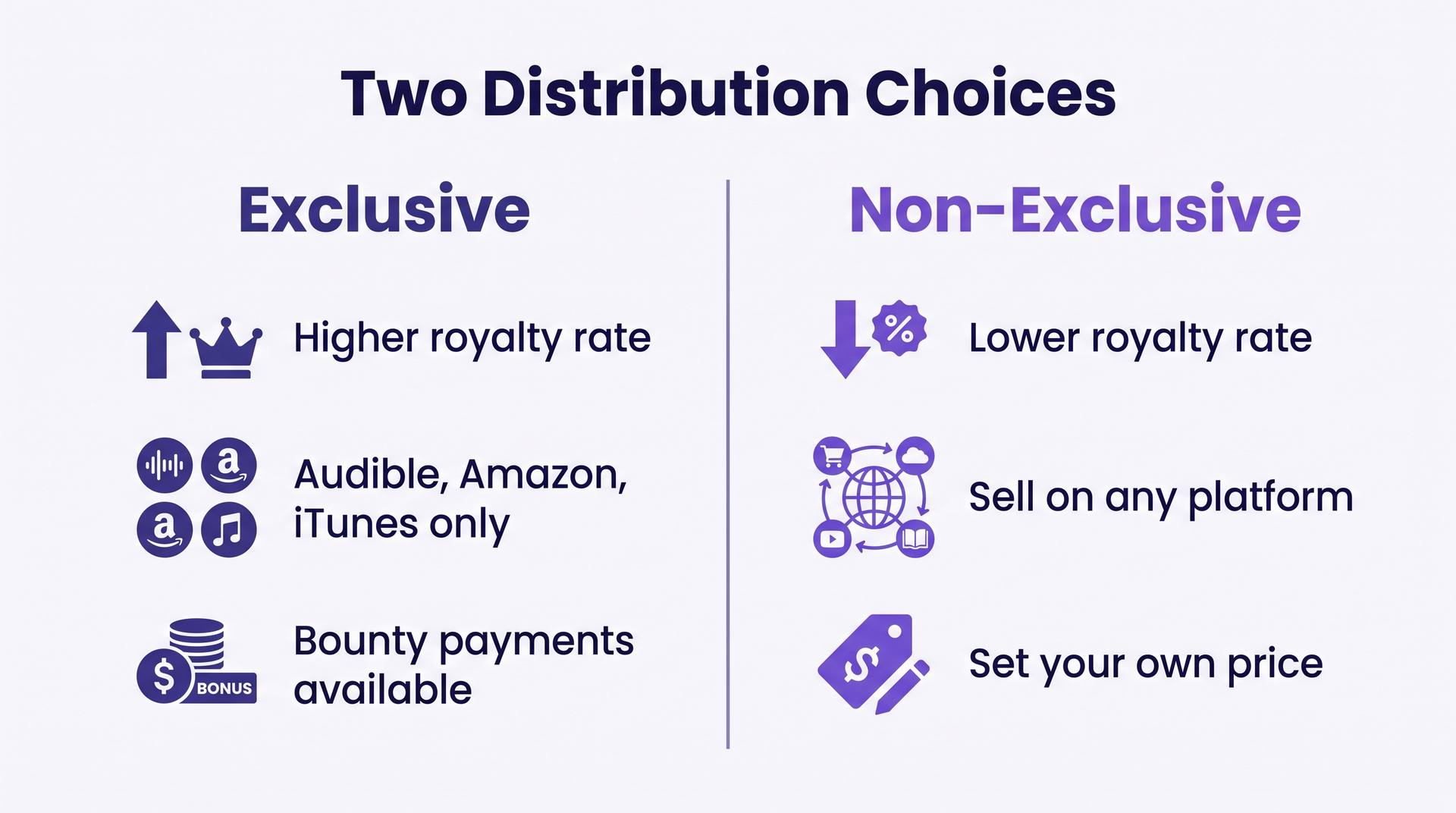
Exclusive distribution pays a higher royalty rate on each sale and restricts retail to Audible, Amazon and iTunes. Non-exclusive pays a lower rate but leaves you free to sell the same audiobook through Spotify, Kobo, Google Play, libraries via Findaway-style aggregators, and directly from your own site. ACX publishes the current percentages on its royalty page and has revised them before, so read them the day you sign rather than trusting a blog figure — including this one.
The honest rule of thumb: exclusivity is worth it when Audible is where your readers already are and you have no direct-sales channel of your own. Non-exclusive wins when you have an email list, a series with a back catalogue to bundle, or library sales in reach — those channels only exist on the non-exclusive side, and they compound. If you are already weighing exclusivity on the ebook side, the same tradeoff logic runs through our breakdown of KDP Select.
One more thing hides in that contract: the ACX distribution agreement runs for a fixed term (seven years at the time of writing) before you can request a change. Check the current agreement text before you commit — an exclusive term is a long time to be locked out of a channel you later want.
The ACX flow, step by step
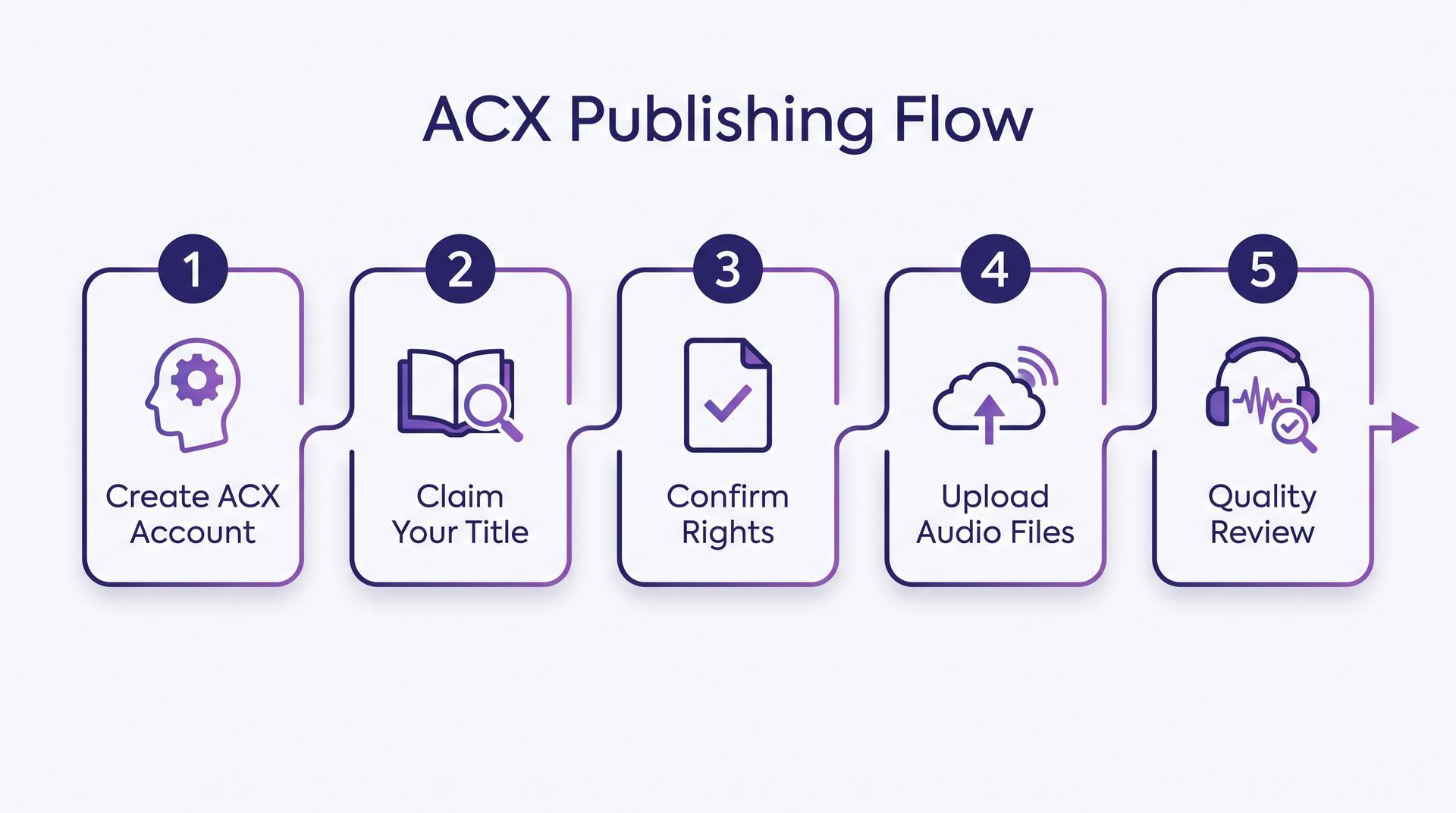
The mechanics are less mysterious than the audio engineering. Five stages, and only two of them are slow.
- 1
Create the ACX account
You sign in with your Amazon account and add a rights-holder profile with tax and payment details. ACX accepts rights holders in a limited set of countries — currently the US, UK, Canada and Ireland — so confirm eligibility before you plan around it.
- 2
Claim your title
Search for your book by its Amazon listing and claim it. The ebook or print edition has to be live on Amazon first, which means the KDP side of the work comes before the audio side. If you have not shipped the text edition yet, start with our step-by-step guide to publishing on Amazon.
- 3
Confirm rights and choose a production path
You state that you hold the audio rights, then pick between narrating it yourself, hiring a narrator through the ACX marketplace on a royalty share or pay-for-production basis, or uploading finished audio you produced elsewhere. That third option is the one most AI-assisted authors use.
- 4
Upload the audio files
One file per chapter, plus opening credits, closing credits and a retail sample. Files are checked automatically on upload, and anything outside the spec bounces back immediately with a reason.
- 5
Wait out the quality review
A human listener checks your files against the audio submission requirements. This usually takes a couple of weeks, though the queue moves at different speeds through the year — ACX quotes its current window on the dashboard once you submit.
The audio spec that rejects most first files
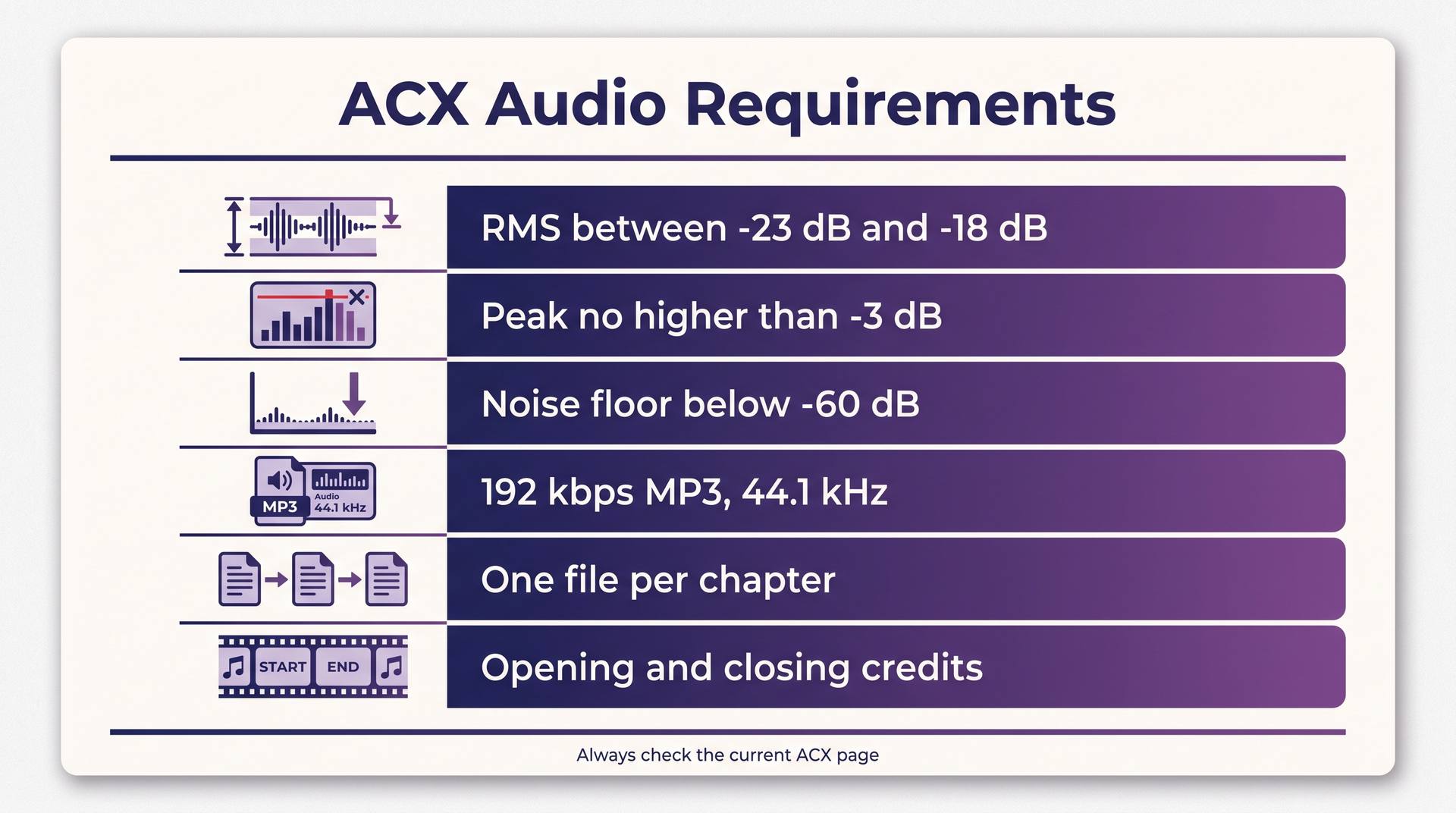
This is where submissions die. ACX's requirements are objective, measurable, and completely unforgiving of a room that hums. Print this and check every file against it before you upload.
- Loudness
- Each file must measure between -23 dB and -18 dB RMS. Too quiet is as much a rejection as too loud, and a whole-book average will not save individual files that drift outside the band.
- Peaks
- No peak may exceed -3 dB. Limiting is fine; clipping is not.
- Noise floor
- Below -60 dB RMS. This is the one that catches home recordings — a fridge compressor, a laptop fan or a road outside the window will fail here even when the voice sounds fine.
- Format
- 192 kbps or higher constant bit rate MP3 at 44.1 kHz, consistently mono or consistently stereo across the whole title. Do not mix the two.
- File structure
- One file per chapter or section, each under 120 minutes, each opening and closing with a short stretch of room tone rather than a hard cut.
- Credits and sample
- A separate opening credits file, a closing credits file, and a retail sample of a few minutes taken from the body of the book — not from the credits.
ACX revises these thresholds occasionally and publishes the authoritative list on its audio submission requirements page. Treat the numbers above as what to test against and the ACX page as what to obey.
Hitting those numbers is partly a hardware question. Noise reduction, de-clicking and a final loudness pass across twelve hours of audio will hold a mismatched desktop hostage for an evening, so if your edits crawl while the processor sits half idle, check your build against a bottleneck calculator before you spend anything on a better microphone.
Review, pricing and the Bounty
You do not set the retail price of an ACX title. Audible sets it from the finished running time — a three-hour book and a nineteen-hour book land in different price bands automatically. That has a practical consequence authors rarely plan for: cutting your manuscript down does not just cost you words, it can drop you into a lower price bracket. A book that finishes just over a band boundary earns more per sale for the rest of its life.
On top of per-sale royalties, exclusive titles are eligible for the Bounty program: when someone signs up as a new Audible member and your title is the first thing they buy, you earn a flat bonus on top of the sale. It rewards authors who drive their own traffic to Audible rather than relying on browse. The current bounty amount is on the ACX royalties page.
Whispersync for Voice is the other quiet upside. When your ebook and audiobook are matched, Amazon offers readers the audio at a reduced add-on price if they already own the Kindle edition, and lets them switch between reading and listening. It converts unusually well, and it only happens if both editions exist under the same title with matching metadata — which is a good argument for getting the KDP listing exactly right before you touch ACX.
Virtual voice and the non-ACX routes
Amazon now offers virtual voice narration directly through KDP for eligible ebooks: you pick a synthetic voice, review the pronunciation, and the resulting audiobook is distributed on Audible without going through ACX's production flow at all. Eligibility and territory coverage have been expanding in stages, so check the KDP dashboard for your specific title rather than assuming.
It is genuinely useful for non-fiction, where a clean, even read is what listeners want. It is weaker for fiction with dialogue, where a flat delivery flattens the characters along with it. If your book leans on voice and performance, produce the audio yourself and upload it as a finished file.
Outside Amazon, Spotify's audiobook program for authors (built on the former Findaway Voices) distributes to Spotify plus a long list of retailers and library systems, and lets you set your own list price rather than inheriting one. Kobo Writing Life and Google Play Books both accept audiobooks too, Google with its own auto-narration option. None of these are available to you if you signed the exclusive ACX agreement — which is exactly why that first decision matters more than the upload.
Mistakes that cost weeks
Mastering the whole book as one file
Loudness is measured per file. Normalise chapter by chapter, then re-measure, or one quiet chapter fails an otherwise finished title.
Recording before treating the room
No plugin reliably rescues a -45 dB noise floor. Blankets, a closet and a microphone away from hard walls beat any amount of post-processing.
Cutting room tone to zero
Files that start and end on absolute digital silence sound wrong stitched together. Leave a fraction of a second of the room at the head and a few seconds at the tail.
Improvising the credits
Opening and closing credits have a required form. Reviewers check them literally, and a missing narrator credit sends the whole title back to the queue.
Picking a sample from the first minute
The retail sample is your only audition. Pull it from a scene that shows range, not from the credits or a chapter of scene-setting.
Signing exclusive on autopilot
The distribution choice is a multi-year term, not a checkbox. Decide it against the channels you actually have, not the royalty percentage alone.
The AI-assisted shortcut
The expensive part of an audiobook has always been the narration hours. AIWriteBook generates narrated audio from your manuscript inside the same project you wrote it in — you pick a voice, the chapters render, and you download them individually or as a merged book, which is exactly the per-chapter file structure ACX wants.
That leaves you with the mastering pass rather than the recording pass: check each file against the loudness and peak numbers above, add the credits, cut a sample, upload. For a backlist title that already exists as text, this collapses a project measured in weeks into an afternoon of quality control.
If you want the craft side of the decision — voice choice, pacing, where synthetic narration convincingly holds a scene and where it does not — our guide to AI audiobook narration goes deeper, and the audiobook generator page shows what the output sounds like before you commit a manuscript to it.
Copy-paste templates
Two of the required files are pure boilerplate, and getting them wrong is the most avoidable rejection there is. Adapt these.
Opening credits
[Book Title]. [Subtitle, if there is one]. Written by [Author Name]. Narrated by [Narrator Name].
Closing credits
This has been [Book Title], written by [Author Name] and narrated by [Narrator Name]. Production copyright [Year] by [Rights Holder]. Thank you for listening.
Pre-upload checklist
Every file between -23 and -18 dB RMS; no peak above -3 dB; noise floor under -60 dB; 192 kbps 44.1 kHz MP3; same channel mode throughout; room tone at head and tail; credits files present; sample pulled from the body of the book.
Run the checklist against the ACX audio requirements page on the day you submit — the thresholds are stable, but the wording of the requirements is what a reviewer works from.
Questions authors keep asking
Publishing itself is free. ACX takes its cut through the royalty split rather than an upfront fee. Costs come from production — a narrator, studio time, or the tools you use to generate and master the audio yourself.
Yes. ACX claims titles from existing Amazon listings, so the Kindle or print edition has to be live first. It also means your audiobook inherits that listing's metadata, which is a reason to fix the title, subtitle and author name before you claim.
Amazon offers its own virtual voice narration through KDP for eligible titles, and ACX accepts finished audio files without auditing how the voice was produced. Disclosure rules and eligibility have been changing, so read the current KDP and ACX terms for your title rather than assuming last year's answer still holds.
Typically a couple of weeks from submission to going on sale, with the queue slower around holidays. If files are rejected you fix and resubmit, and the clock starts again — which is why the pre-upload checklist earns its keep.
Not on ACX. Audible prices the title from its finished running time. If pricing control matters to you, that argues for non-exclusive distribution through channels that let you set a list price.
The order that actually works
Publish the text edition, get the metadata right, decide exclusivity with your own channels in mind, produce the audio, master it against the spec, and only then open the upload page. Authors who reverse that order spend their time in the rejection loop instead of in the catalogue.
Audio is the least crowded shelf a self-published author can reach, and the barrier is a checklist rather than a talent. Work through the rest of the Amazon KDP guide for the listing side, and treat the ACX requirements page as the one source you re-read every time you submit.