

On this page
Start with the royalty math, not the price tag
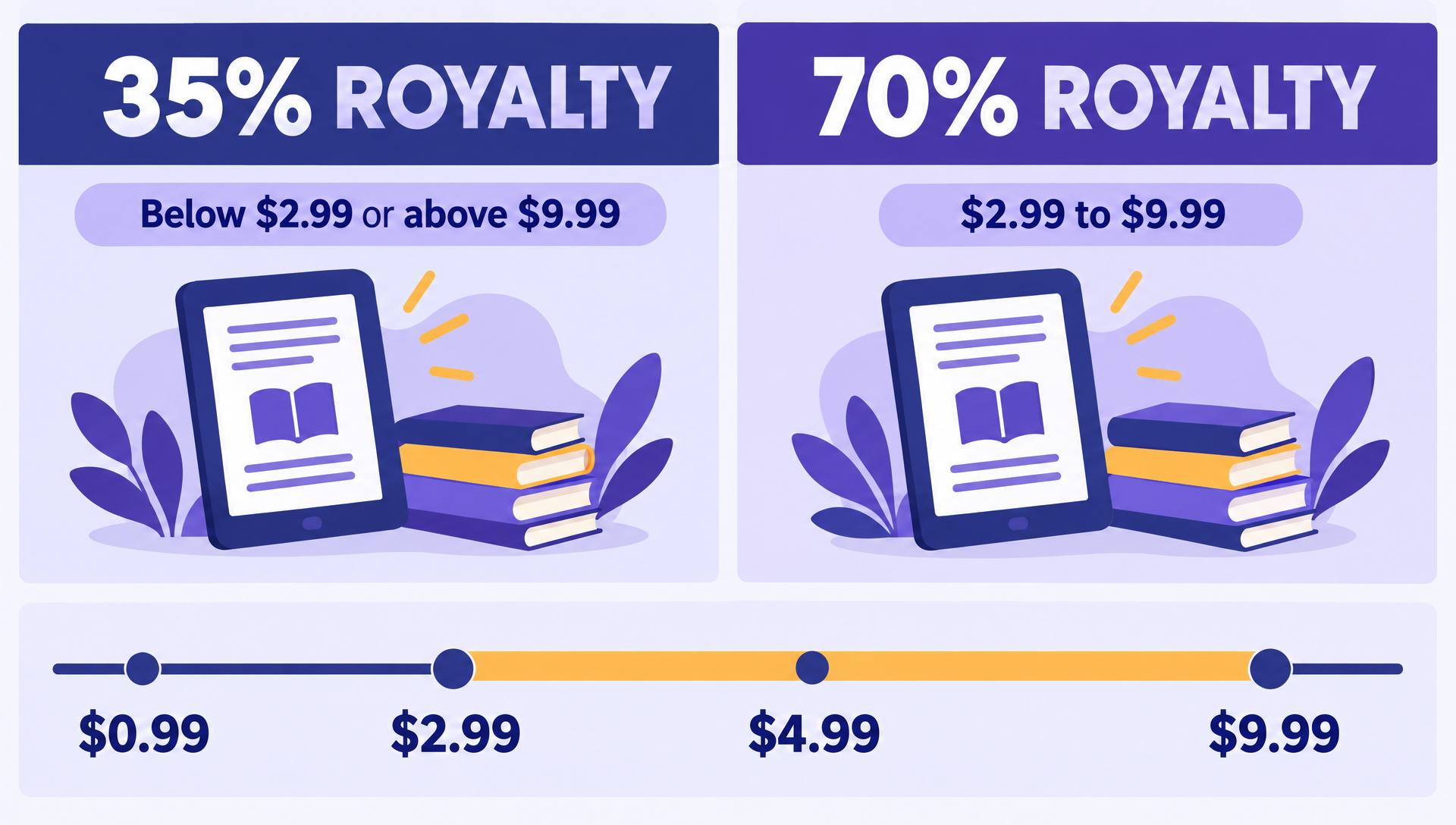
KDP pays ebooks on two tiers. List your book between $2.99 and $9.99 in the US store and you can choose the 70% royalty. Go below $2.99 or above $9.99 and you drop to 35%. That cliff decides more pricing outcomes than any psychology trick.
The 70% tier has a catch most new authors miss: Amazon subtracts a delivery fee based on file size (in the US, $0.15 per megabyte). A text-only novel of 1 to 2 MB barely notices it. A cookbook with 40 photos at 18 MB pays about $2.70 per sale in delivery, which can make 35% the better option. Compress images before you upload.
The cleanest way to see the cliff is to compare two nearby prices. At $2.99 and 70% you keep about $2.07. At $2.98 and 35% you keep $1.04. One cent of price costs you half of your income per copy.
For a full breakdown of KDP Select, Kindle Unlimited page reads and print royalties, see how KDP royalties work.
Try it: what each price actually pays you
Drag the price and set your file size. The calculator applies the US royalty rules above and shows how many sales you need to earn $1,000.
Royalty tier
70% (minus delivery)
You earn per sale
$2.49
Sales for $1,000
402
For print and Kindle Unlimited, run your numbers in the free KDP royalty calculator.
What readers in your genre already expect to pay
Price is a genre signal. A romance at $9.99 looks like a mistake to a Kindle Unlimited reader, and a business book at $0.99 looks like a pamphlet. These are the ranges you see across the Kindle top 100 in each genre for indie titles. Check your own category before you trust any table, including this one.
| Genre | Typical indie price | Why |
|---|---|---|
| Romance | $0.99 to $4.99 | Voracious readers, heavy Kindle Unlimited use, buy many books a month |
| Thriller and mystery | $2.99 to $5.99 | Series readers, first book often discounted |
| Fantasy and sci-fi | $3.99 to $6.99 | Long books, readers accept a higher price for page count |
| Self-help and business | $4.99 to $9.99 | Bought to solve a problem, price signals authority |
| Short reads and guides | $0.99 to $2.99 | Impulse buys, under 20,000 words |
To check your niche, open the category bestseller list, ignore traditionally published books (their prices are set by publishers at $11.99 and up), and note the price of the 20 indie titles nearest the rank you can realistically reach. The category finder helps you pick the categories worth checking.
Length, series position and the price ladder
Within a genre, readers compare price against perceived value, and the first proxy for value is length. A 25,000-word novella at $4.99 earns one-star reviews about price that the same story at $2.99 would never get. Know your word count before you price: run your manuscript through the free word counter.
Series change everything. The first book is your advertisement, so many series authors price it at $0.99 or even free and price books two onward at $3.99 to $5.99, where the 70% tier and read-through do the earning. If 50% of book one readers continue to book two, every cheap first-book sale is worth far more than its royalty. See how to write a book series for building that read-through.
A simple series price ladder
- 1Book 1: $0.99 to $2.99, the entry point
- 2Books 2 and 3: $3.99 to $4.99, full 70% royalty
- 3Later books: $4.99 to $5.99, your most committed readers
- 4Box set of 1 to 3: $7.99 to $9.99, still inside the 70% band
Launch pricing vs evergreen pricing
A launch price and a long-term price do different jobs. The launch price buys velocity: a burst of sales in the first days pushes your Best Sellers Rank up, gets you onto also-bought lists and gives you early reviews. The evergreen price earns money for the next five years.
Launch week
$0.99 to $2.99 for 3 to 7 days, paired with a newsletter push or a promo site. Accept a lower royalty for rank and reviews.
Evergreen
Raise to your genre's normal price once the launch push ends. Return to a discount only for planned promotions.
If you are in KDP Select
A Kindle Countdown Deal lets you discount a 70% book and keep the 70% rate during the deal. Free days are a separate tool for the first book in a series.
Do not leave a book at $0.99 forever because it sold well at launch. A permanent bargain price trains your readers to wait for discounts and earns you 35 cents a copy. Read how Kindle Countdown Deals work before you plan the launch, and fold the price into your wider book launch strategy.
Get the listing right before you touch the price
Price only converts a shopper who already clicked. AIWriteBook generates your KDP keywords, categories and blurb from the finished book, so the listing that the price sits on is working too.
How to test a price without fooling yourself
Amazon has no A/B testing for prices, so every test is a before-and-after test. These steps keep the noise out.
- 1
Pick one book and one change
Change only the price. If you also change the cover, run ads or send a newsletter that week, you will not know what moved sales.
- 2
Measure two weeks before and two weeks after
Record daily units, Kindle Unlimited pages read and royalty from the KDP reports. Two weeks evens out the weekday and weekend swing.
- 3
Compare earnings, not units
Going from $4.99 to $2.99 has to raise sales by roughly 70% just to break even on royalties. More copies sold is not the same as more money.
- 4
Watch rank and read-through
A lower price that lifts rank can grow Kindle Unlimited reads and sales of later books. Add those to the result before you call the test.
- 5
Decide and wait 60 days
Keep the winner for at least two months. Constant price changes make your data useless and can confuse price-matching on other stores.
Worked example: a thriller at $4.99 sells 6 copies a day and earns about $20.70 a day at 70%. At $2.99 it needs about 10 copies a day ($2.07 each) to match. If it sells 9 a day, the price drop lost money even though sales went up 50%.
International list prices
KDP converts your US price into every other marketplace automatically, which gives you prices like £3.87 or €4.13 that look odd to local readers. Set each major market by hand to a clean local price: £2.99, €3.99, CA$4.99, AU$5.99.
Each marketplace has its own 70% band, and in Brazil, Japan, Mexico and India the 70% royalty is only available to books enrolled in KDP Select. Check the band for each store on the pricing page before you save.
If you plan to sell in other languages, price for that market's readers rather than converting. AIWriteBook can translate your whole book into 30+ languages, and each translated edition deserves its own local price research.
Ebook pricing questions
For most indie fiction it is $2.99 to $4.99, the bottom of the 70% royalty band where readers still treat the book as an easy purchase. Non-fiction that solves a specific problem often sells well at $4.99 to $9.99. Your genre's top 100 indie prices are the real answer.
Only for a short time or for the first book in a series. At $0.99 you earn about 35 cents per sale, so it only makes sense when the price buys rank, reviews or sales of later books.
Up to a point. In non-fiction a price far below the category average can signal low quality. In fiction genres with heavy readers, a high price mainly sends shoppers to the next book on the list.
As often as you like; changes usually go live within 72 hours. For clean data, change it rarely and give each price at least two weeks.
Yes. Readers expect the ebook to cost clearly less than print. A common pattern is a $3.99 to $5.99 ebook next to a $12.99 to $16.99 paperback, which also makes the ebook look like a bargain on the product page.
The short version
Price inside the 70% band unless you have a reason not to, match what your genre's indie readers already pay, discount for launches and series entry points, then raise the price and leave it alone. Test one change at a time and judge it on royalties, not units.