

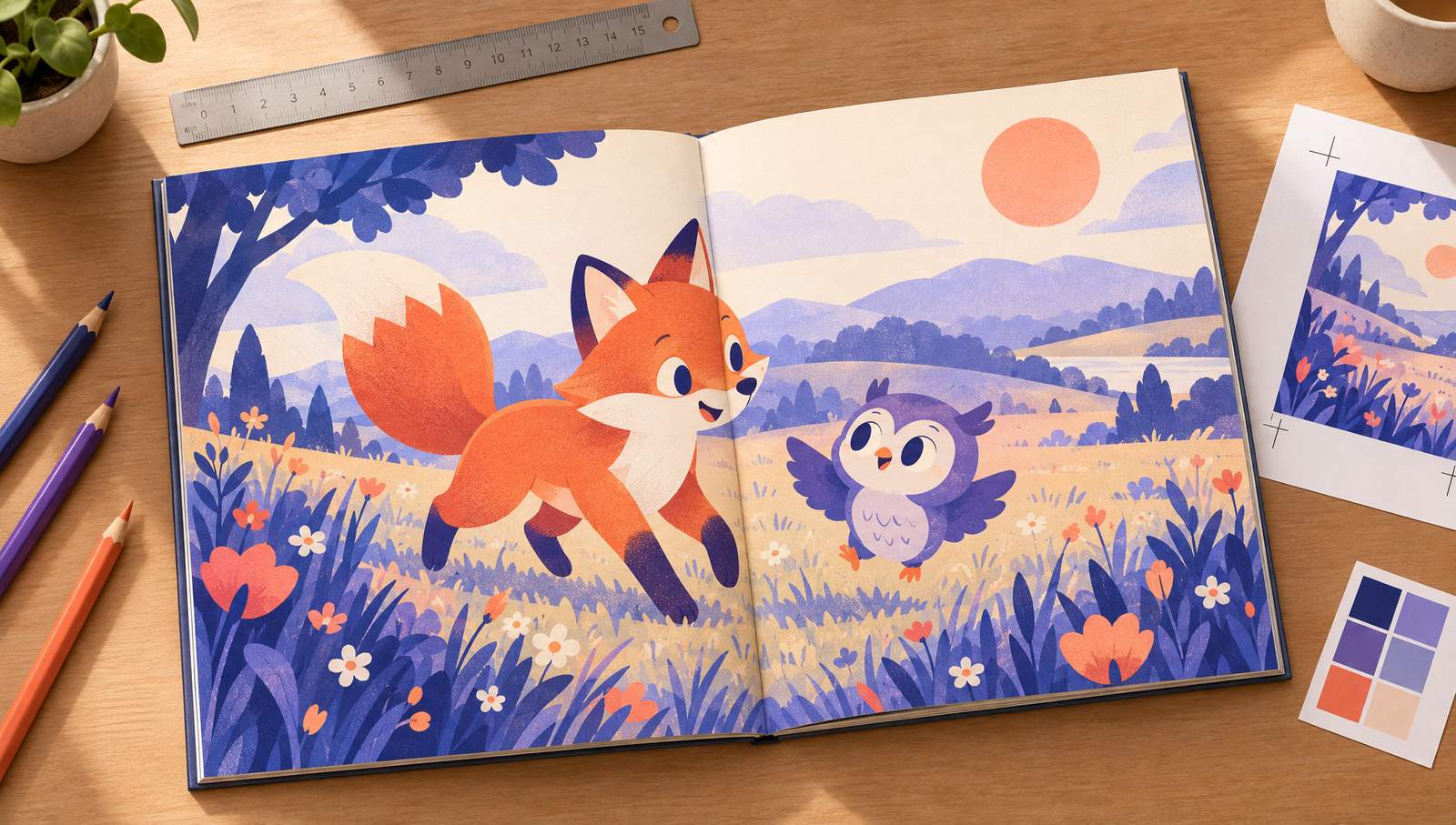
Decide three things before you draw a single page
Trim size, page count and ink type set the canvas for every illustration. Change any of them after the art is done and you are cropping, repainting or re-laying out every spread. Most first picture books that get rejected by KDP fail on these three choices, not on the story.
If the manuscript is not finished yet, start with how to write a children's book and come back here once the text fits on roughly 14 spreads. If the word trim size is new to you, the trim size glossary entry explains it in one minute.
Picture book trim sizes that work on KDP
KDP paperbacks top out at 8.5 inches wide, so the classic big square picture book from the bookstore shelf is not on the menu. These are the trims picture book authors actually use, with the PDF page size you export once bleed is added.
| Trim | Best for | PDF page with bleed |
|---|---|---|
| 8.5 x 8.5 in | The default square picture book. Room for big art and a line or two of text per page. | 8.625 x 8.75 in |
| 8 x 10 in | Portrait picture books with tall scenes, characters standing full height. | 8.125 x 10.25 in |
| 8.25 x 8.25 in | A square book a little smaller and cheaper to ship, same feel as 8.5. | 8.375 x 8.5 in |
| 8.25 x 6 in | Landscape books where spreads become wide panoramas: roads, rivers, races. | 8.375 x 6.25 in |
| 8.5 x 11 in | Activity, coloring and early learning books with lots of white space. | 8.625 x 11.25 in |
| 6 x 9 in | Early readers and chapter books with spot illustrations, not full-bleed art. | 6.125 x 9.25 in |
Bleed adds 0.125 inch to the width and 0.25 inch to the height of every page. Any trim wider than 6.12 inches or taller than 9 inches is a large trim and costs more per page to print.
Picture book calculator: file size, print cost, royalty
Pick a trim, page count, ink and list price. The numbers use KDP's US paperback print cost formula and royalty rates, so you can see what a book earns before anyone draws it.
Your interior PDF
8.625 x 8.75 in
2588 x 2625 px canvas at 300 DPI
- Inside margin (gutter): 0.375 in
- Outside margins: at least 0.375 in
Per paperback sold on Amazon.com
$3.63 royalty
- Print cost: $3.56
- Royalty rate: 60% of list price, minus print cost
- Lowest list price KDP accepts: $7.12
- KDP hardcovers start at 75 pages, so this length is paperback only on KDP.
Print cost is $1.00 per book plus a per-page rate: premium color 0.065 regular trim or 0.08 large trim, standard color 0.0255 or 0.0402. Royalty is 60% at $9.99 and above, 50% below, minus print cost. Expanded distribution and other marketplaces use different rates.
The 32-page picture book, mapped
Thirty-two pages is the industry standard because it prints from one large press sheet. Here is how those pages split between front matter, story spreads and the closing page.
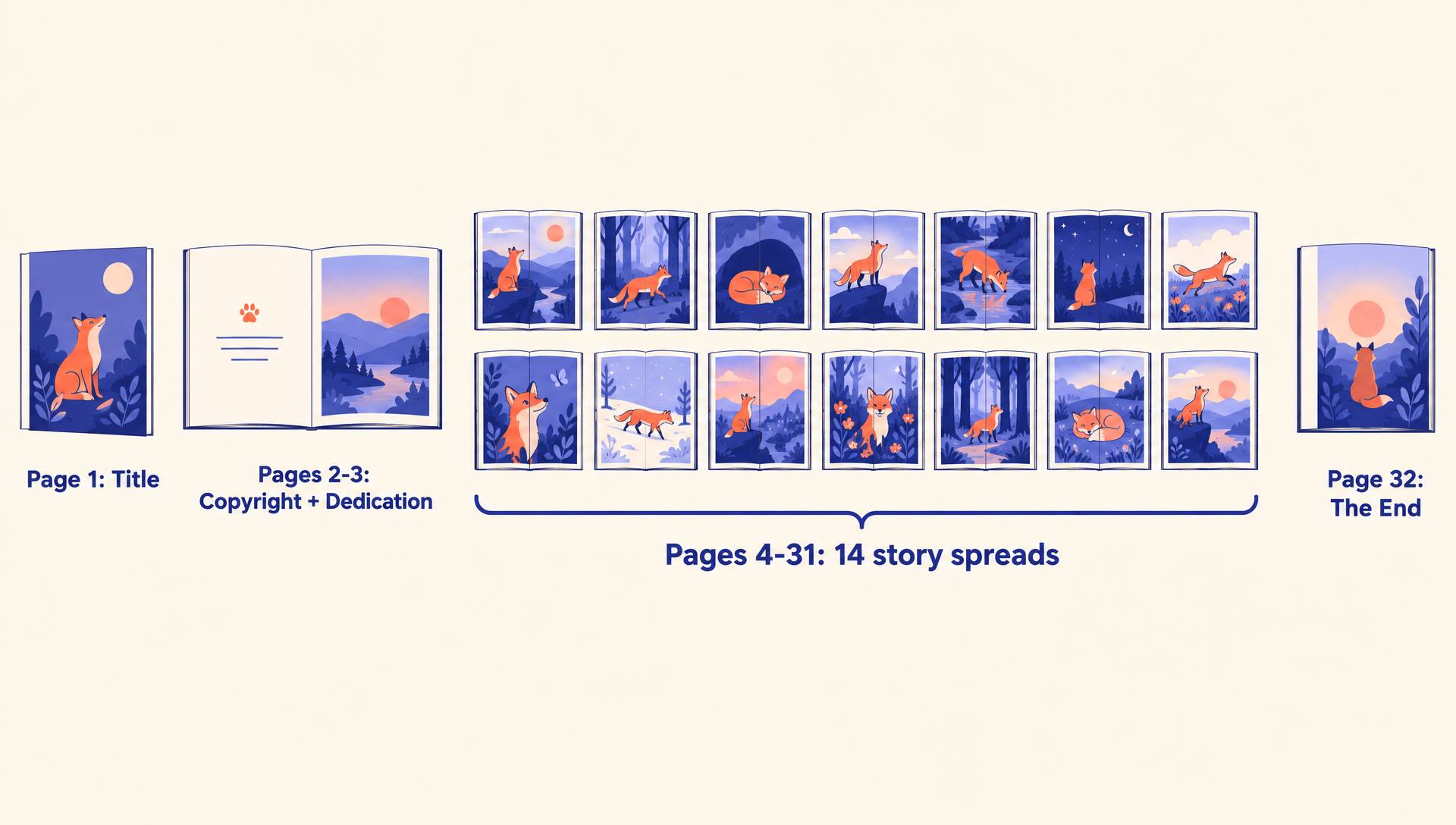
Fourteen spreads is your storyboard. Write one beat of the story per spread, and put page turns where the reader should want to know what happens next. Text that runs long is the usual reason a book grows to 40 pages, and every extra page adds print cost.
Bleed, safe zone and gutter
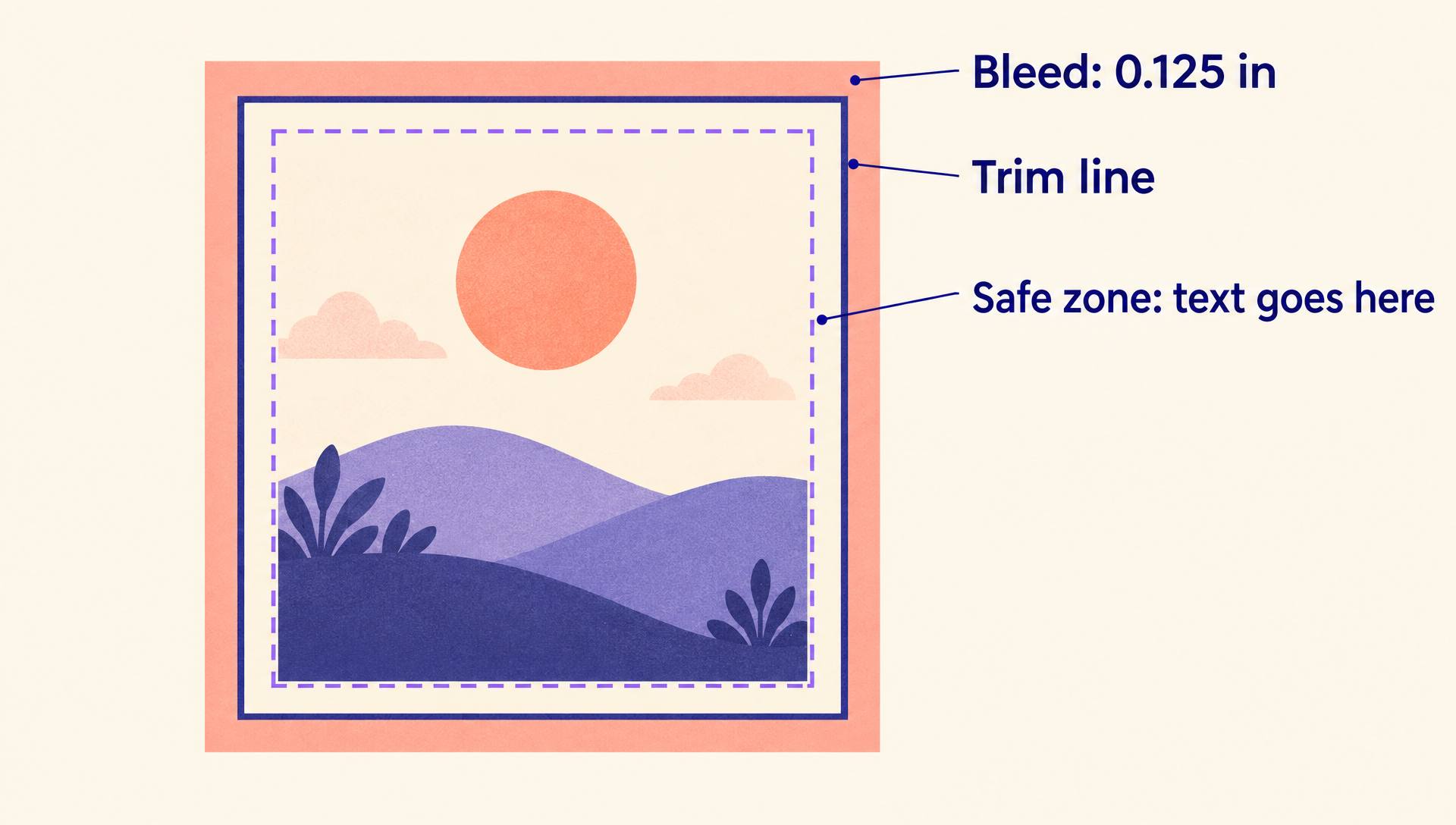
Art that touches the edge of the page has to extend past it, because the paper is cut after printing and the cut drifts by a fraction of an inch.
- Extend background art 0.125 inch past the trim on the top, bottom and outside edge of every page.
- Keep text and faces at least 0.375 inch inside the trim on the outside edges, so the cut never clips them.
- Keep important art and text out of the inside margin, 0.375 inch for books of 24 to 150 pages, where the binding swallows the page.
- Never put a character's face across the middle of a spread. Split the scene so each half reads on its own.
How to format a children's book for KDP in 7 steps
The order matters: set the document up for print first, then place the art and text, then export and check.
- 1
Lock trim, ink and page count
Choose the trim size, premium or standard color, and a page count in multiples of two. For a full color picture book, premium color is the usual choice and allows books as short as 24 pages.
- 2
Create the document at the bleed size
Set each page to the trim plus 0.125 inch in width and 0.25 inch in height, at 300 DPI. For an 8.5 x 8.5 book that is 8.625 x 8.75 inches, a 2588 x 2625 pixel canvas.
- 3
Add guides for trim, safe zone and gutter
Mark the trim line, a safe zone at least 0.375 inch inside it, and a 0.375 inch inside margin. Keep every word and every face inside those guides.
- 4
Place the art as single pages
Paint spreads if you like, but split each spread into its left and right page before export. KDP wants one page per PDF page, in reading order, starting with page 1 on the right.
- 5
Set the text in a readable size
Use one or two simple typefaces at a size a parent can read aloud from arm's length, usually 14 to 24 points. Put text on calm areas of the art, or on a soft panel.
- 6
Build the cover to the exact spine width
Download KDP's cover template for your trim and page count. A 32-page book has a spine too thin for text, since KDP only allows spine text above 79 pages.
The KDP cover calculator guide walks through spine width and the template, and the book cover generator makes front cover art to start from.
- 7
Export, upload and check the previewer
Export a PDF with fonts embedded and images at 300 DPI, choose bleed in KDP's interior settings, then page through the online previewer and fix every flagged page before you publish.
The Kindle version: fixed layout, not reflowable
A picture book cannot reflow like a novel, because the words belong in a fixed place on the art. On Kindle it becomes a fixed layout ebook: every page keeps its design, and readers zoom into text with pop-ups on tablets and phones.
Kindle Kids' Book Creator has been retired, so the tool for this today is Kindle Create, which imports a PDF as a fixed layout book and lets you add text pop-ups. For how fixed layout compares with Print Replica and reflowable, and what each costs in delivery fees, read Print Replica vs reflowable.
Want a hardcover picture book?
KDP hardcovers need at least 75 pages and print only in premium color, so a standard 32-page picture book is paperback only on KDP. Authors who want a hardcover at picture book length usually print it through IngramSpark and keep the paperback on KDP. The trade-offs between the two are in KDP vs IngramSpark.
Formatting mistakes that get picture books rejected
Uploading spreads as one page
A two-page spread uploaded as a single wide page fails review. Split every spread into separate left and right pages.
Art that stops at the trim line
Without bleed, the cut leaves thin white slivers along the edge. Extend backgrounds past the trim on every bleed page.
Text in the gutter or near the edge
Words that sit closer than 0.375 inch to the trim or the spine get flagged, or get cut and swallowed in print.
Low resolution art
Images exported at 72 DPI look fine on screen and blurry in print. Work at 300 DPI at the final printed size.
Choosing standard color for a short book
Standard color needs at least 72 pages. A 32-page picture book has to be premium color.
Picking a trim KDP does not print
Large square picture book sizes from bookstores are wider than KDP's 8.5 inch maximum. Choose the trim before the art, not after.
Skip the blank canvas
Write and illustrate the book in one place
AIWriteBook's Visual Books turn your story into a picture book: you write or generate the text, pick an illustration style, and get a page by page book with consistent characters across every spread.
You keep editing until each page reads right, then export print-ready files and a Kindle edition to upload to KDP.
Want to try it on one idea first? The picture book maker walks you through a single story, and the page for children's book creators shows what authors build with it.
A 32-page plan you can copy
Fill this in before you sketch. The copyright page generator writes page 2 for you, and the author bio generator drafts the closing page.
| Pages | What goes there |
|---|---|
| 1 | Title page: title, author and illustrator names, a small spot illustration. |
| 2-3 | Copyright page on the left, dedication on the right, or a quiet opening scene behind both. |
| 4-5 | Spread 1: meet the main character in their ordinary world. |
| 6-9 | Spreads 2-3: the want or the problem appears. |
| 10-19 | Spreads 4-8: tries and fails, each attempt a little bigger than the last. |
| 20-25 | Spreads 9-11: the worst moment, then the turn. |
| 26-29 | Spreads 12-13: the solution and what it costs or changes. |
| 30-31 | Spread 14: the quiet ending, often an echo of spread 1. |
| 32 | The end, or an about the author and illustrator page. |
Children's book formatting FAQ
What is the best trim size for a children's book on KDP?
For a full color picture book, 8.5 x 8.5 inches is the most common choice. 8 x 10 suits portrait art, 8.25 x 6 suits landscape art, and 6 x 9 suits early readers with spot illustrations.
How many pages should a picture book have?
32 pages is the standard, with about 14 story spreads. KDP accepts premium color paperbacks from 24 pages, and you can go to 40 or 48 if the story needs it, at a higher print cost.
Do I upload spreads or single pages to KDP?
Single pages. Design in spreads if it helps, but the interior PDF must have one page per PDF page, in reading order.
What bleed does KDP need for a children's book?
Add 0.125 inch to the page width and 0.25 inch to the page height, so art extends 0.125 inch past the top, bottom and outside edge. Then select bleed when you upload the interior.
Can I publish a 32-page picture book as a KDP hardcover?
No. KDP hardcovers need at least 75 pages. Most picture book authors sell the paperback on KDP and print the hardcover through IngramSpark.
How do I make the Kindle version of a picture book?
Import the print PDF into Kindle Create as a fixed layout book and add text pop-ups so the words are readable on phones and tablets. Kindle Kids' Book Creator is retired.
Format first, then draw
Pick the trim, ink and page count, set up a bleed canvas at 300 DPI, plan 14 spreads, and export single pages. Do those in that order and a picture book goes from sketch to KDP without a single rejected file.
More publishing guides live in the Amazon KDP hub.