


Why a newsletter is a book in slow motion
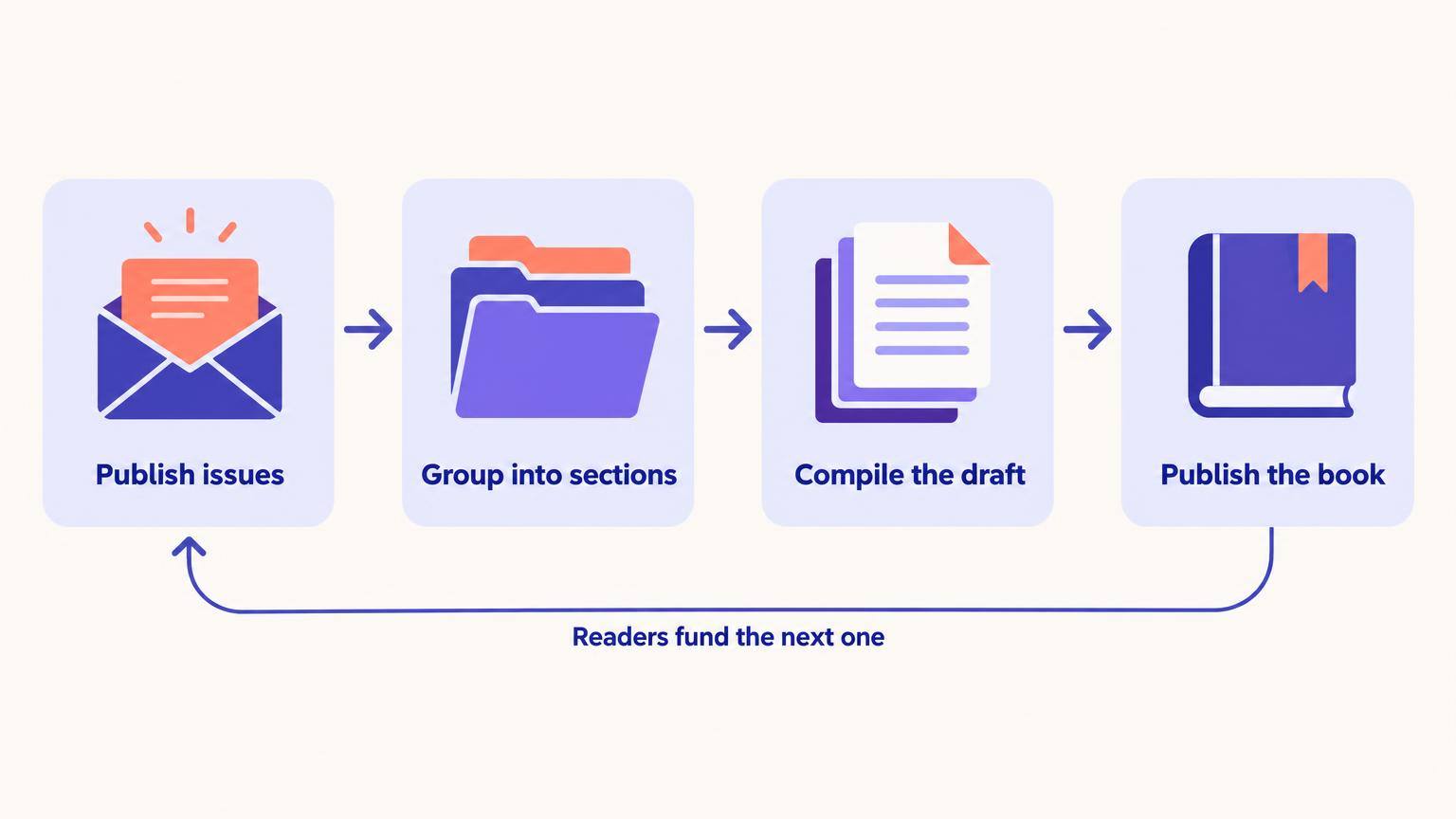
A weekly 1,500-word issue adds up to roughly 75,000 words a year. That is a full nonfiction book or a short novel, written under the one condition most first drafts never get: a real reader is waiting for the next part. Deadlines you set for yourself slide. Deadlines with subscribers attached do not.
Substack is not the only newsletter platform, but it is the one built around this habit. Posts live on a public archive, readers can subscribe free or paid, and the app's Notes feed and recommendations help strangers find you. In 2021 Salman Rushdie used it to serialize a novella, The Seventh Wave, in weekly installments for paying subscribers of his newsletter Salman's Sea of Stories. You do not need his name for the model to work. You need a topic narrow enough that every issue is obviously a piece of the same book.
What Substack costs and what you keep
- Free to publish, however large the list gets
- On paid subscriptions Substack takes 10%, and the card processor takes its own fee on top
- Your posts and your subscriber list can be exported from the dashboard
- Paid tiers run monthly and annual plans; you set the price
The second payoff is evidence. Open rates, replies and the issues people share tell you which chapters carry the book and which ones readers skim. Few authors get that feedback before the manuscript is finished. If you are still deciding whether email in general deserves your time, our email marketing guide for authors covers lists that live outside Substack too.
The three-shelf rule
The authors whose newsletters never turn into books usually wrote good issues. The issues just did not belong to anything. Before you write each one, decide which of three shelves it goes on, and tag it in Substack's sections so the decision is visible later.
About 60% of issues
Chapter shelf
Self-contained pieces of the book: an argument, a method, a scene, a story with a point. Written at book quality from day one, with the next chapter's question left open at the end.
About 25%
Scaffold shelf
Research notes, reader polls, rough timelines, 'I tried this for a month' reports. These never go in the book as written, but they feed the chapters and keep you honest about facts.
About 15%
Porch shelf
Community posts, thank-yous, announcements, links you liked. Good for the relationship, useless for the manuscript. Keep them short so they do not eat writing time.
The percentages are a target, not a law. What matters is that by month three you can open the Chapter section and see a table of contents forming. If you cannot, the newsletter is drifting into a blog.
A 12-week plan from blank publication to working draft
Twelve weeks is long enough to learn what readers respond to and short enough that you keep the book in view. The plan assumes one Chapter issue a week plus one short Scaffold or Porch note.
Week 1
Name the book, not the newsletter
Write a working title and a one-paragraph promise of what the finished book gives a reader. Put that promise on your About page. The book title generator is a fast way to test ten options before you pick one.
Week 1
Draft a loose outline
Ten to fifteen chapter headings, each phrased as the question that chapter answers. You will reorder it, and that is fine. The free outline generator gives you a starting skeleton to argue with.
Weeks 2 to 4
Publish three Chapter issues from the middle
Not chapter one. Middle chapters are where your expertise or story is strongest, and they make better first impressions than an introduction that only promises things.
Weeks 5 to 8
Read the signals and adjust the outline
Note which issues got replies, shares and new sign-ups in the following days. Promote those topics to full chapters. Demote the quiet ones to Scaffold or cut them.
Weeks 9 to 11
Fill the gaps
Write the chapters the outline needs but readers would not request: the setup, the definitions, the transitions. Some of these can stay private drafts instead of issues.
Week 12
Export and compile
Export your posts, pull the Chapter section into one document in outline order, and read it straight through for the first time. This is your working draft.
Worked example: 14 issues become 9 chapters
Here is how a compile actually looks. The newsletter below is an illustration: a gardening writer publishing weekly about growing food on a small balcony. After fourteen weeks the Chapter section holds fourteen posts. The book needs nine chapters.
| Newsletter issue | What happened in the compile | Book chapter |
|---|---|---|
| #3 Why my tomatoes split | Kept almost as written; the most shared issue | Ch. 5 Watering |
| #1 Welcome + #2 My first balcony | Merged and cut by half | Ch. 1 Start small |
| #6 Reader poll results | Turned into a sidebar inside chapter 2 | Ch. 2 What to grow |
| #8 and #11 on containers | Combined; contradictions fixed | Ch. 3 Pots and soil |
| #9 A rant about garden centres | Cut; it was a Porch post in disguise | None |
| No issue | Written fresh; nobody asks for this but the book needs it | Ch. 9 Planning next season |
Three patterns show up in almost every compile. Early issues get merged, because you were still finding your voice. Popular issues survive nearly untouched. And at least one chapter has to be written from scratch, because a newsletter rewards topics readers ask about while a book also needs the parts that hold the argument together.
Serializing fiction on Substack
Fiction works on Substack, but the rhythm is different. Each installment needs its own small payoff and an ending that makes the next email feel urgent. Our guide to writing cliffhangers is worth reading before episode one, because a soft chapter ending costs you more in a serial than in a novel.
Decide early what stays free. A common split is the first few episodes free, the rest for paid subscribers, with the full archive unlocked when the book comes out. Readers who paid for the serial are often the first to buy the finished edition, especially if the book adds something the emails did not: an epilogue, a map, a revised ending.
Check this before you plan an Amazon release
KDP Select and Kindle Unlimited require the ebook to be exclusive to Amazon. If the whole story is readable for free on your newsletter, the ebook is not eligible. Either take the serial down before you enroll, keep most of it behind the paid tier, or plan a wide release instead. Our breakdown of KDP Select pros and cons walks through the trade-off.
The AI-assisted compile
The slow part of a newsletter-to-book project is not the writing. It is the week you lose copying forty posts into one file, fixing headings, and realising the issue from March contradicts the one from June. That part can be fast.
- 1
Export your posts from the Substack dashboard and paste the Chapter section into a Word document, one post per chapter heading, in outline order.
- 2
Upload that .docx to AIWriteBook. The importer finds the chapters and shows a review screen where you rename, reorder, split or combine them before anything is saved. Your text is not rewritten.
- 3
The import learns your writing style from your own prose, so when you generate the chapters the newsletter never covered, they come out in the voice your subscribers already know.
- 4
Use the chapter chat to ask for specific fixes, like smoothing a transition or removing repetition between two merged issues, and accept or reject each change in the diff.
That is the whole point of the manuscript import: you keep every sentence you already wrote and only fill the holes. For a closer look at how the voice matching works, see the writing style builder.
Have a folder of issues already?
Import them and see your book's table of contents in minutes.
Mistakes that break the pipeline
- Writing about writing the book
- Progress updates feel productive and give readers nothing. One a month is plenty. Everything else should be the book itself.
- Chasing the trending topic
- An issue about whatever is in the news can spike sign-ups and then sit in the archive with no chapter to belong to.
- Leaving the book unnamed until the end
- Subscribers who know a book is coming open more issues and buy on launch day. Say the title out loud early.
- Editing each issue to death
- Issues need to be good, not final. Save line editing for the compiled draft, where you can see the whole shape. A tool like the grammar checker catches the small stuff in seconds.
- Forgetting that Substack is rented land
- Export your list every few months. Platform rules and features change; the email addresses are yours.
Templates you can copy
Three short templates. Open each one and adapt it.
Chapter issue skeleton
- Subject: the chapter's question, in plain words
- Opening: one concrete moment, scene or number
- Body: the answer, in three to five sub-points
- Close: the question the next chapter answers
- Footer: 'This is part of [Book title]. Reply with what is missing.'
Chapter-ready checklist
- Would it make sense to someone who never read the newsletter?
- Is the topic already covered by another issue?
- Are dated references (this week, last month) removed?
- Does it end by opening the next question?
- Is it tagged in the Chapter section?
Launch announcement issue
- Subject: The book you helped write is out
- Thank readers for the specific issues that shaped it
- Say what is new in the book that the emails did not have
- One link to buy, one ask to review
- A preview of what the newsletter covers next
For the launch itself, the launch email sequence generator drafts the follow-up emails from your book description, and an author page gives readers one link with your books and a sign-up form.
Substack for authors: FAQ
Both. Nonfiction is easier because each issue can stand alone. Fiction needs a serial rhythm, with each installment ending on a reason to open the next email, and a plan for which episodes stay free.
No. A free newsletter gives you the deadline, the feedback and the launch list. Paid tiers help fund the writing time, but many authors keep the newsletter free and sell the book.
Yes, the rights to your posts stay with you. The catch is KDP Select: if the full text is free online, the ebook cannot be enrolled in Kindle Unlimited. Revise and expand the compiled draft so the book offers more than the archive anyway.
Most chapter issues land between 1,200 and 2,500 words. Longer pieces can be split into two parts. Shorter notes usually belong on the Scaffold or Porch shelf.
There is no threshold. A few hundred engaged readers who opened most of the chapter issues will do more on launch day than thousands who signed up for one viral post.
The short version
Pick a book-shaped topic, sort every issue onto a shelf, and publish the middle chapters first. Read the signals, fill the gaps, then compile in week twelve instead of someday.
A newsletter is one channel in a bigger plan. For pricing, launches, ads and reviews, keep going with our book marketing guide, or see how the same audience-first habit works on a visual platform in Instagram for authors.