


In this comparison
Why the choice matters more than it looks
Both apps turn a Word manuscript into an EPUB for ebook stores and a print-ready PDF for paperbacks. Both are one-time purchases with free updates and a 30-day refund window. On paper they are the same product.
The differences show up later. You will open this app for every book, every reprint and every typo fix for years, so the machine it runs on, the way it handles a series, and how it treats each store matter more than any single feature. Switching halfway through a ten-book series means re-styling every back list title.
One more thing before you read other reviews: Atticus is made by Kindlepreneur, the site behind many of the most-read Vellum reviews. That doesn't make those reviews wrong, but read them knowing who wrote them. We don't sell either app.
Head-to-head: 12 things that differ
Everything below comes from vellum.pub, the Vellum help center and blog, atticus.io and the Atticus help center, checked in September 2026.
| What differs | Vellum | Atticus |
|---|---|---|
| Price | $199.99 Ebooks, $249.99 Press | $147, ebook and print included |
| Computers | Mac only, macOS 13 or newer | Windows, Mac, Linux, Chromebook |
| How it runs | Native desktop app | Browser app that also works offline |
| Try before paying | Free download: build and preview, pay to generate files | 30-day money-back guarantee |
| Import | Word .docx only | .docx from Word or Google Docs |
| Writing inside the app | Editing yes, but built for a finished manuscript | Full writing editor with goals and word counts |
| Design range | Curated built-in styles, few choices to make | 17+ templates, 1,200+ combinations, custom theme builder |
| Print options | Press only: 24 trim sizes, large print, hardcover, full bleed | Print PDF with trim presets, large print support |
| Ebook output | Separate files per store (Kindle, Apple, Kobo and more) plus a generic EPUB | One EPUB for every store |
| Store-aware links | Store Links point each edition to its own store | Universal book links through built-in BookLinker |
| Collaboration | One license per person, no shared editing | Invite co-authors and editors into the project |
| AI writing | None | None (ProWritingAid integration for grammar) |
Both export a Word file too, but only as an editable manuscript. Neither Word export keeps the finished book design.
What you actually pay
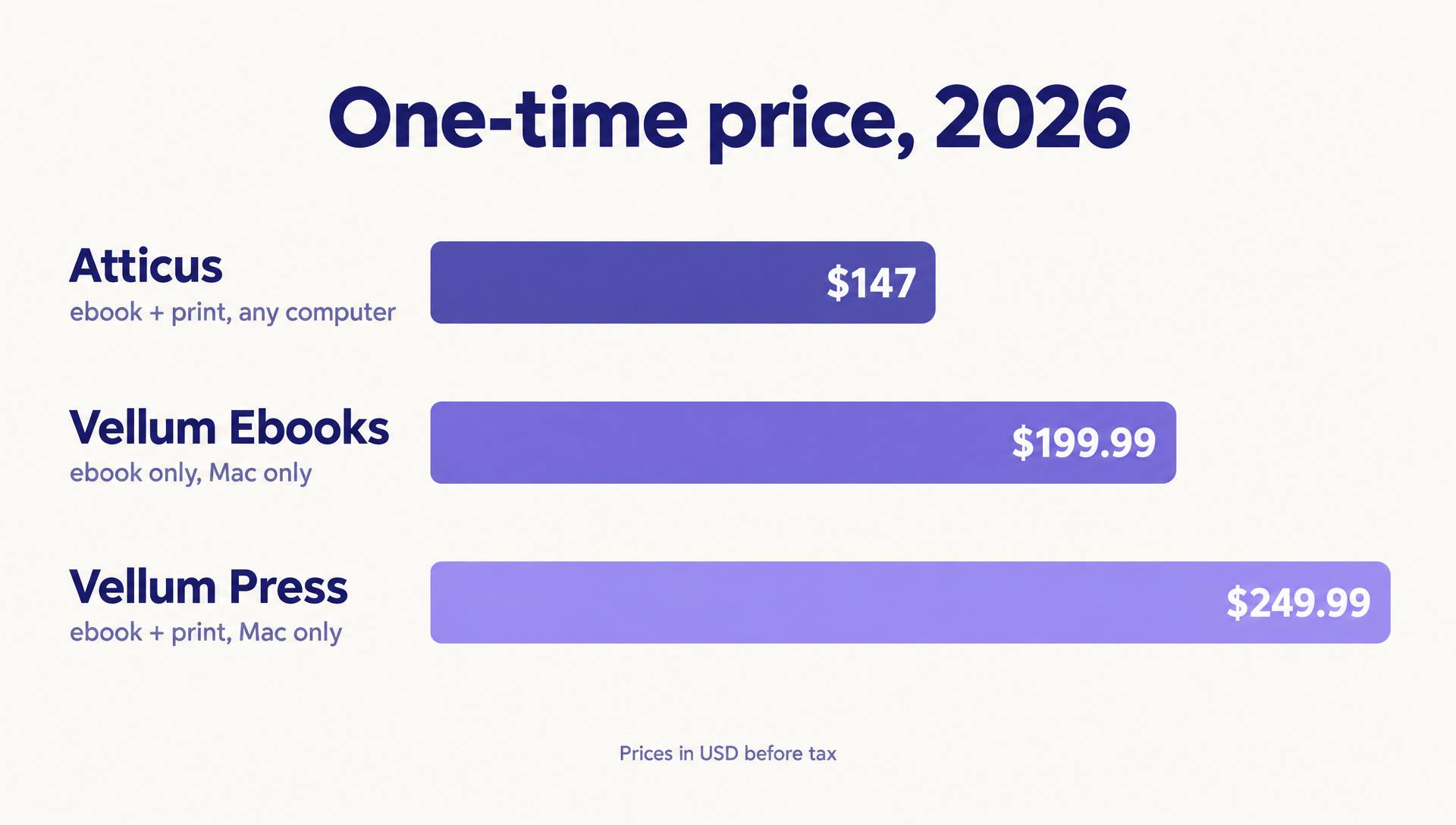
Atticus is the cheaper sticker at $147, and it already includes print. Vellum splits in two: Vellum Ebooks at $199.99 makes ebooks only, and Vellum Press at $249.99 adds paperbacks and hardcovers. If you buy Ebooks and later want print, the upgrade to Press is $69.99, so buying Ebooks first ends up costing $269.98 in total, $20 more than buying Press on day one. Vellum says to contact support within 30 days of purchase for a price adjustment instead.
The hidden line item is the computer. Vellum needs a Mac with macOS 13 or newer. If you don't own one, the real price of Vellum is a Mac or a monthly rented Mac in the cloud, and at that point Atticus wins on cost for almost everyone.
Per book, both get cheap fast. Over five books, Atticus works out to about $29 a book and Vellum Press to $50. Compared with paying a formatter for every title, both pay for themselves by the second book.
The four questions that decide it
Skip the feature lists. These four questions settle Vellum vs Atticus for nearly every author, in this order.
1. What computer do you write on?
No Mac means Atticus, and nothing else on this page changes that. On a Mac, keep going.
2. Do you need paperbacks?
Ebook-only authors can compare Vellum Ebooks at $199.99 with Atticus at $147. Print means Vellum Press at $249.99, or Atticus at the same $147.
3. Do you want choices or defaults?
Vellum is loved because its built-in styles look good with almost no tweaking. Atticus gives you more design control and a theme builder, which is great if you enjoy it and a time sink if you don't.
4. Where do you write the book?
If you want to draft and format in one place, Atticus has a real writing editor. Vellum expects the manuscript to arrive finished from Word, Scrivener or Pages.
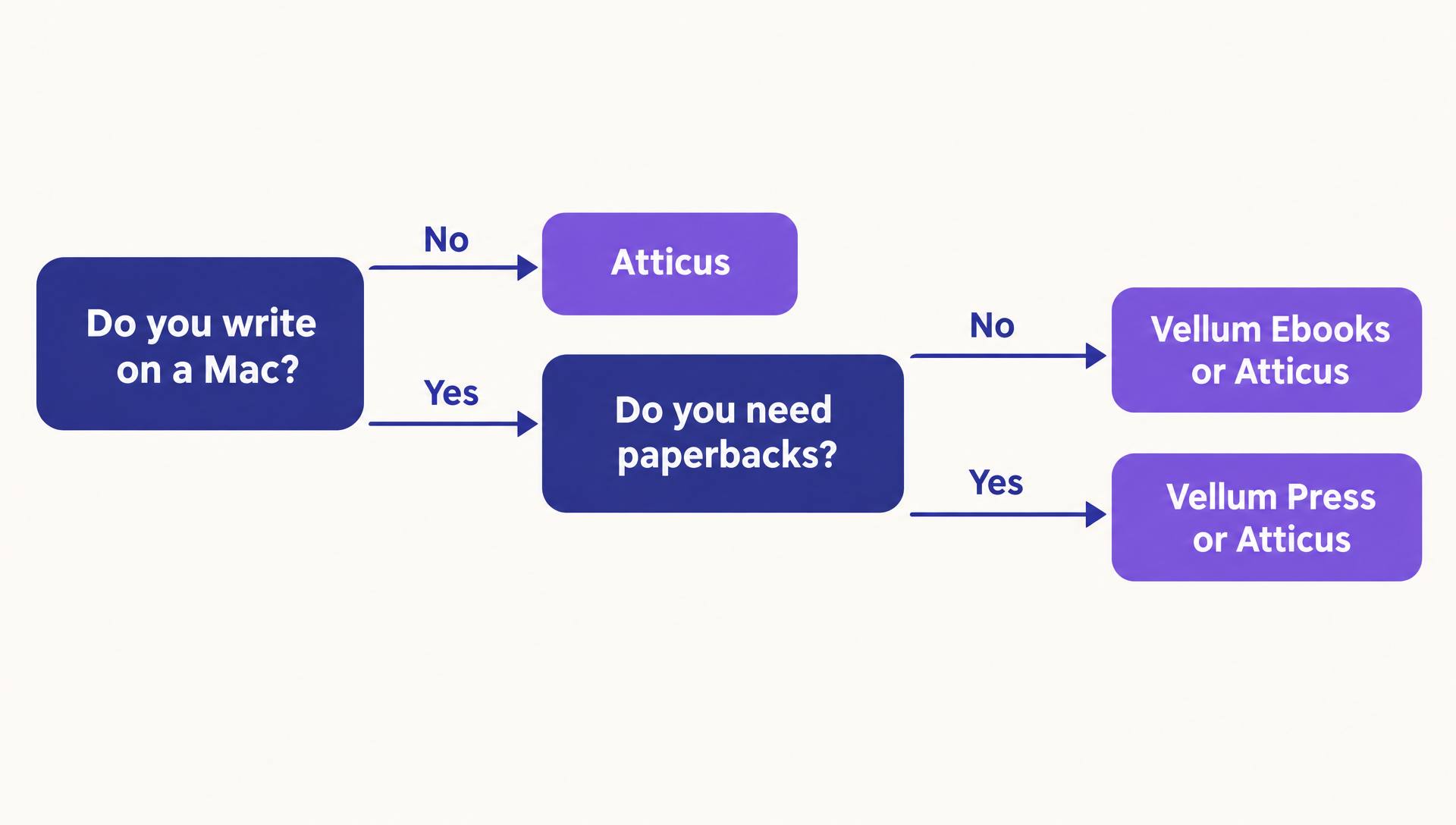
Try it: your answer in three clicks
Answer three questions and get a recommendation with the price attached.
Formatting the same manuscript in each
Here is the path a finished 80,000-word novel takes through each app. The steps look similar; where you spend the time does not.
In Vellum
- 1Save the manuscript as .docx with chapter titles as headings, then import it.
- 2Check the chapter list Vellum detected and fix any split or merged chapters.
- 3Pick a book style and a heading preset, then preview it on phone, tablet, e-reader and print pages.
- 4Add store identifiers so each edition links to its own store.
- 5Generate: one pass writes the Kindle, Apple, Kobo and generic EPUB files plus the print PDF.
In Atticus
- 1Import the .docx, with every chapter title set to Heading 1 and a page break between chapters.
- 2Review the chapters, front matter and back matter in the sidebar.
- 3Pick a template or build your own theme: fonts, headings, scene breaks and drop caps.
- 4Choose the trim size and check the device previews for ebook and print.
- 5Export an EPUB for every store and a print PDF, from any computer you are signed in on.
Whichever you choose, clean the Word file first. Both importers read heading styles, so a chapter title typed in bold instead of Heading 1 becomes body text in either app.
For KDP's own margin, bleed and trim rules, which apply no matter which app you use, see our KDP formatting guide.
Common mistakes when choosing
Buying Vellum Ebooks "to save money"
If there is any chance you will want a paperback, Ebooks plus the $69.99 upgrade costs more than Press. Decide on print before you buy.
Assuming Atticus is a writing assistant
Atticus is a writing editor and formatter with no AI drafting. We checked its update log through September 2026 and found nothing on AI. Our fact-check on Atticus and AI has the details.
Formatting before the text is final
Every late edit means re-checking page breaks and widows in print. Finish line editing first, then format once.
Ignoring where you'll be in two years
A Vellum license is tied to you and runs on a Mac. If your next computer might be a PC, that $249.99 will not come with you.
The AI-assisted shortcut
Both apps assume the hard part is done: a finished manuscript sitting in Word. For many authors that is exactly where they are stuck. Neither Vellum nor Atticus will help you draft, revise a chapter or keep a series consistent.
AIWriteBook puts writing and formatting in one place. You draft or import your manuscript, edit it with the chapter AI chat (every change arrives as a diff you accept or reject), and then the Format step typesets it in the browser. If your book is already finished, the book formatter also takes a .docx directly, so you can skip the writing part entirely.
What the Format step does today: five interior themes, 12 embedded body fonts, nine trim sizes from 5 × 8 to 8.5 × 11, a front and back matter builder, a live preview, and a preflight check that names what a store would reject. It outputs a PDF/X-1a print interior for KDP and IngramSpark, a wrap cover with the spine calculated from your page count, an EPUBCheck-validated EPUB and a DOCX. Unlocking a book costs 200 credits once on the Pro and Ultra plans, and re-generating afterwards is free.
Where Vellum and Atticus still win, honestly: Atticus has far more templates and a full theme builder, and Vellum has 24 print trims, hardcovers and per-store ebook files with Store Links. If formatting is the only job you need done and you want maximum design control, buy one of them. If you also need to write, edit and publish the book, a single tool saves you the hand-off.
Write it and format it in one place
Start with your draft or a blank page. Your first book is free to start.
Three authors, three answers
The Windows romance author with a 12-book backlist
AtticusVellum is off the table without a Mac. Atticus at $147 covers ebook and print for all 12 books, and a single custom theme keeps the series looking consistent. Publishing wide? Our Kobo publishing guide covers the next step.
The Mac literary novelist who wants a hardcover
Vellum PressVellum Press handles hardcover, 24 trim sizes and full-bleed pages, and its default styles look finished with little fiddling. For $249.99 once, it's the easy call.
The first-timer on a Chromebook with half a draft
Finish the draft firstFormatting is a later problem. Finish the draft first: in Atticus's editor, or in AIWriteBook, where the same book can also be formatted and exported without buying a second app.
A settings template for your first book
These starting settings work in either app for a typical paperback novel. Change them only for a reason.
- Trim size
- 6 × 9 in for most fiction, 5.5 × 8.5 in for shorter or literary books
- Body text
- A serif font at 11 to 12 pt with the theme's default line spacing
- Chapter openings
- New chapters start on a right-hand page for print
- Scene breaks
- Use the theme's ornament, never a blank line alone
- Front matter
- Title page, copyright page, then an optional dedication
- Back matter
- Acknowledgments, About the Author, and "Also by" with links
Need a copyright page? Our free copyright page generator writes one you can paste into either app. Deciding whether your opening pages are a foreword or a preface? See foreword vs preface.
Vellum vs Atticus: questions authors ask
For polish with few decisions on a Mac, many authors think so. Atticus has more design options, runs on every computer and costs $147 instead of $249.99. Neither is better at everything.
No. Vellum is Mac-only and needs macOS 13 or newer. Windows users either rent a Mac in the cloud or choose Atticus, which runs on Windows, Mac, Linux and Chromebook.
No. As of September 2026, Atticus has no AI drafting or AI editing. It integrates with ProWritingAid for grammar checks.
Neither. Vellum Ebooks ($199.99), Vellum Press ($249.99) and Atticus ($147) are one-time purchases with free updates.
Yes, but plan for work. Export your text to Word from Vellum, import it into Atticus, then re-apply your design. Vellum's styles don't carry over.
No. KDP accepts a well-styled Word file and Amazon's free Kindle Create. Paid formatters buy you a better-looking book and time saved, not access.
The bottom line
Vellum vs Atticus comes down to your computer first and your taste second. On a Mac, Vellum Press is the fastest route to a beautiful book. Everywhere else, and for authors who like to tinker, Atticus is the better value at $147.
And if the manuscript isn't finished yet, the formatter is the wrong thing to buy today. Get the draft done first.