

How to contact KDP customer service, step by step
Every official route starts from inside your KDP account. That is on purpose: support can see your books, payments and history only once you are signed in.
- 1
Sign in to KDP
Use the account that owns the book. If you run two pen names, you still have one KDP account, so sign in to that one.
- 2
Open the Contact Us page
Scroll to the bottom of any KDP page and click Contact Us, or go straight to kdp.amazon.com/contact-us.
- 3
Pick the topic and subtopic
Choose the closest match, for example Royalties and Payments, then the exact issue. The topic decides which team gets your message, so a wrong pick adds a round of forwarding.
- 4
Choose how to be contacted
Every topic accepts a written message. Some, such as account and banking questions, also offer a phone callback or chat. A callback request is the only way to talk to KDP by phone: you leave your number and they call you.
- 5
Write one clear message
Say what happened, what you expected, and what you need them to do. Add the book title and ASIN or ISBN, dates and any order or case number. One issue per message.
- 6
Reply in the same thread
Answers arrive at the email on your account. If you need to add something, reply to that email instead of opening a new case, so the history stays in one place. Check your spam folder too.
Which team handles which problem
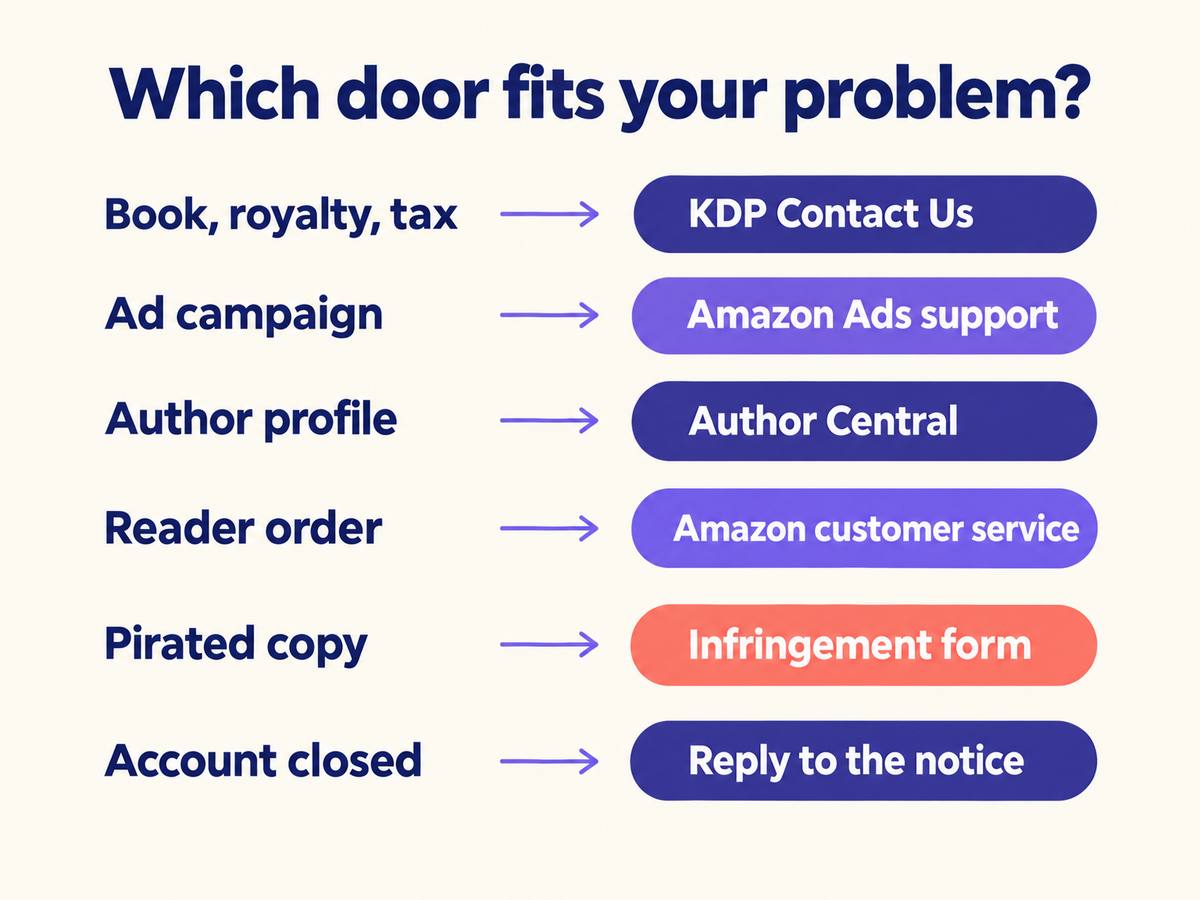
A lot of slow answers come from asking the wrong team. KDP support covers your books, files, royalties and account. Several common problems belong to other Amazon teams.
| Your problem | Where to go |
|---|---|
| Royalties, payments, tax and bank details | KDP Contact Us, Royalties and Payments topic |
| Book blocked, stuck in review or content questions | KDP Contact Us, or reply to the email KDP sent you about that book |
| Upload errors, formatting, print proofs | KDP Contact Us, under the matching book topic |
| Sponsored Products and other book ads | Amazon Ads support, from inside your Ads account |
| Author page, bio, photo and editorial reviews | Author Central, through its own Contact Us link |
| A reader's order, delivery or refund | Amazon customer service. The reader contacts them, not you |
| Someone selling a pirated copy of your book | Amazon's copyright infringement report form |
| General how-to questions | KDP Help pages and the KDP Community forum, where other publishers answer |
Setting up your Amazon Author Central page is a separate job from KDP, and so is its support.
What to have ready before you write
Support agents answer faster when they do not have to ask follow-up questions. Gather these first:
- The email address on your KDP account
- The book title, format and its ASIN (eBook) or ISBN (paperback or hardcover)
- The dates involved: when you published, when the problem started, which royalty month
- Screenshots of the error or the report that looks wrong
- Any case number or email KDP already sent you about this issue
- For rights questions, proof you hold the rights, such as a contract or your original files
Never include your password or full bank or card numbers. KDP says it will never ask for them.
Message templates that get a useful answer
Copy one, fill the brackets, and cut anything that does not apply. Short, factual and polite works best.
Missing or wrong royalty paymentShow template
Hello,

I have not received my royalty payment for [month and year] for the [marketplace] marketplace.

Account email: [email]
Books: [title, ASIN]
Expected amount from my Payments report: [amount]
Bank account on file ends in: [last 4 digits]

Could you confirm whether the payment was sent and, if not, what I need to change?

Thank you,
[name]
Book blocked or stuck in reviewShow template
Hello,

My book [title, ASIN or ISBN] has been [in review since date / blocked on date]. The email I received said: "[short quote]".

I have [describe the fix you made, or ask what to change]. I hold all rights to this content and can provide [proof].

Could you tell me exactly what needs to change so the book can go live?

Thank you,
[name]
Account suspension or termination appealShow template
Hello,

I received your notice dated [date], case [number], about my KDP account [email].

I understand the concern was [their stated reason]. Here is what happened: [brief, factual explanation].

What I have done: [specific steps, such as removing or replacing content].
What I will do going forward: [specific process change].

Attached: [documents].

I would be grateful if you would review my account.

Thank you,
[name]
What KDP support will not handle
Knowing the limits saves you a wasted message.
- Account-specific questions over social media. KDP answers general questions on its official Facebook and Instagram pages, but your account issues go through Contact Us.
- Editing, cover design or marketing services. KDP is free to use and does not sell any of these.
- Advice on whether to enroll a book. Read the trade-offs yourself in our guide to KDP Select pros and cons.
- Which categories or keywords will sell. Support fixes category errors but will not plan your strategy. Our KDP categories strategy guide covers that.
- Legal advice about who owns your work. For the basics, see how to copyright a book.
If your account is suspended or terminated
An account action arrives as an email notice with a case number. Read it twice. It tells you what KDP found and how to respond, and the route it gives you is the one that reaches the team reviewing your account.
Reply through that route, calmly, and answer each point in the notice. Explain what happened in plain facts, say what you changed, and attach proof: contracts, original manuscript files, licenses for images or fonts. One complete reply beats five angry ones.
Do not open a second KDP account while the first is under review. KDP allows one account per publisher.
Prevention is easier than an appeal. Before you publish, confirm you hold the rights to every word and image, keep the metadata honest, and plan a free day promotion on KDP by the rules rather than with tricks.
Fake KDP support and scams
Search for a KDP phone number and you will find numbers on third-party sites. They are not KDP support. Some lead to services that charge you, and some are run by people who want into your account.
KDP will never ask for your password
Or for your full bank account or card number. Anyone who does is not KDP.
KDP does not sell publishing services
A message that offers "KDP-approved" editing, covers or marketing for a fee is not from KDP.
Check the link before you click
If an email worries you, do not use its links. Type the KDP address into your browser, sign in, and look for the same notice in your account.
Calls go one way
KDP may call you after you request a callback, and very rarely in other cases. You cannot call KDP on a number you found online.
Fewer reasons to contact support
Get the listing right before you press Publish
Many support cases start with a form: a description over the limit, a keyword that breaks Amazon's rules, the wrong category, a mismatch between the eBook and paperback details.
The free KDP Publishing Assistant Chrome extension fills the KDP title setup from your AIWriteBook book and checks each field as you type, so problems show up before you save.
Choosing where your book sits? Try the free category finder and KDP keyword research tools, which work from live Amazon data.
Frequently asked questions
No public one. The only way to speak to KDP by phone is to request a callback through the Contact Us page, and that option appears only for some topics. Numbers listed on third-party sites are not KDP support.
There is no general email address to write to. You send messages through the Contact Us form while signed in, and replies come to the email on your account. You can reply to those emails to continue the same case.
KDP does not publish a guaranteed response time. A clear message sent under the right topic, with your title, ASIN or ISBN and dates included, avoids extra rounds of questions.
Only for general questions, on KDP's official Facebook and Instagram pages. Account-specific issues are not handled on social media, so use Contact Us for anything about your books or payments.
No. KDP support is free. Anyone asking you to pay for KDP help, or offering paid services in KDP's name, is not KDP.
Amazon Ads support, from inside your Amazon Ads account. KDP support handles your books, files, royalties and KDP account, not ad campaigns.
The short version
Sign in, use Contact Us, pick the right topic, and send one clear message with your title, ASIN or ISBN and dates. Ask for a callback when the topic offers it. Send ads, author page and reader order problems to the teams that own them, and treat any unofficial phone number as a red flag.
Publishing for the first time? Start with the full Amazon KDP guide, or read KDP Print Replica vs reflowable eBooks before you upload.