

On this page
Why the wrapper pages matter
Front matter does three jobs: it identifies the book (title page), protects it (copyright page), and orients the reader (contents, foreword, introduction). Back matter does a different job. It is the only part of the book read by someone who just finished your story and liked it, which makes it the single best place to sell your next book.
On Amazon there is a fourth job nobody mentions. KDP's Look Inside preview shows about 10% of an ebook and 20% of a paperback, and your front matter is part of that sample. Every page of front matter you add is a page of story the browsing reader does not see. Twelve pages of praise, maps, and dedications in a 200-page paperback eat a third of a 40-page preview.
10%
of an ebook shown in Look Inside
20%
of a paperback shown in Look Inside
~10%
KDP's ceiling for bonus content
Every element, explained
Tap a section to see what it is for, where it sits in print, and how to treat it in an ebook. Not every book needs every page; most novels use five or six of these.
- Essential
Purpose: Title, subtitle, author name, and optionally the publisher or imprint. The name and title must match your cover and KDP metadata.
In print: Right-hand page. Author name without the word by.
In the ebook: Keep it. One clean page.
The standard order
Print order comes from two rules. Important pages open on the right-hand side (recto), and the copyright page takes the left-hand side (verso) behind the title page. KDP's own paperback formatting guidance follows this: half title and title page on the right, copyright on the first left page after the title, dedication and contents on the right, chapter one on the right.
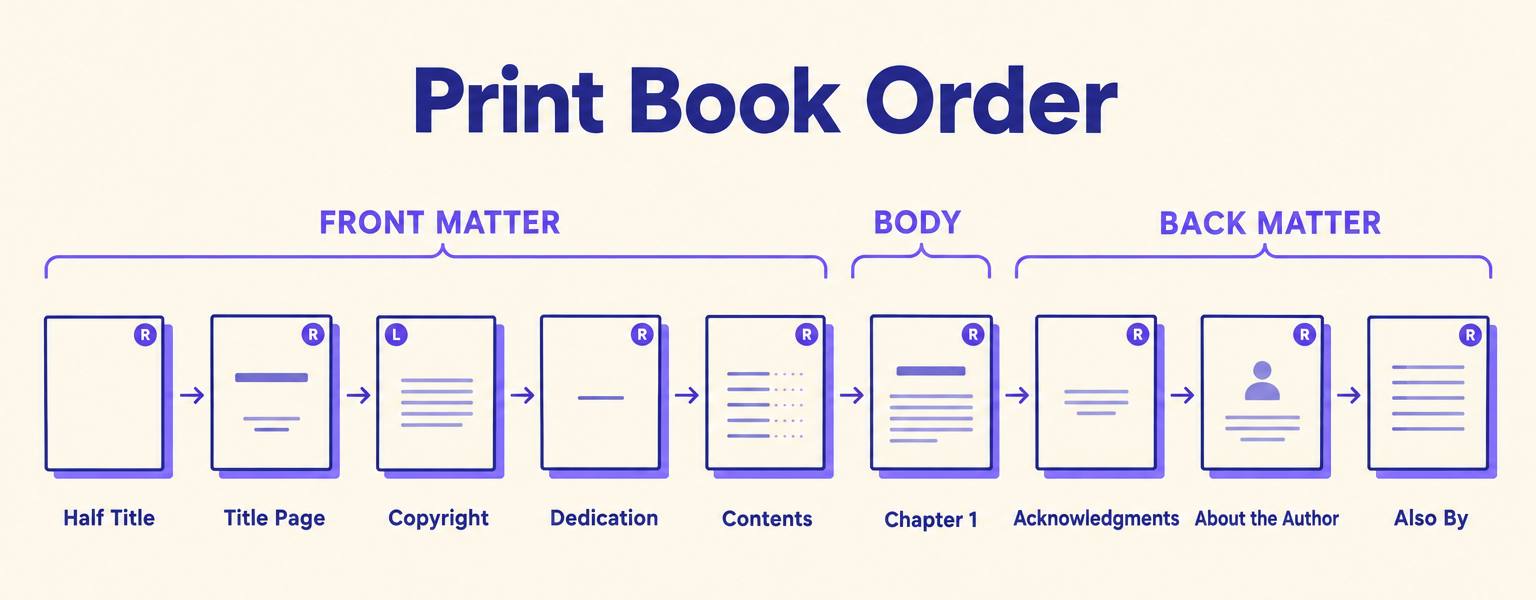
That right-hand rule is why print books have blank pages. If the dedication ends on a right page, the back of it stays blank so the contents can open on the next right page. In an ebook there are no spreads, so every blank page is a wasted swipe and you should remove them all.
For nonfiction, the order inside the opening goes foreword (someone else), preface (you, on why you wrote it), acknowledgments, then introduction (you, on the subject). If the difference between the first two is fuzzy, our guide to foreword vs preface sorts it out in two minutes.
Back matter order that sells
Traditional publishers put acknowledgments first and the author bio last. Indie authors who sell series do the opposite: the page right after THE END asks for the next action (newsletter or next book), and the thank-yous come after. A reader's attention is highest on the first page after the story, so spend it on the thing that matters most to you.
What KDP expects: print vs ebook
KDP does not publish a list of mandatory pages. What it does enforce is consistency and reader experience: the title and author name in the book must match the cover and your metadata, the contents must be accurate, and nothing should disrupt reading. Here is how that plays out by format.
| Element | Paperback / hardcover | Kindle ebook |
|---|---|---|
| Title page | Expected; must match cover and metadata | Expected; must match metadata |
| Copyright page | Standard; carries the print ISBN | Standard; can sit at the back |
| Table of contents | Strongly recommended, with page numbers | Effectively required: clickable, near the start, no page numbers |
| Half title | Traditional, optional | Leave out |
| Blank pages | Normal, to keep sections on the right | Remove every one |
| Bonus content | At the end | At the end, listed in contents, around 10% of the book at most |
| Links | Short typed URLs | Allowed, but no disruptive links and no promised gifts or rewards |
| Index | Expected in reference nonfiction | Usually dropped |
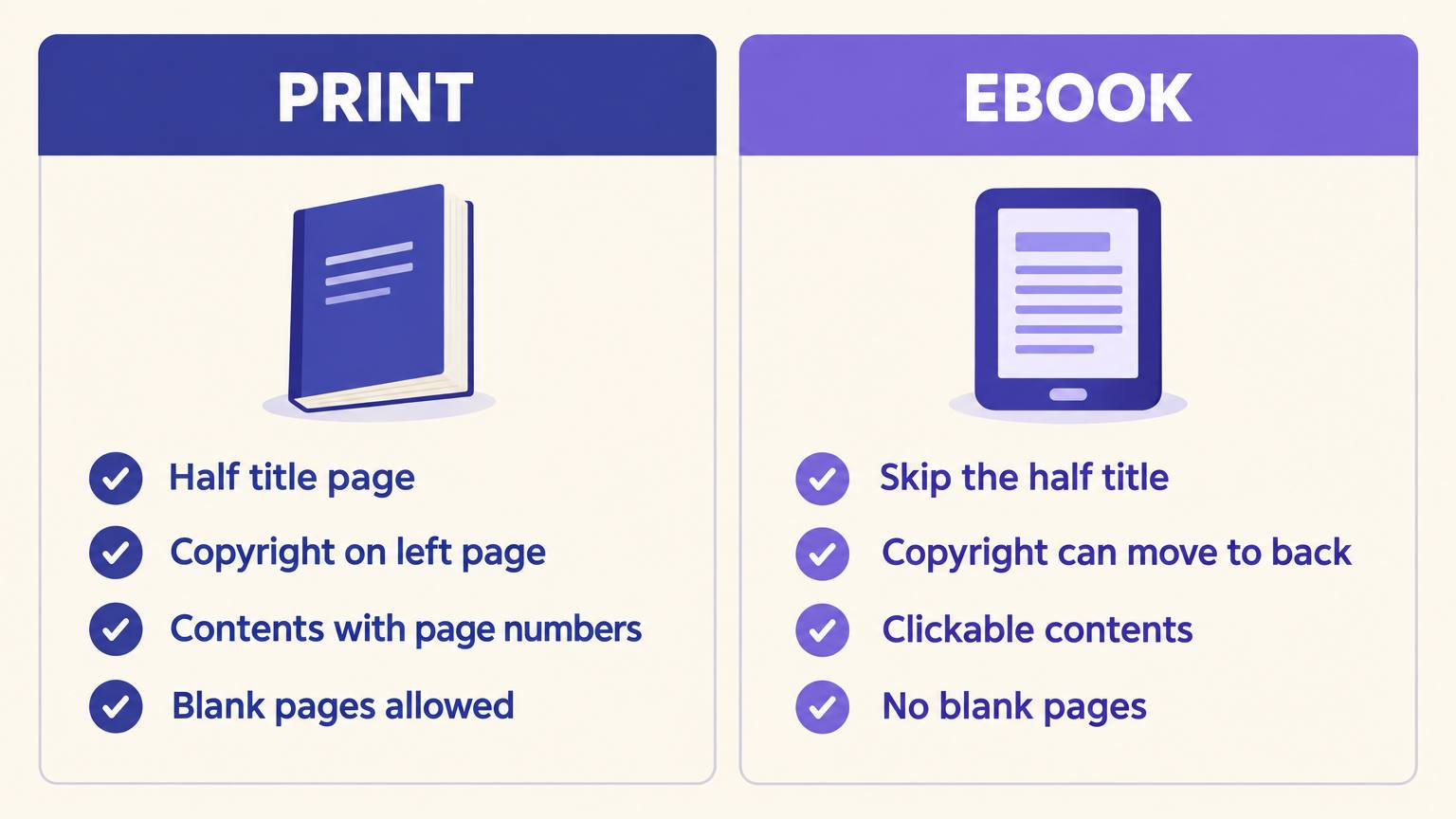
Two KDP rules trip people up. First, Kindle's guidelines say the contents belong toward the beginning, not the end, because readers flip there and because it affects the last-page-read sync. Second, if your book is in KDP Select, any bonus content such as a preview of another book must also be exclusive to Amazon. For the full upload process, our KDP formatting guide covers trim size, margins and fonts.
Common mistakes
01
A sample that never reaches the story
Half title, title, copyright, praise, dedication, epigraph, map, cast list, contents, prologue. By the time chapter one starts, the free preview is over. In the ebook, cut to title, short copyright, contents, chapter one.
02
Name on the title page differs from the cover
J. R. Smith on the cover, Jane Smith on the title page, J.R. Smith in metadata. KDP reviewers flag mismatches. Pick one exact spelling, including spaces and periods.
03
Contents entries that do not match the chapters
You renamed chapter 7 during edits and the contents still shows the old title. KDP's formatting guidance says entries must match the body exactly.
04
Acknowledgments before the call to action
Three pages thanking your writing group, then the newsletter link. Most readers stop at the thank-yous. Flip the order.
05
Promising a gift for a review
KDP's bonus content rules ban promises of gifts or rewards, and Amazon's review policy bans incentivized reviews. A plain request for an honest review is fine.
06
Stale also-by lists
Book 4 is out but books 1 to 3 still end with a list of three. Update the back matter of every earlier book each time you publish a new one; it costs nothing and it is where series sales come from.
Build the wrapper pages once, export every format
Write the book in AIWriteBook, add the front and back matter you need, and export print PDF, EPUB and DOCX with the pages in the right order.
The AI-assisted shortcut
Most of the work in front and back matter is not writing, it is ordering and keeping things consistent across formats. The AIWriteBook book formatter has a front and back matter builder with each section as its own block: half title, also by, title page, copyright, dedication, epigraph, contents, foreword, preface, introduction, prologue, epilogue, afterword, acknowledgments, about the author, newsletter invite, next-book preview, glossary, appendix, notes, bibliography and store links. It places them in reading order and builds the contents from your chapters, then exports a print PDF, an EPUB and a DOCX from the same source, so a renamed chapter is renamed everywhere.
Your About the Author bio is written once and shared across all your books and your public author page, so updating it in one place updates every edition. If you already have a manuscript, the manuscript importer detects existing front and back matter in your Word file and keeps it separate from the chapters.
For individual pages, the free tools do the drafting. The back matter generator writes acknowledgments, an author note, an about-the-author section and a reader call to action in one consistent voice. The copyright page generator builds the notice, rights line, disclaimer and ISBN block. The author bio generator gives you several bio lengths for the book, Amazon and social profiles.
Three real-world stacks
Here is what the full sequence looks like for three common books. Notice how much the ebook differs from the paperback of the same title.
Debut romance, ebook
Title page · Short copyright · Contents · Chapter 1 to 32 · Epilogue · Newsletter invite with bonus epilogue · About the author · Acknowledgments · Full copyright
The sample reaches chapter one on the third screen. The bonus epilogue is a newsletter reason, not a reward for reviews.
Business nonfiction, paperback
Half title · Title page · Copyright · Dedication · Contents · Foreword · Introduction · Chapters 1 to 12 · Conclusion · Acknowledgments · Notes · Bibliography · Index · About the author
Roman numerals until the introduction. A foreword by a known name is worth its pages in the preview.
Fantasy series, book 3, ebook
Title page · Copyright · Map · Contents · Story so far · Chapter 1 to 45 · Author's note · Preview of book 4 · Also by (series order) · Glossary · About the author
The story-so-far recap helps returning readers. The glossary goes to the back and is linked from the contents. Planning the whole series in a series planner makes the also-by list obvious.
Copy-ready templates
Replace the bracketed parts. These are starting points, not legal advice; your country's rules may add requirements.
Copyright page (fiction)
Copyright © [Year] [Author or pen name] All rights reserved. No part of this book may be reproduced in any form without written permission from the author, except for brief quotations in a book review. This is a work of fiction. Names, characters, places and incidents are products of the author's imagination or are used fictitiously. ISBN: [Paperback ISBN] Cover design by [Name] Edited by [Name] First edition [Year]
First page after THE END
Thank you for reading [Title]. Want to know what happened to [Character] the night before the wedding? Join my newsletter and I'll send you the bonus epilogue: [short-url] [Book 2 title] is out now: [link]
About the author
[Name] writes [genre] about [themes]. [One concrete, human detail.] [Name] lives in [place] with [people or pets]. Find all [Name]'s books at [website].
Pre-upload checklist
Tick each item for the format you are uploading. Your progress stays on this page while you work.
0 of 10 done
Front and back matter FAQ
KDP does not reject a book for lacking one, and in the US your copyright exists from the moment you write the work. Every professional book still carries one, because it states ownership, the edition and the ISBN, and readers and retailers expect it.
Kindle Unlimited pays per page read, measured with Amazon's normalized page count for your book. Front and back matter are part of the book, but KDP's content guidelines act against formatting designed to inflate pages read, so treat these pages as reader service, never as filler.
Near the start, after the copyright page. Kindle's navigation guidelines say not to put the contents at the end of the book. You also need the logical navigation contents that Kindle shows in its Go To menu, which any proper EPUB export includes.
No. A prologue is part of the story, so it belongs to the body and sits right before chapter one. A preface or introduction is front matter.
Fifty to a hundred words for fiction, a little more for nonfiction where credentials matter. Write it in third person, add one human detail, and finish with one place readers can find you.
The short version
Front matter identifies and orients; keep it lean, especially in the ebook where it eats your sample. Back matter sells; put your most important ask on the first page after the story. Respect the right-hand rule in print, remove blank pages in digital, and make the name on every page match your cover.
If you are still deciding what name goes on that title page, our guide to publishing under a pen name covers the KDP side. And the dedication examples and acknowledgments tips posts help with the two pages people agonize over most.