

The short answer
Scrivener
Best for structure
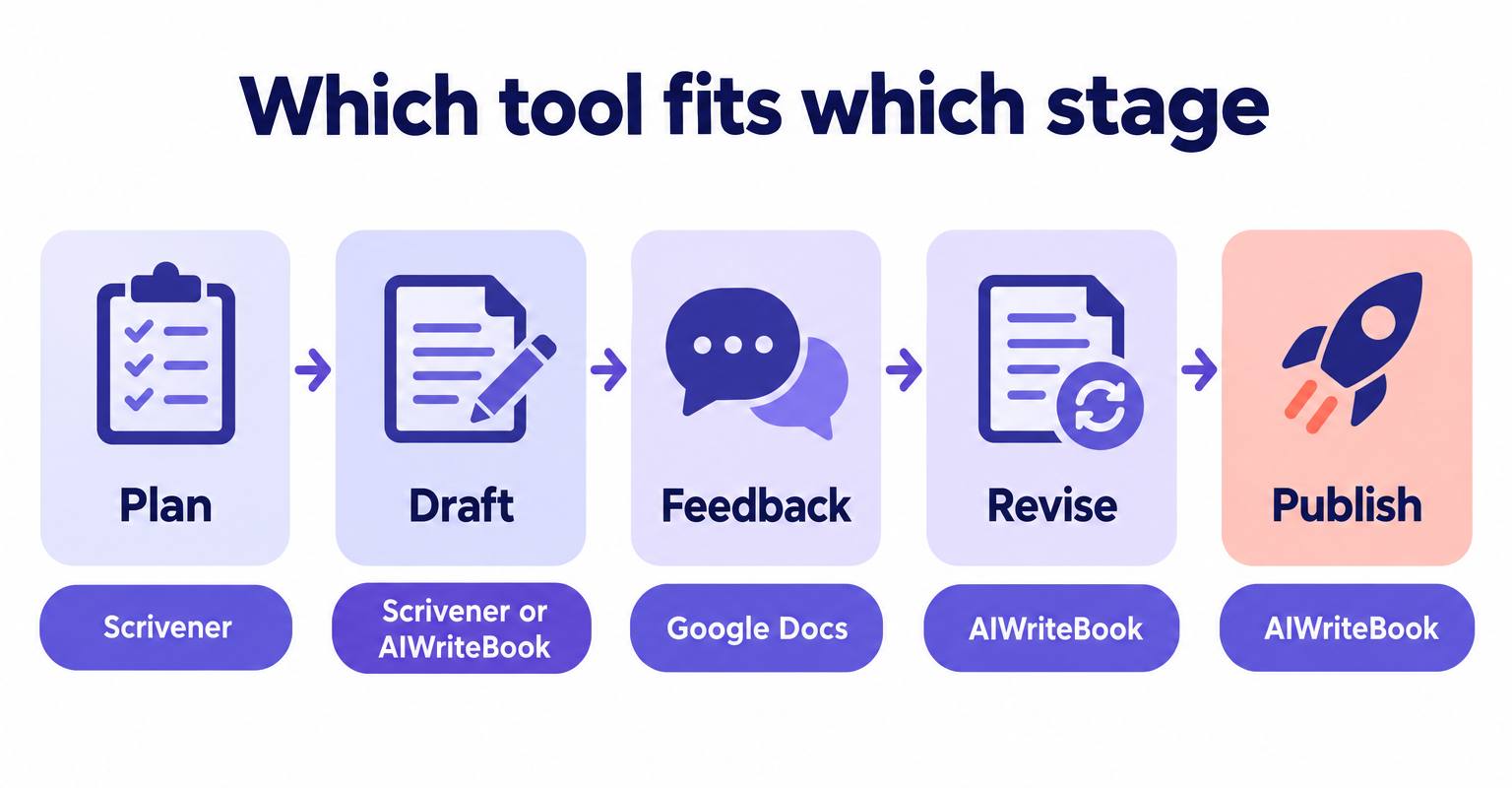
Pick it if your book lives in 60 scenes you keep rearranging, you want everything offline, and you would rather pay once than subscribe.
The short answer
Google Docs
Best for feedback
Pick it if beta readers, an editor or a co-author need to comment on the draft, or you write on three different devices a day.
The short answer
AIWriteBook
Best for finishing
Pick it if the problem is getting from outline to a finished, formatted book, including drafting help that stays in your voice.
Why the choice matters at book length
Any editor works for a short story. The differences show up somewhere around chapter twelve, when you need to move a scene from chapter four to chapter nine, find every mention of a side character, and check that the timeline still holds.
A typical adult novel runs 70,000 to 100,000 words (our breakdown of how many words a novel needs has genre-by-genre ranges). At that size, a single scrolling document stops being a manuscript and starts being a haystack. Structure, search and navigation become the actual job of your software.
The other half of the job is people. Most first novels pass through at least one round of beta readers or an editor before publication, and the tool that makes drafting pleasant is often the one that makes collecting feedback painful.
Scrivener vs Google Docs vs AIWriteBook, side by side
| What matters | Scrivener 3 | Google Docs | AIWriteBook |
|---|---|---|---|
| Price | $59.99 once for Mac or Windows, $23.99 for iOS | Free with a Google account; Gemini needs a paid plan | Start free, no credit card; paid plans for more credits |
| Runs on | macOS, Windows, iPhone and iPad (separate licences) | Any browser, plus Android and iOS apps | Any modern browser |
| Book structure | Binder, corkboard, outliner, one file per scene | Headings outline and document tabs (up to 100, three levels deep) | Story bible, chapter outline, characters, one chapter at a time |
| Offline | Fully offline, files on your own disk | In Chrome with the Docs Offline extension | Needs a connection |
| Feedback and co-writing | No real-time collaboration | Live co-editing, comments, suggestion mode | Built for one author, not reader comment threads |
| AI | None by design | Gemini on Google AI Pro, Ultra and eligible Workspace plans | Outline, chapter drafts in your style, chat edits shown as a diff |
| Length limit | No per-document cap; each scene is its own file | 1.02 million characters per document | Imports manuscripts up to 200,000 words |
| Book files | Compile to DOCX, PDF, EPUB and more | Download as DOCX, PDF, EPUB, ODT, RTF, TXT, Markdown | Print PDF, EPUB and DOCX from the book formatter |
Checked against the vendors' own pages in September 2026.
Where Scrivener wins, and where it hurts
Scrivener, from Literature & Latte, has been around since 2007 and is still the reference point for long-form writing software. Its idea is simple: a book is not one document, it is hundreds of small ones.
Where it wins
- The binder. Every scene is its own document in a sidebar tree. Drag a scene from Part One to Part Three and the whole manuscript updates.
- Corkboard and outliner. Each scene carries a synopsis card, a status and a label, so you can read your plot as 60 index cards instead of 400 pages.
- Research lives inside the project. PDFs, images and web pages sit next to the chapters that use them.
- Snapshots save a version of any scene before you tear it apart, and project and session word targets keep a daily habit honest.
- Compile turns the same project into a DOCX for an editor, a PDF for print or an EPUB, without touching the draft.
Where it hurts
- The learning curve is real. Compile in particular has enough options that many writers export to Word and format elsewhere.
- Licences are per platform. Mac plus Windows is a $95.98 bundle, and the iOS app is another purchase.
- Sync between computers and the iOS app runs through Dropbox, and a project should not be open on two machines at once.
- No one else can comment inside your project. Feedback means exporting a copy and merging notes back by hand.
Scrivener itself contains no artificial intelligence (AI), nor does it participate in any data scraping activity.
For writers who never want their draft sent to a server, this is the feature. For writers who want drafting help, it means pairing Scrivener with something else.
If you are weighing Scrivener against an AI book writer specifically, our Scrivener vs AIWriteBook comparison follows one example novel through both tools, from outline to KDP files.
Where Google Docs wins, and where it hurts
Google Docs was never designed for novels, and plenty of novels get written in it anyway. It wins on the things Scrivener refuses to do.
Where it wins
- Sharing a draft is one link. Beta readers can comment or suggest edits without installing anything, and you accept or reject each suggestion.
- Version history records every change automatically, and you can name versions like "before the ending rewrite".
- Document tabs, added in 2024, let one file hold chapters as tabs and subtabs, which fixes much of the endless-scroll problem.
- It is free, it autosaves, and it is on every device you own.
Where it hurts
- A single document tops out at 1.02 million characters. At roughly six characters per English word including spaces, that is somewhere around 170,000 words, and long documents get sluggish well before that.
- There is no corkboard, no per-scene synopsis and no easy way to reorder 60 scenes. Tabs help, but you still move text by cutting and pasting.
- Offline editing works only in Chrome with the Docs Offline extension, and voice typing only in Chrome on desktop.
- Formatting for print is up to you. The EPUB download is basic, so most authors still take a DOCX into a separate formatter.
What Gemini in Docs actually adds
Since the April 2026 update, Gemini in Docs can draft from a prompt (Help me create), propose edits you approve before anyone else sees them (Help me write), and keep a document's tone consistent with Match writing style.
It is not on free personal accounts. You need Google AI Pro ($19.99 a month in the US) or Ultra, or an eligible Workspace business or education plan, and Google applies usage limits to the style and format matching tools.
It is a general writing assistant, not a novel tool. It sees the document in front of it, not a story bible of your characters, locations and the twist you planted in chapter three.
What each costs over three years
Sticker prices mislead because one tool is a one-off and the others can be subscriptions. Here is the same writer, three years, three setups.
US list prices in September 2026. Scrivener's education licence is $50.99 per platform, and its 30-day trial counts only the days you actually open it. Scrivener licences cover free 3.x updates, not a future major version. Google AI Pro also bundles 5 TB of storage and the Gemini app, so the Docs features are only part of what you pay for.
The honest takeaway: if you only need a place to type and share, Google Docs is unbeatable at $0. The moment you pay for AI, you are paying Scrivener's lifetime price every three months, so it should be AI that knows your book.
Find your setup
Pick the situation that sounds most like you right now.
Why: Import the DOCX, keep your chapters untouched, and continue into the missing ones with drafts that follow your writing style and outline.
The hybrid workflow, step by step
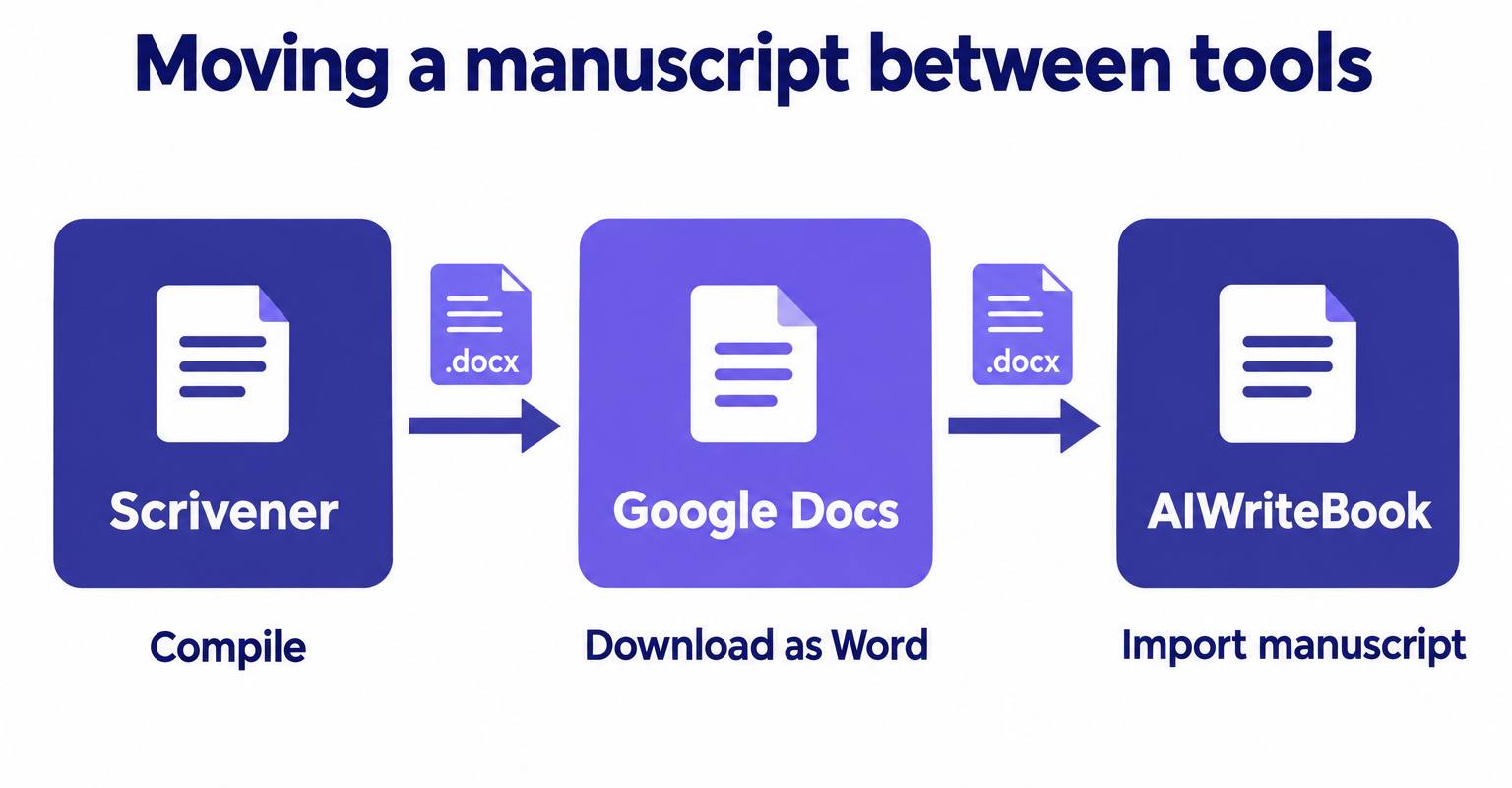
Most working novelists we talk to do not pick one tool. They hand the manuscript between tools at the points where each is strongest, and the handoff format is almost always Word's .docx.
- 1
Plan and draft in Scrivener
One document per scene, a synopsis on every card, a status label for draft, revised and final. Keep research in the project.
- 2
Compile a reader copy
Compile to DOCX with a plain manuscript format. Compile only the chapters you want read, not the whole binder.
- 3
Upload to Google Docs for feedback
Open the DOCX in Drive, which converts it to a Google Doc, then share with comment-only access so readers cannot rewrite your prose.
- 4
Pull feedback back in
Work through comments against your Scrivener scenes, or accept suggestions in Docs and download the result as Word.
- 5
Revise, format and publish
Import the final DOCX into AIWriteBook to revise with chapter chat, then format and export the book files.
Name every export with a date and a stage, like saltarchive_2026-09-27_beta2.docx. "final_FINAL_v3.docx" is how scenes go missing.
Common mistakes when choosing between them
Writing a whole novel in one Google Doc
It works until it does not. Split by act or use tabs from day one, and check your running total with the word counter before a doc gets heavy.
Opening a Scrivener project on two computers at once
A .scriv project is a folder of many files. Opening it on two computers before sync finishes is the classic way to lose a day of work. Close it on one machine before opening it on another.
Learning Compile the night before a deadline
Run a test compile in your first week, even from three chapters, so formatting surprises show up early.
Giving beta readers edit access
Share with comment access. Otherwise one enthusiastic reader rewrites your opening paragraph and version history becomes a rescue mission.
Paying for AI that cannot see your book
A general assistant in a document only knows the page it is looking at. For fiction, drafting help is only useful if it knows your characters, your outline and your voice.
The AI-assisted shortcut
Scrivener gives you structure and no AI. Google Docs gives you collaboration and, on a paid plan, a general assistant. What neither gives you is an assistant that knows the book: who the characters are, what happens in chapter nine, how you write.
That is the gap AIWriteBook fills. It is a web app where the book is built from a story bible, characters and a chapter-by-chapter outline, and every chapter draft is generated from that context in a writing style taken from a sample of your own prose.
It also meets you where your draft already is. Scrivener compiles to DOCX and Google Docs downloads as DOCX, and the manuscript import reads a Word file of up to 200,000 words, finds chapters, front matter and back matter, and lets you rename, reorder, split or combine them before anything is saved. Your imported text is never rewritten, and a chapters import learns your writing style from it.
What you get that neither tool has
- Chapter drafts that follow your outline and your writing style, with a choice of Gemini, Claude or Grok
- Chapter chat where every AI edit arrives as a diff you accept or reject change by change
- Series support that carries characters and plot from up to five previous books into the next one
- A book formatter that exports print PDF, EPUB and DOCX, so you skip the separate formatting app
Where it is not the right tool: AIWriteBook is not built for beta readers leaving comment threads, and it needs a connection. Keep Google Docs for feedback and Scrivener if you want an offline, AI-free drafting space.
Not sure your outline is ready? Try the free outline generator first; it works without an account.
Starter templates you can copy
The same novel set up in each tool. Steal the structure, not the names.
Manuscript
  Part One: The Letter
    Ch 1 · The Fortieth Letter (scene 1, scene 2)
    Ch 2 · Tide Tables
  Part Two: The Keeper
Characters (one card each: want, fear, secret)
Places (lighthouse, archive, Penzance post office)
Research (tide tables PDF, 1970s postmark photos)
Snapshots before every structural editQuestions writers ask
For planning and drafting a long, complex novel alone, usually yes: the binder, corkboard and compile are built for book length. For anything involving other people, such as beta readers, editors or a co-author, Google Docs is better. Many novelists use both.
Yes. A document can hold up to 1.02 million characters, roughly 170,000 words of typical English prose, which covers most novels. Long single documents get slow, so splitting by part or using document tabs keeps it comfortable.
No. Literature & Latte states that Scrivener contains no AI and does not send your text to other servers. On a Mac, system-level features such as Apple Intelligence can work inside it if you turn them on, but that is macOS, not Scrivener.
No. As of September 2026, Gemini in Docs needs Google AI Pro or Ultra, or an eligible Google Workspace business or education plan. Free personal accounts do not get it, apart from a trusted-tester programme.
Compile the project, or just the chapters you need, to DOCX, upload the file to Google Drive and open it with Google Docs. Going the other way, download the Google Doc as Microsoft Word and import it into Scrivener.
Yes. Export a DOCX from either tool and import it. AIWriteBook detects your chapters, keeps your text unchanged, learns your writing style from it, and lets you draft the remaining chapters from an outline.
The bottom line
Choose Scrivener if structure is your bottleneck, Google Docs if feedback is, and stop treating it as a lifetime decision: a DOCX moves between all three in a minute.
If the real bottleneck is finishing, whether that means the missing middle, the revision pass or the book files, that is where an AI book writer earns its place. For a wider look at tools that help you draft, edit and revise, see our AI writing assistant guide, or compare more options in the novel writing software comparison.